Every successful interview starts with knowing what to expect. In this blog, we’ll take you through the top Proof Approval interview questions, breaking them down with expert tips to help you deliver impactful answers. Step into your next interview fully prepared and ready to succeed.
Questions Asked in Proof Approval Interview
Q 1. What is the difference between proofreading and editing?
Proofreading and editing are often confused, but they are distinct processes. Think of editing as the ‘big picture’ and proofreading as the ‘fine details’.
Editing focuses on the overall content, structure, style, and clarity of a text. Editors might restructure paragraphs, rewrite sentences for better flow, suggest stronger word choices, and ensure the writing is consistent with the intended audience and purpose. They’re concerned with the ‘what’ and ‘how’ of the message.
Proofreading, on the other hand, is the final check for errors in grammar, spelling, punctuation, and formatting. It’s about catching the small mistakes that can undermine the credibility of a polished piece. Proofreaders are focused on the ‘correctness’ of the text— ensuring it’s free from typos and inconsistencies.
Analogy: Imagine building a house. Editing is like designing the blueprints and ensuring the foundation is strong. Proofreading is like conducting a final inspection to check for loose nails or crooked tiles before the homeowner moves in.
Q 2. Describe your experience with various proofreading style guides (e.g., Chicago Manual of Style, AP Stylebook).
I have extensive experience applying various style guides, most notably the Chicago Manual of Style and the AP Stylebook. My experience spans academic papers, marketing materials, and journalistic pieces. The Chicago Manual of Style, known for its comprehensive approach, is invaluable for academic works and publications requiring meticulous attention to detail, particularly in areas like note citation and bibliography formatting. I have used its rules extensively to create consistent and academically rigorous documents.
The AP Stylebook, on the other hand, is my go-to for journalistic writing and concise, impactful communications. Its emphasis on clarity and brevity has been crucial in ensuring consistency in news articles, press releases, and other similar content. I’m adept at switching seamlessly between these two style guides depending on the project’s needs, ensuring that the final product adheres strictly to the required standards.
Beyond these two, I’m familiar with numerous other style guides and have the ability to quickly adapt to new ones as needed. My approach prioritizes understanding the underlying principles of each style guide, rather than simply memorizing rules, allowing for flexible application across diverse projects.
Q 3. How do you identify and correct grammatical errors?
Identifying and correcting grammatical errors requires a keen eye for detail and a thorough understanding of grammatical rules. My process involves a multi-step approach:
- Careful Reading: I read the text slowly and attentively, focusing on individual sentences and their structure.
- Active Error Detection: I actively look for common errors such as subject-verb agreement, pronoun agreement, tense consistency, misplaced modifiers, and faulty parallelism.
- Grammar Rule Application: I apply my knowledge of grammatical rules to identify the specific error and determine the appropriate correction. For example, if I find a subject-verb disagreement (e.g., ‘The dog chase the ball’), I correct it by ensuring the verb agrees in number with the subject (e.g., ‘The dog chases the ball’).
- Contextual Understanding: I pay close attention to the context of each sentence to ensure the correction is both grammatically correct and semantically appropriate. A correction might appear grammatically sound in isolation, but be out of place within the broader context.
Example: A sentence like ‘Me and my friend went to the store’ would be corrected to ‘My friend and I went to the store’ because ‘I’ is the correct subjective pronoun in this context.
Q 4. How do you handle inconsistencies in style or formatting?
Inconsistencies in style or formatting are a common challenge in proofreading. My approach involves:
- Establishing a Style Guide: If there isn’t a pre-existing style guide, I’ll create one based on the project’s requirements, or choose a widely accepted style guide as a base.
- Consistent Application: I diligently apply the chosen style guide throughout the document, ensuring consistency in formatting elements such as headings, spacing, font sizes, and capitalization.
- Using Find and Replace (with caution): For simple formatting inconsistencies, I utilize ‘find and replace’ functions in word processing software to efficiently correct recurring errors. However, I always carefully review the changes to avoid unintended consequences.
- Tracking Changes: I use the ‘track changes’ feature to clearly highlight all corrections and formatting adjustments, making it easy for authors to review and accept changes.
- Communicating with the Author: If significant inconsistencies exist or if there are ambiguities in the style guide, I communicate these concerns to the author for clarification and guidance.
Example: If a document uses both British English spelling (‘colour’) and American English spelling (‘color’), I would choose a consistent style and correct the inconsistencies accordingly, documenting the changes for the author’s approval.
Q 5. Explain your process for proofreading digital documents.
My process for proofreading digital documents is similar to that of printed documents, but leverages the capabilities of digital tools. I typically follow these steps:
- Digital Copy Review: I begin by reviewing a digital copy of the document, utilizing the software’s built-in spell-check and grammar-check features as an initial screening tool. However, I don’t solely rely on these tools, as they are not foolproof.
- Multiple Readings: I conduct multiple readings, each with a different focus. The first reading might concentrate on overall flow and coherence. Subsequent readings would concentrate on grammar, spelling, punctuation, and formatting.
- Zoom Function: I utilize the zoom function to magnify the text, allowing for a more detailed and thorough examination.
- Print Preview: If possible, I review the document in print preview mode to ensure the final printed version will be free of layout issues.
- Screen Reader (if applicable): For accessibility purposes, and to catch errors that might be overlooked during visual inspection, I use screen readers when applicable.
This multi-faceted approach ensures a thorough and efficient proofreading process.
Q 6. How do you manage large volumes of content efficiently?
Managing large volumes of content requires a systematic and efficient approach. My strategy focuses on:
- Project Segmentation: Breaking down large documents into smaller, manageable chunks makes the task less daunting and allows for focused attention on each section.
- Prioritization: I prioritize sections based on urgency and importance. Critical sections or deadlines are handled first.
- Batch Processing (where possible): For repetitive tasks like correcting consistent formatting errors, batch processing techniques (e.g., using ‘find and replace’) are employed efficiently.
- Utilizing Technology: I use software with advanced features, such as integrated style guides and track changes, to streamline the process.
- Regular Breaks: Taking regular breaks prevents fatigue and maintains accuracy. This is especially important for extended proofreading sessions.
By implementing these strategies, I maintain accuracy and efficiency even when handling significant volumes of content.
Q 7. What software or tools do you use for proofreading?
My toolkit includes a variety of software and tools tailored to the specific needs of each project. Core tools include:
- Microsoft Word: For its robust features like track changes, spell-check, grammar-check, and formatting tools.
- Google Docs: For collaborative projects, offering real-time co-editing and comment features.
- Grammarly/ProWritingAid: These grammar and style checkers provide additional support in identifying and correcting errors. I view them as supplementary tools and still perform manual checks.
- Adobe Acrobat Pro: For proofreading PDFs, ensuring proper formatting and accessibility features.
The choice of specific tools depends on the type of document, the style guide used, and the collaborative aspects of the project. My approach is always to leverage technology to enhance efficiency and accuracy, but never to fully replace careful manual review.
Q 8. How do you prioritize different types of errors?
Prioritizing errors is crucial for efficient proofreading. I approach this using a tiered system based on severity and impact. Critical errors, such as factual inaccuracies, misleading information, or grammatical errors that significantly alter meaning, take precedence. These errors can derail the intended message and impact the credibility of the document. Next come major errors like significant punctuation blunders, inconsistencies in style, and typos that affect readability. Finally, I address minor errors – small typos, minor inconsistencies, or stylistic preferences – after the more critical issues have been resolved. Think of it like triage in a hospital: life-threatening issues are dealt with first, followed by serious injuries, and then minor ones.
- Critical: Factual inaccuracies, major grammatical errors affecting meaning.
- Major: Significant punctuation errors, style inconsistencies, typos affecting readability.
- Minor: Minor typos, stylistic inconsistencies, minor grammatical slips.
Q 9. Describe a situation where you had to correct a significant error.
In a recent project for a major pharmaceutical company, I was reviewing a clinical trial report. Near the final stages of approval, I discovered a significant error in a data table – a decimal point was misplaced in a crucial dosage figure. This seemingly minor error could have led to serious misinterpretations of the trial results and potential harm. I immediately flagged the error, providing clear evidence and explanations of its potential impact. The client was understandably concerned, but appreciated my diligence. We worked collaboratively to correct the table and re-run the relevant calculations, ensuring complete accuracy before proceeding. The prompt identification and correction prevented a potentially catastrophic outcome and solidified my reputation for meticulous attention to detail.
Q 10. How do you ensure accuracy and consistency in your proofreading?
Accuracy and consistency are paramount. I employ several strategies to ensure both. First, I use a systematic approach, starting with a comprehensive first read for big-picture issues (flow, logic, clarity) then moving to a more detailed check for grammar, punctuation, and style. I utilize style guides and dictionaries consistently and rely on tools like grammar checkers (though I always review their suggestions), and specialized software for consistency checks, particularly in larger documents or when working with specific style guides like Chicago or MLA.
To maintain consistency, I create and maintain a style sheet early in the process. This becomes my bible for the project. I check this sheet frequently to maintain consistent formatting, terminology, and capitalization. Finally, a second proofread, ideally after a break, allows me to approach the document with fresh eyes and catch errors easily missed in the first pass.
Q 11. How do you handle feedback from authors or clients?
Handling feedback is essential for a successful proofreading process. I view feedback as a collaborative effort to refine the final product. I always respond professionally and promptly, acknowledging the feedback received. If I agree with the suggestion, I implement the change and explain my reasoning clearly. If I disagree, I offer a detailed explanation of my reasoning, referencing relevant style guides or grammatical rules. I maintain a respectful and collaborative tone, focusing on finding a solution that satisfies both parties while maintaining the integrity and accuracy of the final document. Open communication prevents misunderstandings and leads to superior results.
Q 12. How do you deal with tight deadlines?
Tight deadlines require strategic planning and efficient workflows. I prioritize tasks based on the error severity (as previously described) and use time management techniques like the Pomodoro method to maintain focus and avoid burnout. I also communicate openly with clients about potential challenges and propose solutions when necessary. In extreme cases, if the deadline is truly unrealistic, I explain the potential risks of rushing and negotiate a more realistic timeframe. Maintaining open communication and prioritizing tasks effectively are key to meeting deadlines without compromising quality.
Q 13. How do you identify and correct spelling, punctuation, and grammatical errors in different languages?
Handling multiple languages requires specialized expertise. I focus on languages I am proficient in, making use of language-specific style guides and dictionaries. For languages I’m less familiar with, I rely on native-speaker reviewers or specialized translation tools, always ensuring a final review for accuracy and consistency. I meticulously check for nuances in grammar, syntax, and idiom, and I treat each language with the respect and attention it deserves. For complex multilingual projects, I establish clear guidelines and communication protocols from the beginning to ensure a seamless workflow.
Q 14. How familiar are you with different document formats (e.g., Word, InDesign, PDF)?
I am proficient in a variety of document formats, including Microsoft Word, Adobe InDesign, and PDF. I understand the unique features and limitations of each format and adapt my proofreading approach accordingly. For instance, InDesign requires a different approach than Word, given its capabilities for complex layout and typography. My experience extends to working with different versions of these programs, ensuring I can handle the varied formatting and features found in different files. I also understand how to work with track changes, comments, and other collaborative features that many of these programs offer.
Q 15. Explain your experience with using track changes in proofreading.
Track changes is an invaluable tool in proofreading, allowing me to meticulously document every alteration made to a document. Think of it as a detailed history of edits, visible to both the author and myself. I utilize it extensively to highlight grammatical errors, typos, inconsistencies in style, and factual inaccuracies. This ensures transparency and allows for easy review and discussion of suggested changes. For example, if I find a sentence that is awkwardly phrased, I’ll use the track changes feature to rewrite it, leaving the original text visible but marked as a deletion. The new wording will appear as an insertion. This method is particularly useful for collaborative projects, facilitating efficient feedback and approval processes.
In practice, I typically utilize the ‘strikethrough’ for deletions and ‘underline’ for insertions, alongside comments to explain the rationale behind each change. This detailed approach minimizes misunderstandings and fosters clear communication. This level of documentation ensures the author can see the ‘before and after’ of each edit, making the revision process smoother and more efficient.
Career Expert Tips:
- Ace those interviews! Prepare effectively by reviewing the Top 50 Most Common Interview Questions on ResumeGemini.
- Navigate your job search with confidence! Explore a wide range of Career Tips on ResumeGemini. Learn about common challenges and recommendations to overcome them.
- Craft the perfect resume! Master the Art of Resume Writing with ResumeGemini’s guide. Showcase your unique qualifications and achievements effectively.
- Don’t miss out on holiday savings! Build your dream resume with ResumeGemini’s ATS optimized templates.
Q 16. How do you ensure the consistency of style and formatting across multiple documents?
Maintaining style and formatting consistency across multiple documents is crucial for professional presentation. My approach involves several key strategies. Firstly, I create a style guide—a living document—that outlines the preferred formatting for various elements such as headings, fonts, spacing, and citation styles. This serves as the single source of truth for all documents. I meticulously adhere to this style guide throughout the proofreading process. For instance, if the style guide dictates using Times New Roman 12pt for body text, I ensure this is consistently applied across all documents.
Secondly, I leverage the style features within word processing software (like Microsoft Word or Google Docs). Using stylesheets allows for easy updating of formatting across an entire document (or multiple documents linked to a master style sheet). If a change needs to be made to the heading style, for example, I simply update the style definition and the change propagates automatically across all headings. Finally, I often utilize find-and-replace functions with formatting specifications (e.g., replacing all instances of inconsistent spacing with a standard spacing). This automated approach complements my manual review, ensuring accuracy and efficiency.
Q 17. How do you approach proofreading technical documents with specialized terminology?
Proofreading technical documents requires specialized knowledge and a methodical approach. Before I begin, I thoroughly research the subject matter to familiarize myself with the specific terminology. I consult relevant glossaries, dictionaries, and industry standards to ensure my understanding of any technical terms. This is crucial for avoiding errors or misinterpretations of jargon. For example, if the document pertains to software engineering, I’ll make sure I’m fluent in concepts like ‘agile methodology’ and ‘RESTful APIs’.
Next, I pay close attention to the accuracy of technical details, formulas, and figures. I often cross-reference information with other credible sources to verify its correctness. If I encounter any uncertainty about a technical term or concept, I carefully research and seek clarification from the author or subject matter expert before making any corrections. My approach is about being both precise and cautious, as a minor error in a technical document can have significant repercussions. This meticulous approach ensures that the final document is not only grammatically correct but also technically sound and accurate.
Q 18. How do you deal with ambiguous or unclear text?
Ambiguous or unclear text is a common challenge in proofreading. My approach is to first identify the specific source of ambiguity. Is it due to vague wording, sentence structure, or missing context? Once I pinpoint the issue, I carefully analyze the surrounding text for clues. Often, understanding the author’s intent requires reading several sentences or even paragraphs before and after the ambiguous section.
If I cannot resolve the ambiguity through contextual clues, I directly contact the author or relevant stakeholder for clarification. For example, if a sentence reads ‘The project will launch soon,’ I might ask for a specific date or timeframe to replace ‘soon.’ I might also suggest alternative wordings that are more precise and clear, providing suggestions with track changes as mentioned previously. This proactive engagement ensures clarity and prevents misunderstandings.
Q 19. Describe your experience with different types of proofreading (e.g., print, digital, web).
My experience encompasses various types of proofreading, each with its own nuances. Print proofreading demands meticulous attention to detail, as errors can be costly to correct in the printing process. I focus on ensuring the layout, typography, and pagination are consistent and accurate. I’ve worked extensively with both print-ready files and hard copies, checking for issues such as incorrect font sizes, bleed issues, and image resolution problems.
Digital proofreading, focusing on documents that will exist electronically, has similar accuracy demands but may also encompass aspects of accessibility and usability. For instance, I would check the document’s responsiveness and readability across various screen sizes in web-based digital proofreading. Web proofreading builds on these by additionally considering aspects such as SEO optimization and site navigation, beyond simply textual accuracy.
Q 20. What are your strategies for preventing errors during the proofreading process?
Preventing errors during proofreading is as important as correcting them. I employ several strategies to minimize mistakes. Firstly, I never proofread my own work immediately after writing it; I always take a break to allow for a fresh perspective. This helps avoid overlooking errors due to familiarity with the text.
Secondly, I use multiple proofreading techniques. I often read the text backward to focus on individual words and spelling; another time, I might read aloud to catch awkward phrasing or grammatical inconsistencies. Additionally, I regularly utilize spellcheckers and grammar checkers as tools to identify potential issues, although I always critically evaluate their suggestions before implementing them. Finally, a thorough checklist tailored to the document type ensures I consistently cover all essential aspects of proofreading, such as grammar, punctuation, style, consistency, and factual accuracy.
Q 21. How do you maintain accuracy and efficiency over long periods of proofreading?
Maintaining accuracy and efficiency over long proofreading sessions requires discipline and effective strategies. I utilize the Pomodoro Technique, working in focused bursts (e.g., 25 minutes) followed by short breaks. This prevents burnout and maintains concentration. I also prioritize tasks based on urgency and complexity, tackling the most challenging documents when my focus is sharpest.
Furthermore, I create and regularly update a style guide for each project, and I build templates for frequently used document formats to increase efficiency. Taking regular short breaks to stretch and rest my eyes is essential to avoid fatigue and maintain accuracy. I’ve found that staying hydrated and ensuring a comfortable working environment also contributes significantly to sustained productivity and precision. Regular self-reflection on my process, identifying areas for improvement and adapting my strategies accordingly, is crucial for maintaining both accuracy and efficiency over extended periods.
Q 22. Describe your experience with using style guides to maintain consistency across documents.
Style guides are the cornerstone of consistent documentation. They’re essentially rulebooks that dictate everything from formatting (headings, font sizes, spacing) to grammar and tone. My experience involves extensively using style guides like the Chicago Manual of Style, AP Stylebook, and company-specific guides. I integrate these guides into my workflow by first reviewing them thoroughly to understand the specific requirements for a project. Then, I create checklists or templates based on the style guide’s key elements. This ensures that every document adheres to the same standards. For instance, if a style guide mandates using a specific font and size for headings, I ensure that every heading in the document follows that rule. This consistency is crucial for brand identity and readability.
For example, working on a large corporate report, we used the company’s style guide, which specified the use of Times New Roman, 12pt for body text, and Arial, 14pt bold for headings. My adherence to this ensured uniformity throughout the lengthy document. Any deviation was meticulously checked and corrected to maintain consistency across all sections and chapters.
Q 23. How do you adapt your proofreading process to different types of content (e.g., marketing materials, technical manuals)?
My proofreading process adapts based on the content type. Marketing materials prioritize clarity, conciseness, and persuasive language. I’ll focus on ensuring the message is compelling and free of grammatical errors that could undermine credibility. Technical manuals, on the other hand, require meticulous attention to accuracy, precision, and clarity of instructions. I’ll thoroughly check for factual errors, ambiguous phrasing, and inconsistencies in terminology. The approach also differs in the tools used; for marketing materials, I might leverage tools focused on readability and SEO, whereas with technical manuals, I prioritize tools that ensure technical accuracy and consistency.
For instance, when proofreading a marketing brochure, I focus on the impact of the language and the overall flow. With a technical manual, I’d meticulously verify the accuracy of diagrams, cross-references, and technical specifications. This adaptability ensures the final product is tailored to its intended audience and purpose.
Q 24. How do you manage proofreading projects with multiple contributors?
Managing multiple contributors requires a robust system. I typically employ a combination of version control software (like Git) and collaborative annotation tools (like Google Docs or Microsoft Word’s Track Changes). A clear style guide is crucial. Before starting, I distribute a detailed style guide and project guidelines to all contributors. I also schedule regular check-in meetings to address questions and ensure everyone is aligned. This collaborative approach is pivotal in maintaining consistency and avoiding conflicts. Each contributor’s edits are tracked, allowing for efficient review and resolution of any discrepancies.
In one project, we used Google Docs to collaboratively edit a website’s content. Each author had their section and we used commenting features for suggestions. This approach, coupled with regular team calls, made the collaboration efficient and ensured consistency.
Q 25. How familiar are you with automated proofreading tools and software? What are their limitations?
I am quite familiar with automated proofreading tools like Grammarly, ProWritingAid, and Hemingway Editor. They’re extremely helpful for catching basic grammar and style errors, improving readability, and flagging potential plagiarism. However, these tools have limitations. They can miss subtle contextual errors, nuanced stylistic issues, and factual inaccuracies. They might also suggest corrections that don’t fit the context or desired tone. Over-reliance on these tools can lead to errors slipping through, as they can’t replace a human editor’s judgment and understanding of the nuances of language and context.
For instance, Grammarly might flag a sentence as grammatically incorrect even though it’s perfectly acceptable in a specific context. Or, it might suggest replacing perfectly good vocabulary with bland alternatives.
Q 26. Describe a time you had to explain a complex proofreading issue to a non-technical audience.
Once, I had to explain a complex issue involving the misuse of semicolons to a non-technical marketing team. They were confused by the grammatical rules. Instead of diving into the technical details of semicolon usage, I used simple analogies and real-world examples. I explained that semicolons connect closely related independent clauses, like two train cars linked together on the same track. I showed them how incorrect usage would be like having two disconnected train cars going in different directions. This visual analogy helped them understand the importance of proper semicolon usage, significantly improving their comprehension and acceptance of the suggested changes.
Q 27. How do you stay updated on grammar rules, style guides, and industry best practices?
Staying updated in this field is continuous learning. I regularly read publications like the Chicago Manual of Style Online, subscribe to grammar and style newsletters, and actively participate in relevant online communities and forums. Attending webinars and workshops, and taking online courses focused on grammar, style, and emerging industry trends are also key. This keeps my skills sharp and my knowledge current, ensuring I’m proficient in the latest rules and best practices.
Key Topics to Learn for Proof Approval Interview
- Understanding the Proof Approval Process: Familiarize yourself with the entire workflow, from initial submission to final sign-off. Consider different methodologies and their implications.
- Quality Control & Standards: Learn about different quality control metrics and how they apply to proofreading and approval. Understand best practices for identifying errors and inconsistencies.
- Software & Tools: Research common software used in proof approval workflows (e.g., Adobe Acrobat, dedicated proofreading software). Understand their functionalities and limitations.
- Collaboration & Communication: Master effective communication techniques for providing constructive feedback and resolving discrepancies with collaborators. Practice clear and concise explanations of identified issues.
- Version Control & Tracking: Understand the importance of version control in proof approval and how to effectively track changes and revisions. Explore different version control systems and their relevance.
- Legal & Compliance Aspects: Depending on the industry, understand any legal or compliance considerations related to proof approval and document accuracy.
- Problem-Solving & Decision-Making: Practice identifying and resolving conflicts in approved materials. Develop strategies for handling disagreements and reaching consensus amongst stakeholders.
Next Steps
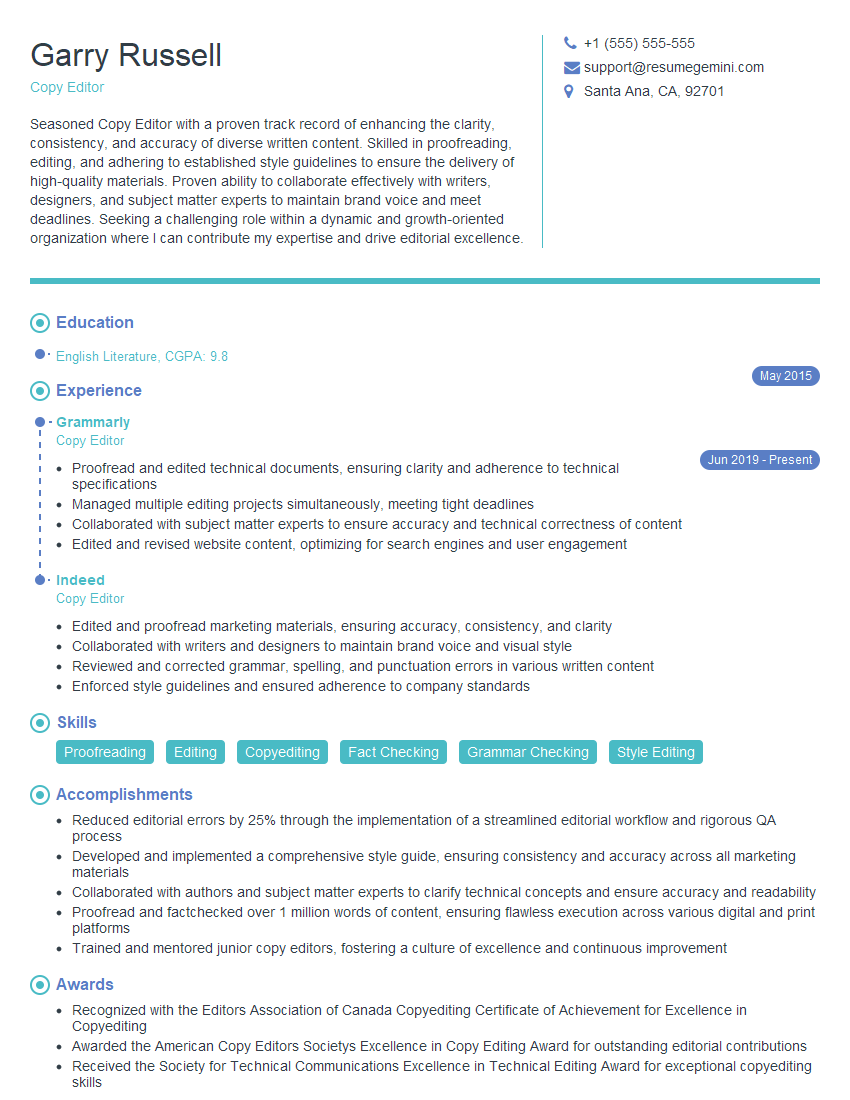
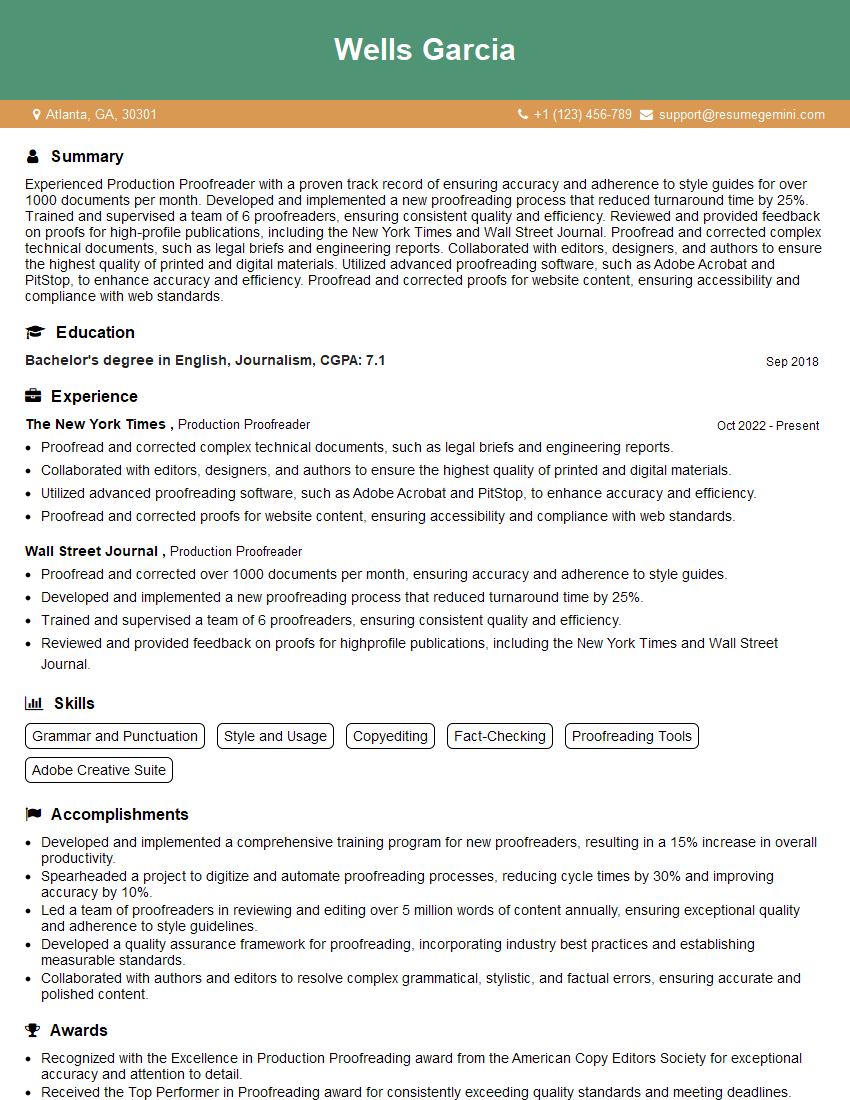
Mastering proof approval skills significantly enhances your career prospects across various industries, demonstrating meticulous attention to detail and a commitment to quality. A strong resume is crucial for showcasing these skills to potential employers. To maximize your chances, focus on creating an ATS-friendly resume that highlights your relevant experience and accomplishments. We highly recommend using ResumeGemini, a trusted resource for building professional resumes, to create a compelling document that stands out. Examples of resumes tailored to Proof Approval roles are available below to help you get started.

Explore more articles
Users Rating of Our Blogs
Share Your Experience
We value your feedback! Please rate our content and share your thoughts (optional).
What Readers Say About Our Blog
Attention music lovers!
Wow, All the best Sax Summer music !!!
Spotify: https://open.spotify.com/artist/6ShcdIT7rPVVaFEpgZQbUk
Apple Music: https://music.apple.com/fr/artist/jimmy-sax-black/1530501936
YouTube: https://music.youtube.com/browse/VLOLAK5uy_noClmC7abM6YpZsnySxRqt3LoalPf88No
Other Platforms and Free Downloads : https://fanlink.tv/jimmysaxblack
on google : https://www.google.com/search?q=22+AND+22+AND+22
on ChatGPT : https://chat.openai.com?q=who20jlJimmy20Black20Sax20Producer
Get back into the groove with Jimmy sax Black
Best regards,
Jimmy sax Black
www.jimmysaxblack.com
Hi I am a troller at The aquatic interview center and I suddenly went so fast in Roblox and it was gone when I reset.
Hi,
Business owners spend hours every week worrying about their website—or avoiding it because it feels overwhelming.
We’d like to take that off your plate:
$69/month. Everything handled.
Our team will:
Design a custom website—or completely overhaul your current one
Take care of hosting as an option
Handle edits and improvements—up to 60 minutes of work included every month
No setup fees, no annual commitments. Just a site that makes a strong first impression.
Find out if it’s right for you:
https://websolutionsgenius.com/awardwinningwebsites
Hello,
we currently offer a complimentary backlink and URL indexing test for search engine optimization professionals.
You can get complimentary indexing credits to test how link discovery works in practice.
No credit card is required and there is no recurring fee.
You can find details here:
https://wikipedia-backlinks.com/indexing/
Regards
NICE RESPONSE TO Q & A
hi
The aim of this message is regarding an unclaimed deposit of a deceased nationale that bears the same name as you. You are not relate to him as there are millions of people answering the names across around the world. But i will use my position to influence the release of the deposit to you for our mutual benefit.
Respond for full details and how to claim the deposit. This is 100% risk free. Send hello to my email id: lukachachibaialuka@gmail.com
Luka Chachibaialuka
Hey interviewgemini.com, just wanted to follow up on my last email.
We just launched Call the Monster, an parenting app that lets you summon friendly ‘monsters’ kids actually listen to.
We’re also running a giveaway for everyone who downloads the app. Since it’s brand new, there aren’t many users yet, which means you’ve got a much better chance of winning some great prizes.
You can check it out here: https://bit.ly/callamonsterapp
Or follow us on Instagram: https://www.instagram.com/callamonsterapp
Thanks,
Ryan
CEO – Call the Monster App
Hey interviewgemini.com, I saw your website and love your approach.
I just want this to look like spam email, but want to share something important to you. We just launched Call the Monster, a parenting app that lets you summon friendly ‘monsters’ kids actually listen to.
Parents are loving it for calming chaos before bedtime. Thought you might want to try it: https://bit.ly/callamonsterapp or just follow our fun monster lore on Instagram: https://www.instagram.com/callamonsterapp
Thanks,
Ryan
CEO – Call A Monster APP
To the interviewgemini.com Owner.
Dear interviewgemini.com Webmaster!
Hi interviewgemini.com Webmaster!
Dear interviewgemini.com Webmaster!
excellent
Hello,
We found issues with your domain’s email setup that may be sending your messages to spam or blocking them completely. InboxShield Mini shows you how to fix it in minutes — no tech skills required.
Scan your domain now for details: https://inboxshield-mini.com/
— Adam @ InboxShield Mini
support@inboxshield-mini.com
Reply STOP to unsubscribe
Hi, are you owner of interviewgemini.com? What if I told you I could help you find extra time in your schedule, reconnect with leads you didn’t even realize you missed, and bring in more “I want to work with you” conversations, without increasing your ad spend or hiring a full-time employee?
All with a flexible, budget-friendly service that could easily pay for itself. Sounds good?
Would it be nice to jump on a quick 10-minute call so I can show you exactly how we make this work?
Best,
Hapei
Marketing Director
Hey, I know you’re the owner of interviewgemini.com. I’ll be quick.
Fundraising for your business is tough and time-consuming. We make it easier by guaranteeing two private investor meetings each month, for six months. No demos, no pitch events – just direct introductions to active investors matched to your startup.
If youR17;re raising, this could help you build real momentum. Want me to send more info?
Hi, I represent an SEO company that specialises in getting you AI citations and higher rankings on Google. I’d like to offer you a 100% free SEO audit for your website. Would you be interested?
Hi, I represent an SEO company that specialises in getting you AI citations and higher rankings on Google. I’d like to offer you a 100% free SEO audit for your website. Would you be interested?