The thought of an interview can be nerve-wracking, but the right preparation can make all the difference. Explore this comprehensive guide to Knowledge of user experience design (UX) interview questions and gain the confidence you need to showcase your abilities and secure the role.
Questions Asked in Knowledge of user experience design (UX) Interview
Q 1. Describe your process for conducting user research.
My user research process is iterative and deeply rooted in understanding user needs and behaviors. It typically involves these key stages:
- Define the Research Goals: Clearly articulate the specific questions we need to answer. For example, ‘What are the biggest pain points users experience when completing online checkout?’
- Choose the Right Method: Select appropriate research methods based on the research goals. This could include user interviews, surveys, usability testing, card sorting, A/B testing, or diary studies. The choice depends on the resources available, the stage of the project, and the information needed.
- Recruit Participants: Carefully select participants who represent the target audience. This is crucial to ensure the research is relevant and reliable. We utilize screening questionnaires to ensure we have the right participants.
- Conduct the Research: This stage involves executing the chosen research methods, meticulously recording data (e.g., video recordings, notes, survey responses). For interviews, I typically follow a structured interview guide but allow for flexibility to explore interesting tangents.
- Analyze the Data: Data analysis can involve qualitative techniques (e.g., thematic analysis of interview transcripts) and quantitative techniques (e.g., statistical analysis of survey data). The goal is to identify key patterns and insights.
- Report the Findings and Recommendations: Finally, I create a comprehensive report that summarizes the key findings and provides actionable recommendations for design improvements. This report is presented to the stakeholders visually and clearly to facilitate collaboration.
For instance, in a recent project for an e-commerce platform, we used a combination of user interviews and usability testing to identify friction points in the checkout process. This revealed a need for clearer instructions and a simplified payment options display, leading to significant improvements in conversion rates.
Q 2. Explain the difference between usability testing and A/B testing.
Usability testing and A/B testing are both crucial UX research methods, but they serve different purposes.
Usability testing focuses on observing users interacting with a product or prototype to identify usability issues. It’s qualitative research that explores why users struggle. We observe user behavior, identify pain points, and understand their thought processes. This provides rich qualitative data through observation and user feedback.
A/B testing, on the other hand, is a quantitative method comparing two versions (A and B) of a design element to see which performs better based on pre-defined metrics (e.g., click-through rate, conversion rate). It’s about measuring the impact of design changes. A/B testing provides quantifiable data demonstrating which design performs better numerically. It doesn’t necessarily reveal why one version performs better.
Think of it this way: usability testing helps you understand the ‘why,’ while A/B testing helps you understand the ‘which’. Often, they are used together. For example, usability testing might reveal a confusing button placement, and A/B testing would then be used to compare different placement options to see which is more effective.
Q 3. How do you define and measure success in a UX project?
Defining and measuring success in UX is multifaceted. It’s not just about a visually appealing design, but about achieving business goals while ensuring a positive user experience.
Success is defined by a combination of factors, including:
- Meeting User Needs: Did the design solve the user’s problem effectively? This can be measured through user satisfaction surveys and task completion rates during usability testing.
- Achieving Business Objectives: Did the design contribute to increased conversions, engagement, or other key performance indicators (KPIs)? This is measured through A/B testing, analytics dashboards, and sales data.
- Improved Usability: Did the design improve ease of use and efficiency? This is evaluated through usability metrics such as task completion rate, error rate, and efficiency.
- Positive User Feedback: What are users saying about the design? This involves collecting qualitative feedback from various channels like surveys, interviews, and app store reviews.
Success is measured using a mix of qualitative and quantitative data. For example, we might measure the success of a redesigned checkout page by looking at both the conversion rate (quantitative) and user feedback on the ease of use and clarity (qualitative).
Q 4. What are some common UX design methodologies you utilize?
I utilize several UX design methodologies, adapting them to suit the project needs. Some of my favorites include:
- User-Centered Design (UCD): This holistic approach places the user at the heart of the design process, emphasizing research and iterative testing to ensure the design meets user needs.
- Agile UX: An iterative approach that emphasizes flexibility and collaboration, well-suited for projects with evolving requirements. We use short sprints and frequent testing to adapt to feedback quickly.
- Lean UX: This methodology focuses on building Minimum Viable Products (MVPs) and iterating based on user feedback. This is excellent for validating assumptions and reducing waste.
- Design Thinking: A problem-solving approach that uses empathy, ideation, prototyping, and testing to create innovative solutions. The five stages (empathize, define, ideate, prototype, test) ensure a user-centric approach from start to finish.
The choice of methodology depends on factors like project size, timeline, budget, and client preferences. Often, I blend elements from different methodologies to create a bespoke approach for each project.
Q 5. Explain your experience with wireframing and prototyping tools.
I have extensive experience with various wireframing and prototyping tools. My go-to tools include:
- Figma: A versatile collaborative tool for wireframing, prototyping, and design. Its real-time collaboration features are excellent for teamwork.
- Adobe XD: Another powerful tool for wireframing, prototyping, and UI design. Its strong integration with other Adobe products makes it a good choice for teams already using the Adobe Creative Suite.
- Sketch (MacOS): A popular vector-based design tool for crafting high-fidelity prototypes and UI designs. Its extensive plugin ecosystem is a valuable asset.
- Balsamiq: A tool useful for creating low-fidelity wireframes, promoting early-stage brainstorming and design exploration.
My tool choice is guided by project requirements and team preferences. For instance, I’d use Balsamiq for early-stage brainstorming, Figma for collaborative design sprints, and Adobe XD for creating interactive prototypes with advanced animations.
Q 6. How do you handle conflicting feedback from stakeholders?
Handling conflicting stakeholder feedback is a crucial skill in UX design. My approach involves:
- Understanding the Perspectives: I start by listening carefully to each stakeholder’s concerns and understanding their underlying motivations. Why do they hold this particular opinion?
- Facilitating Dialogue: I create a platform for open communication and collaboration, encouraging stakeholders to discuss their perspectives and find common ground. Meetings and collaborative design sessions are key.
- Data-Driven Decision Making: I leverage user research data to support design decisions. If user research contradicts stakeholder opinions, I present the evidence clearly and objectively.
- Prioritization and Compromise: When conflicts cannot be resolved completely, I use prioritization matrices to identify the most critical features and make informed compromises. This often involves ranking features based on their impact on users and the business.
- Documentation and Transparency: I maintain clear documentation of decisions made, along with the reasoning behind them. This ensures transparency and facilitates accountability.
Ultimately, the goal is to find a design solution that balances stakeholder needs with user needs, ensuring everyone’s concerns are adequately considered. Sometimes, compromise is necessary to achieve a viable and successful product.
Q 7. Describe a time you had to iterate on a design based on user feedback.
In a recent project redesigning a mobile banking app, initial user testing revealed significant frustration with the account transfer feature. Users found the process confusing and prone to errors. Specifically, they struggled to understand the difference between various transfer types.
Based on this feedback, we iterated on the design in several ways:
- Simplified terminology: We replaced complex financial jargon with clear, plain language.
- Improved visual hierarchy: We redesigned the UI to clearly distinguish between different transfer options, using visual cues like color-coding and distinct icons.
- Added progress indicators: We incorporated a clear progress bar to provide users with visual feedback during the transaction process.
- Enhanced error messages: We replaced generic error messages with more specific and helpful instructions, guiding users on how to resolve issues.
After implementing these changes, subsequent usability testing showed a significant improvement in task completion rates and user satisfaction. Error rates decreased by over 40%, demonstrating the direct impact of iterative design changes based on user feedback. This experience highlighted the importance of continuous testing and adaptation throughout the design process.
Q 8. How do you stay current with the latest UX design trends and technologies?
Staying current in the ever-evolving field of UX design requires a multi-pronged approach. It’s not just about passively absorbing information; it’s about actively engaging with the community and seeking out diverse perspectives.
Following Industry Publications and Blogs: I regularly read publications like UX Collective, Nielsen Norman Group’s Alertbox, and Interaction Design Foundation articles to stay informed about the latest research, trends, and best practices. This keeps me up-to-date on emerging technologies and design thinking methodologies.
Attending Conferences and Workshops: Conferences like UXPA International and Interaction 17 offer invaluable opportunities for networking and learning from leading experts. Workshops provide hands-on experience with new tools and techniques.
Participating in Online Communities: Engaging in online forums, such as those on Reddit’s r/UXDesign or UX Stack Exchange, allows me to learn from others’ experiences, ask questions, and participate in discussions. This fosters a collaborative learning environment.
Experimenting with New Tools and Technologies: I actively explore new design software, prototyping tools (like Figma, Adobe XD, and InVision), and emerging technologies (like VR/AR design) to understand their potential and limitations in UX design.
Following Key Influencers and Thought Leaders: I follow prominent UX designers and researchers on social media platforms like Twitter and LinkedIn to stay updated on their insights and projects. This exposure expands my understanding of different design philosophies.
By combining these methods, I maintain a comprehensive understanding of current UX trends and technologies, ensuring my designs remain relevant and effective.
Q 9. What is your preferred method for creating user personas?
My preferred method for creating user personas is a highly iterative and collaborative process. I avoid relying solely on assumptions and instead base personas on thorough research, ensuring they are grounded in reality.
User Research: I begin by conducting user interviews, surveys, and usability testing to gather data about target users. This might involve observing users interacting with existing products or conducting contextual inquiries to understand their behaviors and needs in their natural environment. This is crucial for obtaining accurate, insightful data.
Data Analysis: I analyze the collected data to identify patterns and commonalities among user groups. This might involve creating affinity maps or employing other qualitative data analysis techniques to reveal key characteristics and motivations.
Persona Development: Based on the analyzed data, I create detailed personas, each representing a distinct user segment. These personas are not just demographic descriptions but also include their goals, frustrations, motivations, and technology proficiency. A well-crafted persona might include a name, photo, job title, background story, and quotes that represent their thoughts and feelings.
Validation: I validate the personas with stakeholders and other team members to ensure alignment and accuracy before using them to guide design decisions. This collaborative approach ensures everyone shares a common understanding of the target users.
For instance, when designing a new mobile banking app, I might create personas representing a young professional, a retired senior citizen, and a busy parent—each with distinct needs and expectations for the app’s design and functionality.
Q 10. Explain the concept of user flows and their importance in UX design.
User flows are visual representations of the steps a user takes to accomplish a specific task within a digital product or service. They’re essentially roadmaps for user journeys, illustrating how users navigate through a system to achieve their goals.
Their importance in UX design is paramount because they help designers:
Identify Pain Points: User flows help highlight areas where users might encounter friction, confusion, or difficulty. Identifying these pain points early in the design process allows for proactive problem-solving.
Improve Usability: By visualizing the user’s journey, designers can optimize the sequence of steps and interactions, leading to a more intuitive and user-friendly experience. Inefficient or confusing flows can be easily identified and redesigned.
Ensure Consistency: User flows promote consistency in design and navigation by ensuring that all users follow a similar path to complete a particular task. This reduces confusion and enhances the overall user experience.
Facilitate Collaboration: They serve as a common language for designers, developers, and stakeholders to understand the user experience and align on design decisions. This collaborative aspect helps minimize misunderstandings.
Test and Iterate: User flows can be used as a blueprint for usability testing, allowing designers to observe user behavior and identify areas for improvement. This iterative process leads to a continuously refined user experience.
For example, a user flow for an e-commerce website might show the steps a user takes to add an item to their cart, proceed to checkout, and complete the purchase. A clear and efficient user flow for this process leads to a smoother, more satisfying shopping experience for the user.
Q 11. How do you ensure accessibility in your designs?
Ensuring accessibility is not an afterthought; it’s a fundamental principle that should be integrated into every stage of the design process. My approach involves adhering to established accessibility guidelines and best practices.
WCAG Compliance: I meticulously follow the Web Content Accessibility Guidelines (WCAG) success criteria, aiming for at least WCAG 2.1 AA conformance. These guidelines provide a comprehensive framework for creating accessible web content, catering to users with a wide range of disabilities.
Alternative Text for Images: Every image should have descriptive alternative text (alt text), providing context for screen readers used by visually impaired users. This ensures that images convey their meaning to everyone.
Keyboard Navigation: I ensure that all interactive elements are accessible using only a keyboard, eliminating the need for a mouse for all users. This is crucial for users with motor impairments.
Color Contrast: I maintain sufficient color contrast between text and background elements to ensure readability for users with low vision. Tools and guidelines exist to help with this process and maintain WCAG standards.
Captioning and Transcripts: For multimedia content like videos, I ensure captions and transcripts are provided. These are essential for deaf and hard-of-hearing users.
Semantic HTML: I use semantic HTML5 elements to structure content logically, making it easier for assistive technologies to interpret and convey information correctly.
Regular Testing: Accessibility testing is an ongoing process. I conduct regular testing using assistive technologies like screen readers and keyboard-only navigation to identify and address any accessibility issues.
By prioritizing accessibility from the beginning, I create inclusive designs that cater to the broadest possible audience, ensuring a positive user experience for everyone, regardless of their abilities.
Q 12. Describe your experience with design systems and component libraries.
Design systems and component libraries are indispensable tools in modern UX design. They streamline the design process, enhance consistency, and improve efficiency across multiple projects.
Experience with Design Systems: I have extensive experience working with and contributing to design systems. I understand the importance of establishing a comprehensive set of guidelines, including style guides, component libraries, and interaction patterns, that ensure consistency and scalability across a product’s various platforms and interfaces. I can participate in designing and maintaining such systems.
Component Libraries: I’m proficient in utilizing component libraries like those offered by platforms such as Storybook, ensuring that components are reusable, well-documented, and maintainable. I know how to leverage these libraries effectively to increase design speed and quality and decrease redundancy.
Benefits of using a Design System: Design systems translate to a faster and more consistent design process, reducing development time and costs. They help to maintain brand consistency across all touchpoints. They enable designers and developers to collaborate more effectively and improve the overall product quality. A well-maintained design system allows for faster iteration on designs and a more streamlined workflow overall.
For instance, in a previous role, I helped develop and maintain a design system for a large e-commerce platform. This system included a comprehensive style guide, a component library with reusable UI elements like buttons, forms, and navigation menus, and a set of interaction patterns that defined how users interacted with different elements of the platform. This resulted in significant improvements in design consistency and development efficiency across the platform.
Q 13. Explain your understanding of information architecture.
Information architecture (IA) is the structural design of shared information environments. It’s the art and science of organizing and labeling websites, applications, and digital content so that users can find what they need quickly and easily. Think of it as the skeleton that supports the user experience.
My understanding of IA encompasses:
Card Sorting: I use card sorting, both open and closed, to understand how users naturally categorize information and use this knowledge to inform the information hierarchy of a website or app.
Tree Testing: Tree testing helps evaluate the findability of specific items within a website’s navigation structure. This reveals whether users can easily locate what they are looking for.
Sitemaps and Wireframes: I create sitemaps and wireframes to visualize the information architecture and the relationships between different pages or sections of a website or app. These diagrams are critical for planning the layout and navigation.
Metadata and Tagging: I understand the importance of using effective metadata and tagging systems to enhance search functionality and content discoverability.
Labeling and Navigation: I carefully craft labels and navigation elements to ensure clarity, consistency, and intuitive understanding for users. Ambiguous or inconsistent labeling can significantly hinder usability.
A strong IA contributes to a user-friendly and efficient experience by reducing cognitive load and enabling users to quickly and easily find what they need. Poor IA, on the other hand, leads to frustration and lost users.
Q 14. How do you prioritize features during the design process?
Prioritizing features during the design process is a critical skill that balances user needs with business goals and technical feasibility. My approach typically involves a combination of methods:
User Research and Feedback: I start by analyzing user research data to identify the most important features based on user needs and pain points. This ensures that the highest-priority features address core user needs.
MoSCoW Method: I often utilize the MoSCoW method (Must have, Should have, Could have, Won’t have) to categorize features based on their importance and feasibility. This structured approach helps to prioritize features clearly.
Value vs. Effort Matrix: A value vs. effort matrix visually represents the relative value of each feature against the effort required to implement it. This helps identify features that deliver high value with minimal effort.
Prioritization Workshops: I facilitate prioritization workshops with stakeholders to ensure everyone is on the same page regarding which features are most important and aligns design decisions with business strategy.
Data-Driven Decisions: Whenever possible, I use quantitative data like analytics and A/B testing results to inform prioritization decisions, moving beyond assumptions to fact-based conclusions.
MVP Approach: For large projects, starting with a Minimum Viable Product (MVP) allows for the initial release of a core set of features, gathering user feedback, and iterating based on real user interactions. This minimizes initial development cost and risk and allows for informed feature additions in later releases.
The key is to balance user needs with business goals, technical feasibility, and project timelines. Prioritization is an iterative process refined throughout the project’s lifecycle.
Q 15. What are some key metrics you track to evaluate the success of a UX design?
Evaluating the success of a UX design isn’t just about aesthetics; it’s about measuring the impact on users and business goals. We track a variety of key metrics, categorized for clarity. These metrics can be broadly grouped into usability, engagement, and business metrics.
- Usability Metrics: These focus on how easily users can accomplish tasks. Examples include:
- Task Completion Rate: Percentage of users successfully completing a given task. A low rate indicates usability issues.
- Error Rate: Number of errors users make while completing tasks. High error rates suggest design flaws.
- Time on Task: How long it takes users to complete tasks. Longer times might indicate inefficiencies in the design.
- System Usability Scale (SUS): A widely used questionnaire providing a quantitative score for overall usability.
- Engagement Metrics: These show how users interact with the design over time. Examples include:
- Session Duration: How long users spend on the site or app in a single session.
- Pages per Visit: Average number of pages viewed per session, reflecting navigation and exploration.
- Bounce Rate: Percentage of users who leave after viewing only one page, suggesting a lack of engagement.
- Conversion Rate: Percentage of users who complete a desired action (e.g., purchase, sign-up).
- Business Metrics: These link UX to the bottom line. Examples include:
- Customer Satisfaction (CSAT): Measured through surveys, reflecting overall user happiness.
- Net Promoter Score (NPS): Gauges customer loyalty and willingness to recommend the product/service.
- Revenue Generated: Directly links UX improvements to increased sales or subscriptions.
For example, in a recent e-commerce project, we saw a 15% increase in conversion rate after redesigning the checkout process based on usability testing data. This directly impacted revenue.
Career Expert Tips:
- Ace those interviews! Prepare effectively by reviewing the Top 50 Most Common Interview Questions on ResumeGemini.
- Navigate your job search with confidence! Explore a wide range of Career Tips on ResumeGemini. Learn about common challenges and recommendations to overcome them.
- Craft the perfect resume! Master the Art of Resume Writing with ResumeGemini’s guide. Showcase your unique qualifications and achievements effectively.
- Don’t miss out on holiday savings! Build your dream resume with ResumeGemini’s ATS optimized templates.
Q 16. Describe your experience working with agile methodologies.
I have extensive experience collaborating within Agile frameworks, primarily Scrum and Kanban. I thrive in iterative development environments, where regular feedback and adaptation are central. My role involves active participation in sprint planning, daily stand-ups, sprint reviews, and retrospectives. I’m comfortable working closely with developers, product owners, and stakeholders to ensure design solutions align with project goals and timelines.
For instance, in a recent project using Scrum, I created user story maps to visualize user journeys and prioritized features based on user needs and business value. This ensured we focused on delivering high-impact designs within each sprint. We used tools like Jira to manage tasks and track progress, facilitating transparency and collaboration.
My experience extends to adapting design processes to fit the specific needs of each Agile project. Sometimes, Kanban’s flexibility proves beneficial for managing evolving requirements or unpredictable tasks. I am adept at using wireframes and prototypes to gather feedback early and often, ensuring continuous improvement throughout the development cycle.
Q 17. How do you handle design constraints, such as time or budget limitations?
Design constraints are a reality in most projects. My approach to handling them involves a combination of prioritization, creative problem-solving, and efficient resource allocation. It’s about making smart choices that maximize impact within the given limitations.
- Prioritization: I work closely with stakeholders to identify the most critical features and user needs. We use techniques like MoSCoW analysis (Must have, Should have, Could have, Won’t have) to prioritize functionalities.
- Creative Problem-Solving: I explore alternative design solutions that achieve the desired outcome with fewer resources. This might involve simplifying the design, using existing components, or leveraging readily available assets.
- Efficient Resource Allocation: I optimize the design process by focusing on efficient workflows, utilizing design systems and reusable components to reduce development time and costs.
- Iterative Design: I adopt an iterative approach, starting with a Minimum Viable Product (MVP) to test core functionalities before adding more complex features.
For example, when faced with a tight deadline, I might create a low-fidelity prototype to test the core user flow before moving to high-fidelity designs. This allows for quick iteration and feedback, ensuring we deliver a functional and user-friendly product despite time constraints.
Q 18. What is your experience with responsive design and cross-device compatibility?
Responsive design and cross-device compatibility are paramount for delivering seamless user experiences. My experience includes designing and developing websites and applications that adapt flawlessly across various devices – from desktops and laptops to tablets and smartphones. I am proficient in using responsive design techniques such as fluid grids, flexible images, and media queries to ensure consistent functionality and visual appeal regardless of screen size.
I’m also familiar with cross-browser testing and utilize tools such as BrowserStack and cross-browser testing frameworks to ensure consistent rendering across different browsers and operating systems. My knowledge extends to understanding the unique characteristics and limitations of different devices and adapting the design accordingly, considering factors such as touch interactions, screen resolutions, and processing power.
For instance, in a recent project, I used a mobile-first approach, designing for the smallest screen first and then scaling up for larger devices. This ensures that the core functionality is always present and accessible, even on low-powered devices.
Q 19. Explain your understanding of user-centered design principles.
User-centered design (UCD) is a philosophy, not just a process. It puts the user at the heart of every design decision. It’s about understanding user needs, behaviors, and motivations to create designs that are effective, efficient, and enjoyable to use. Key principles include:
- Empathy: Deeply understanding the user’s perspective, including their goals, frustrations, and context of use.
- User Research: Conducting thorough research to gather insights about users, using methods like user interviews, surveys, and usability testing.
- Iteration: Continuously testing and refining designs based on user feedback, ensuring continuous improvement.
- Accessibility: Designing for users of all abilities, including those with disabilities, ensuring inclusivity and equitable access.
- Usability: Making the design easy to learn, use, and remember, reducing cognitive load on the user.
For example, in a recent project for a healthcare app, we conducted extensive user interviews with patients to understand their specific needs and anxieties around managing their health. This helped us design an intuitive and reassuring interface that addressed their concerns.
Q 20. How do you incorporate user feedback into your design process?
User feedback is crucial for refining designs and ensuring they meet user needs. I integrate user feedback throughout the design process, from early stages of concept development to final product testing. My approach involves:
- Gathering Feedback: Employing various methods to collect feedback, such as user interviews, usability testing sessions, surveys, and A/B testing.
- Analyzing Feedback: Systematically reviewing feedback data to identify recurring themes, patterns, and pain points.
- Prioritizing Feedback: Focusing on feedback that aligns with key design goals and user needs, prioritizing critical issues over minor ones.
- Iterative Design: Incorporating feedback into design iterations, creating refined prototypes and testing them again to validate changes.
- Communication: Clearly communicating changes and rationale to stakeholders, ensuring transparency and buy-in.
For instance, during usability testing of a new mobile banking app, we discovered that users struggled with the navigation. Based on this feedback, we redesigned the navigation menu, making it more intuitive and streamlined. Post-redesign testing showed a significant improvement in task completion rates.
Q 21. Describe your experience with different types of user testing.
I have experience conducting a range of user testing methodologies, each with its strengths and weaknesses. The choice depends on the project’s goals, resources, and timeframe.
- Usability Testing: Observing users as they interact with a prototype or finished product, identifying pain points and areas for improvement. This can be moderated (with a facilitator) or unmoderated (remote testing).
- A/B Testing: Comparing two versions of a design to determine which performs better based on specific metrics like conversion rates or click-through rates.
- Card Sorting: A method for understanding how users categorize information, helping to inform navigation structures and information architecture.
- Eye-Tracking: Using technology to track users’ eye movements, providing insights into visual attention and areas of interest or confusion.
- Heuristic Evaluation: Expert review of a design based on established usability principles (heuristics), identifying potential usability problems.
For example, in a recent project, we used a combination of moderated usability testing and A/B testing. Moderated testing helped us uncover specific usability issues, while A/B testing allowed us to quantitatively evaluate the impact of design changes on key performance indicators.
Q 22. Explain your process for creating and conducting user interviews.
My user interview process is iterative and user-centric. It begins with defining clear objectives. What specific information do we need to gather? Then, I create a detailed interview guide, focusing on open-ended questions to encourage rich responses. This guide isn’t rigid; I adapt it based on the interviewee’s flow. Before each interview, I thoroughly research the participant’s background to personalize the conversation.
The interview itself follows a structured approach. I start with icebreakers to build rapport, then delve into the core questions, actively listening and probing for deeper insights. I use techniques like paraphrasing and summarizing to ensure understanding and to keep the conversation flowing. Nonverbal cues are also crucial; I observe body language for further understanding.
After the interview, I transcribe the recording meticulously, analyzing the data for patterns, recurring themes, and unmet needs. I then create a summary report, including key findings and actionable insights that inform design decisions. Finally, I iterate on the process, refining my interview guide based on learnings from previous interviews.
For example, while designing a new mobile banking app, I conducted interviews to understand user frustrations with existing apps. This led to the design of a simplified interface, reducing steps for common transactions, and improving user satisfaction.
Q 23. How do you measure the effectiveness of your UX designs?
Measuring UX design effectiveness involves a multi-faceted approach combining quantitative and qualitative data. Quantitative metrics, like task completion rates, error rates, and bounce rates, provide objective measures of usability. Tools like Google Analytics can track these effectively. For instance, a high bounce rate on a landing page indicates a problem with its design or messaging, prompting a redesign.
Qualitative data, obtained through user interviews, usability testing, and surveys, offers richer insights into user experience. Feedback on aspects like perceived ease of use, enjoyment, and overall satisfaction provides context to the quantitative data. For example, while task completion rate might be high, user interviews might reveal dissatisfaction with the visual design.
A/B testing is crucial. We create two versions of a design, A and B, and track which performs better based on chosen metrics. This allows data-driven decision-making to improve the design iteratively. Ultimately, the effectiveness is judged by how well the design meets user needs, achieves business goals, and improves user satisfaction.
Q 24. What are your strengths and weaknesses as a UX designer?
My strengths lie in my ability to empathize with users and translate their needs into effective design solutions. I am highly proficient in user research methodologies, adept at conducting user interviews, usability testing, and analyzing data. I possess strong communication skills, crucial for collaborating with diverse stakeholders. Furthermore, I’m a quick learner, constantly adapting to new technologies and design trends.
However, I recognize that perfectionism can sometimes slow down my design process. To mitigate this, I actively prioritize tasks and focus on delivering MVPs (Minimum Viable Products) first, iterating based on user feedback. Another area for improvement is expanding my expertise in motion graphics; I’m actively seeking opportunities to enhance my skills in this area.
Q 25. How do you handle criticism of your designs?
I view criticism as an opportunity for growth and improvement. My approach involves actively listening to the feedback, understanding the perspective behind the criticism, and asking clarifying questions. I avoid becoming defensive and instead focus on understanding the concerns raised. I analyze the feedback objectively, considering whether it aligns with user needs and business goals.
If the criticism is valid, I incorporate it into the design, explaining my rationale and changes to stakeholders. If the criticism is not aligned with user research or project goals, I politely explain my reasoning, presenting evidence to support my design decisions. The goal is collaborative problem-solving, not simply defending personal preferences.
Q 26. Describe your experience with data analysis in UX design.
Data analysis is fundamental to my UX design process. I utilize various tools and techniques to analyze quantitative and qualitative data. For quantitative data, I use tools like Google Analytics to track website traffic, user behavior, and conversion rates. Statistical analysis helps to identify significant trends and patterns in this data. For qualitative data from user interviews or surveys, I use thematic analysis to identify recurring themes and insights. Software like NVivo can assist in organizing and analyzing this qualitative data.
For example, analyzing heatmaps from usability testing allowed me to identify areas of a website users were ignoring or struggling with, guiding design improvements. Combining quantitative data on bounce rates with qualitative feedback revealed the root cause of user frustration, enabling effective design solutions.
Q 27. How do you communicate your design decisions to stakeholders?
Communicating design decisions effectively requires a clear and concise approach. I start by understanding my audience – their level of technical knowledge and their priorities. I use visual aids like wireframes, prototypes, and mockups to convey design concepts effectively. Data visualization is key; charts and graphs summarizing user research findings can easily demonstrate the rationale behind design choices.
Presentations are structured and focused, highlighting key improvements and addressing potential concerns proactively. I encourage active participation and feedback from stakeholders. I also document design decisions thoroughly, ensuring clarity and consistency throughout the project. For example, a design decision matrix helps to transparently communicate trade-offs and reasoning.
Q 28. Describe a challenging UX project you worked on and how you overcame the challenges.
One challenging project involved redesigning a complex e-commerce platform with limited resources and a tight deadline. The existing platform had poor navigation, low conversion rates, and negative user feedback. The challenge was to improve the user experience significantly while adhering to budget and timeline constraints.
We tackled this by prioritizing user research. Through usability testing and user interviews, we identified key pain points and prioritized features for improvement. We employed an iterative design process, focusing on delivering a Minimum Viable Product (MVP) quickly. This allowed us to test early and often, incorporating user feedback throughout the development cycle. We also employed agile methodologies to manage the project effectively and adapt to changing requirements.
Despite the constraints, the redesigned platform showed significant improvements in conversion rates and user satisfaction. The iterative approach and focus on user research proved crucial in overcoming the challenges and delivering a successful product.
Key Topics to Learn for a User Experience Design (UX) Interview
- User Research Methods: Understanding user needs through various techniques like user interviews, surveys, usability testing, and persona development. Practical application: Designing a research plan to inform the design of a new mobile banking app.
- Information Architecture (IA): Organizing and structuring website content for optimal user navigation and findability. Practical application: Creating a sitemap and navigation menus for an e-commerce platform focusing on intuitive user flow.
- Interaction Design (IxD): Designing the way users interact with a product or service, focusing on intuitive and engaging experiences. Practical application: Designing user flows and wireframes for a new social media platform, ensuring ease of use and a positive user experience.
- Usability Principles: Applying principles like learnability, efficiency, memorability, errors, and satisfaction to create user-friendly designs. Practical application: Conducting a heuristic evaluation to identify usability issues in an existing website.
- Wireframing and Prototyping: Creating low-fidelity and high-fidelity prototypes to visualize and test design solutions. Practical application: Building interactive prototypes using tools like Figma or Adobe XD to test user flows and gather feedback.
- User Interface (UI) Design Principles: Understanding visual design elements like typography, color palettes, and imagery to create aesthetically pleasing and consistent interfaces. Practical application: Designing a visually appealing and user-friendly dashboard for a productivity app.
- Accessibility and Inclusivity: Designing products and services that are accessible to users with disabilities. Practical application: Ensuring website compliance with WCAG guidelines.
- Design Thinking Process: Understanding and applying the iterative design process of empathize, define, ideate, prototype, and test. Practical application: Leading a design sprint to solve a specific user problem.
Next Steps
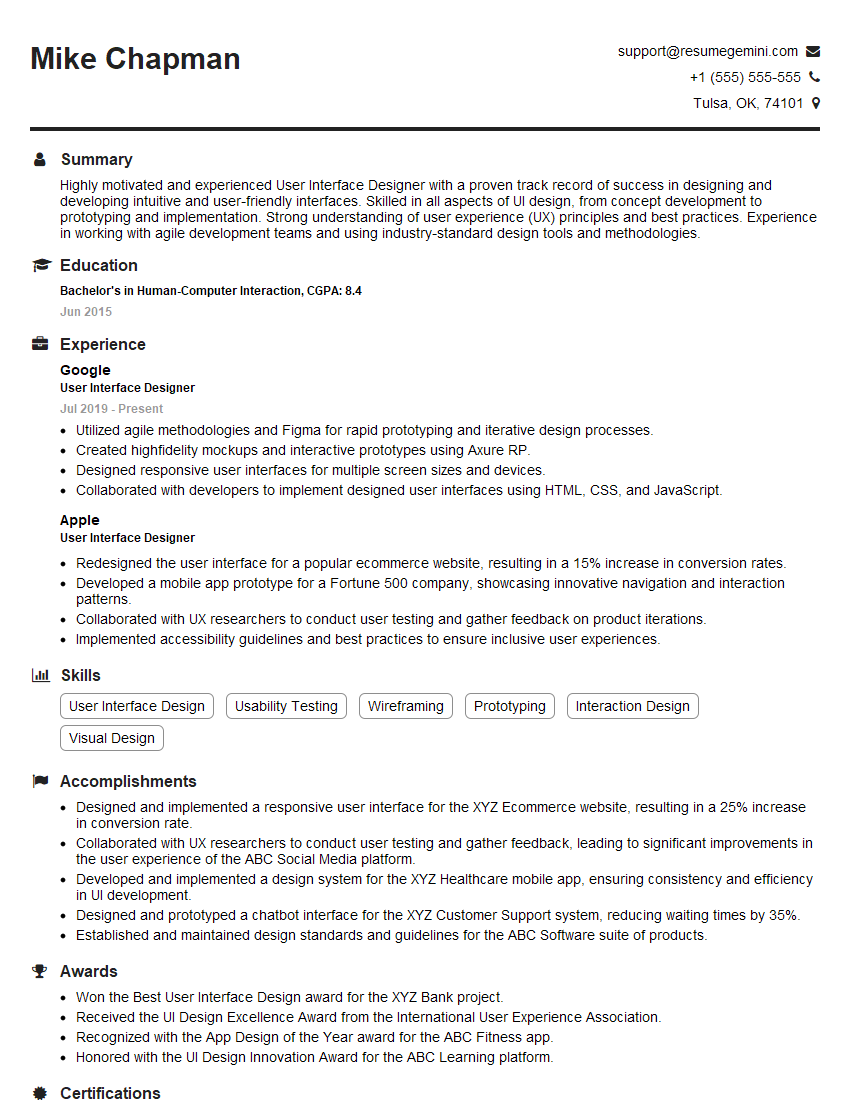
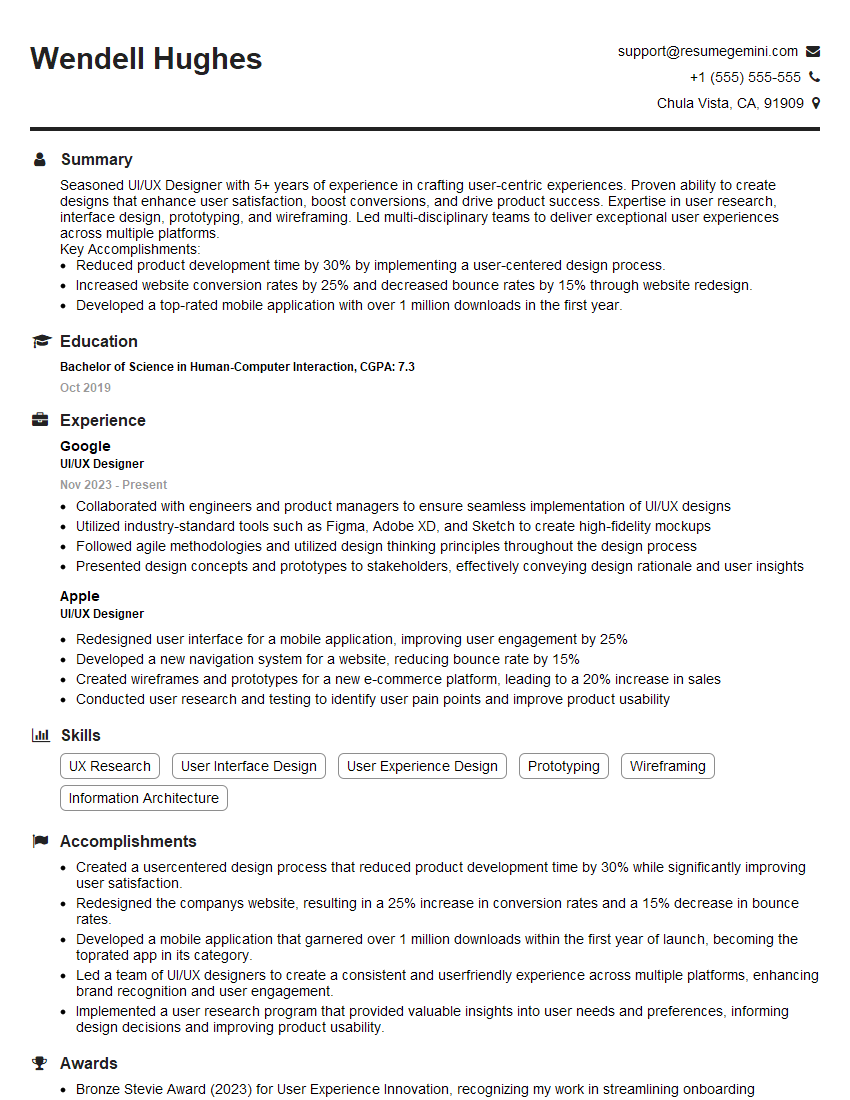
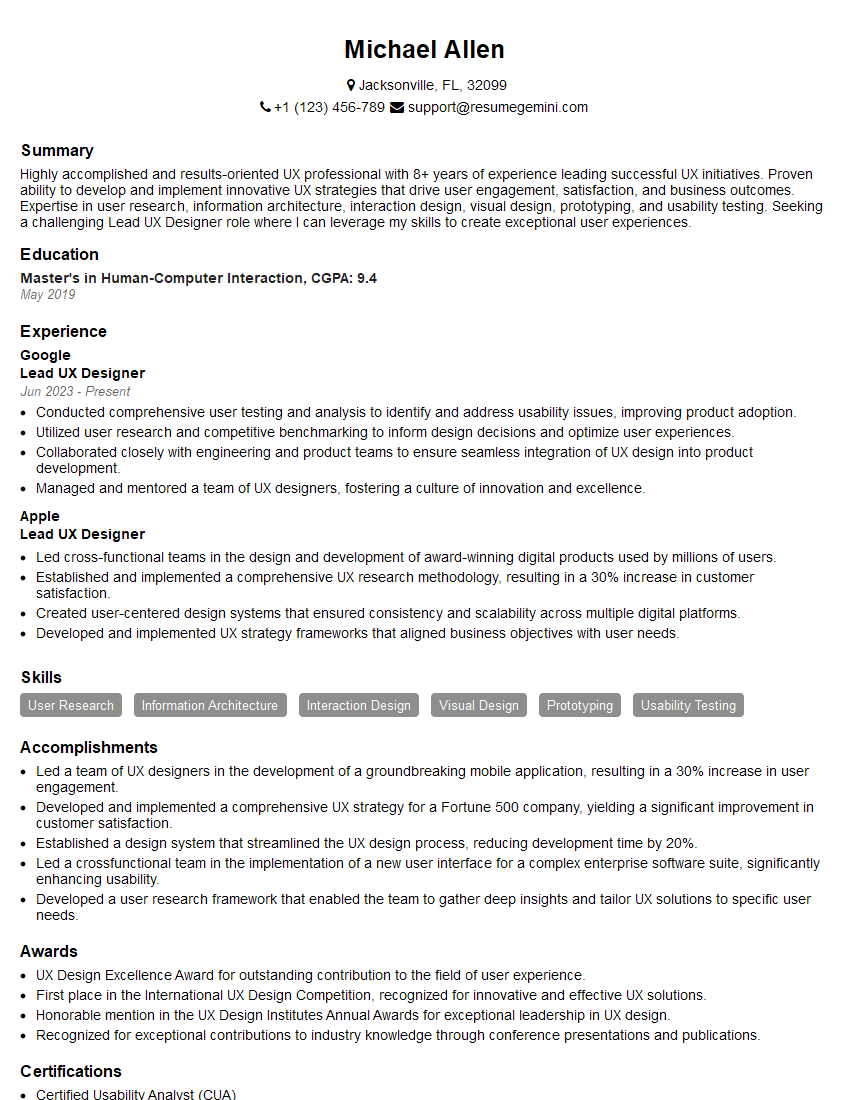
Mastering UX design is crucial for a thriving career in the ever-evolving digital landscape. A strong understanding of user-centered design principles opens doors to exciting opportunities and higher earning potential. To maximize your job prospects, crafting an ATS-friendly resume is paramount. ResumeGemini is a trusted resource that can help you build a professional and impactful resume that highlights your UX skills effectively. Examples of resumes tailored specifically to UX design roles are available through ResumeGemini, showcasing best practices for showcasing your expertise and landing your dream job.



Explore more articles
Users Rating of Our Blogs
Share Your Experience
We value your feedback! Please rate our content and share your thoughts (optional).
What Readers Say About Our Blog
Very informative content, great job.
good