Interviews are opportunities to demonstrate your expertise, and this guide is here to help you shine. Explore the essential Experience with offset printing processes interview questions that employers frequently ask, paired with strategies for crafting responses that set you apart from the competition.
Questions Asked in Experience with offset printing processes Interview
Q 1. Explain the difference between sheetfed and web offset printing.
The core difference between sheetfed and web offset printing lies in how the paper is fed into the press. Think of it like this: sheetfed is like manually feeding individual sheets of paper into a printer, while web offset is like feeding a continuous roll of paper, much like a giant roll of wallpaper.
- Sheetfed Offset Printing: Uses individual sheets of paper, typically larger formats, and is ideal for high-quality, shorter-run jobs where precise control over each sheet is crucial. Think of brochures, business cards, or high-end magazines. The process is slower but offers superior control over print quality and reduces waste for shorter runs.
- Web Offset Printing: Employs a continuous roll of paper (the ‘web’), making it perfect for high-volume, long-run jobs like newspapers, magazines with large print runs, and mass-market publications. Speed is the key advantage, but there’s less individual sheet control, leading to a slightly lower level of quality for individual sheets in comparison.
In essence, sheetfed is about quality and precision for smaller quantities, while web offset is about speed and efficiency for larger quantities. The choice depends entirely on the job’s requirements – print run, desired quality, and budget.
Q 2. Describe the process of platemaking for offset printing.
Platemaking in offset printing is the crucial step of transferring the image from a digital file onto a printing plate. This plate then transfers the image to the blanket cylinder, and finally, to the paper. There are several methods, but Computer-to-Plate (CTP) is the dominant technology.
In CTP, a high-resolution digital file is sent directly to a platesetter. This machine uses lasers to expose a photosensitive plate, hardening specific areas according to the image data. The unexposed areas are then washed away, leaving a relief image on the plate ready for printing. Think of it as creating a stencil, where the ink only sits on the raised areas of the image.
Different types of plates exist, including thermal plates (requiring heat for development) and violet plates (using UV light). The choice depends on factors like press speed, image detail, and budget. Careful plate handling is paramount to prevent damage and maintain print quality.
Q 3. What are the common causes of dot gain in offset printing?
Dot gain, the enlargement of printed dots, is a common offset printing issue. It results in darker and less vibrant colors than intended.
- Ink Properties: Highly absorbent inks can lead to excessive ink spread, increasing dot gain.
- Paper Characteristics: Highly porous or textured paper absorbs ink quickly, causing significant dot gain. Think of blotting paper – it quickly absorbs ink, making the dot bigger.
- Printing Pressure: Excessive pressure on the impression cylinder forces ink deeper into the paper, increasing dot size.
- Blanket Condition: A worn or damaged blanket can lead to uneven ink transfer and increased dot gain.
- Ink-Water Balance: Poor ink-water balance (too much water) can dilute the ink and cause the dots to spread.
Controlling dot gain requires careful attention to all these factors. Proper ink selection, paper choice, precise press settings, and regular blanket maintenance are key to achieving accurate color reproduction.
Q 4. How do you troubleshoot a printing press that is experiencing color inconsistencies?
Troubleshooting color inconsistencies in offset printing involves a systematic approach. It’s like detective work – we need to find the culprit among many potential suspects.
- Check the Proof: Ensure the original proof accurately reflects the desired colors. Is the problem on the press, or was the problem there from the start?
- Ink-Water Balance: Examine the ink-water balance carefully. Too much water leads to dull colors, while too little results in heavy, muddy colors.
- Ink Density: Measure ink density using a densitometer. Inconsistent ink density across the different colors will yield inconsistent prints.
- Plate Condition: Inspect the printing plates for any damage or defects. Scratches or debris can affect color.
- Blanket Condition: Check the blanket cylinder for wear or damage. A worn blanket will impact ink transfer consistency.
- Paper Consistency: Different batches of paper might absorb ink differently. Ensure consistent paper stock is used throughout the print run.
- Press Settings: Review press settings, such as impression cylinder pressure and inking rollers.
By systematically eliminating possibilities, one can identify the root cause and make the necessary adjustments to restore consistent color output.
Q 5. What are the different types of inks used in offset printing, and what are their properties?
Offset printing utilizes various ink types, each with unique properties:
- Conventional Inks: These are oil-based inks, offering vibrant colors and good gloss. They are widely used but have environmental concerns regarding VOCs (Volatile Organic Compounds).
- UV (Ultraviolet) Inks: These cure instantly upon exposure to UV light, offering quicker drying times, reduced waste, and a higher gloss finish. They’re common for packaging and products requiring immediate handling.
- LED UV Inks: Similar to UV inks, but they cure with LED light, requiring less energy and potentially leading to lower running costs.
- Water-Based Inks: Environmentally friendly, these inks are increasingly popular due to their lower VOC emissions. They provide a matte finish and offer a healthier working environment, but can have limitations in color vibrancy and drying speed.
Ink selection is critical and depends on factors like print speed, substrate, environmental regulations, and the desired print finish. Each ink type necessitates press adjustments for optimal performance.
Q 6. Explain the role of the blanket cylinder in the offset printing process.
The blanket cylinder acts as an intermediary between the printing plate and the paper. Imagine it as a highly flexible, resilient rubber ‘sponge’.
The plate, carrying the inked image, transfers the image onto the blanket. The blanket, in turn, transfers the image to the paper with far greater precision and finesse. It’s this indirect transfer that reduces wear on the printing plate and allows the use of a wider variety of papers.
The blanket’s flexibility enables it to conform to the irregularities of the paper’s surface. This crucial step ensures that the image is evenly transferred to the paper, producing a crisp and clear print. A damaged blanket can severely compromise print quality.
Q 7. How do you ensure proper register in offset printing?
Register, the accurate alignment of different colors or elements in multi-color printing, is vital for high-quality output. Think of it as perfectly overlapping different colored layers in a painting.
Ensuring proper register involves several steps:
- Accurate Plate Mounting: Plates must be mounted precisely on the printing cylinders. This requires meticulous attention to detail and the use of precise mounting tools.
- Precise Press Adjustments: The press needs fine-tuning for sidelay (lateral shift) and head-to-tail register. This involves adjusting the cylinder positioning, often with the aid of specialized measuring devices.
- Regular Monitoring: Throughout the printing process, regular register checks are crucial. This is often done using a register gauge or by visually inspecting the printed sheets.
- Professional Training: Skilled press operators are crucial. They understand how to identify and correct register issues rapidly, minimizing waste.
Maintaining proper register requires a combination of skilled operators, well-maintained equipment, and consistent quality control.
Q 8. What are the common paper types used in offset printing, and how do they affect the print quality?
Offset printing utilizes a wide variety of paper types, each impacting the final print quality significantly. The choice depends on factors like the project’s budget, desired finish, and intended use.
- Coated Papers: These are popular for their smooth surface, resulting in sharp, vibrant images and crisp text. They’re great for high-quality brochures, magazines, and catalogs. However, they can be more expensive than uncoated options.
- Uncoated Papers: These have a more textured surface, offering a more natural, less glossy look. They’re often preferred for business cards, letterheads, and invitations, providing a more tactile experience. The absorbency of the paper can impact ink penetration and drying time.
- Gloss Papers: Offer a highly reflective surface, making colors appear vibrant and bold. They’re well-suited for projects needing a luxurious feel, like product packaging or annual reports.
- Matte Papers: These provide a smooth, non-reflective surface, reducing glare and making text easier to read. They are a good option for publications that need to be easily read in diverse lighting conditions.
- Recycled Papers: Environmentally friendly, these papers can have varying textures and finishes. The recycled paper’s quality directly impacts printability, with some offering excellent results while others might require adjustments to the printing process.
For instance, using a highly absorbent uncoated paper with a high ink coverage might lead to show-through, where the ink is visible on the opposite side of the sheet. Conversely, a glossy paper may not be suitable for detailed line art due to ink feathering.
Q 9. Describe the process of color management in offset printing.
Color management in offset printing is critical to ensure accurate color reproduction from design to final print. It involves a series of steps to standardize and control the color throughout the workflow.
- Profile Creation: Each device in the process (scanner, monitor, press) needs a color profile – a mathematical representation of its color capabilities. This ensures consistency across all stages.
- Color Space Conversion: Designs are usually created in RGB (additive color model for screens), but offset printing uses CMYK (subtractive color model for inks). Color space conversion is vital, and choosing the right profile is essential for avoiding color shifts.
- Proofing: Soft proofs (digital simulations) and hard proofs (printed samples) are used to verify color accuracy before proceeding to the full print run. These proofs help detect any deviations and make necessary corrections.
- Press Calibration and Control: Regular calibration of the printing press ensures consistent ink density and color across the entire print run. This often involves using spectrophotometers and color management software to measure and adjust ink levels.
- Ink Selection: Choosing the right inks (brand and type) is important for achieving desired color accuracy and consistency. Different ink manufacturers and ink series may vary slightly in their color reproduction.
Think of it like baking a cake: you need the right ingredients (inks), the correct recipe (color profile), and precise measurements (calibration) to produce a cake that tastes as expected. Ignoring color management can lead to significant color discrepancies and wasted resources.
Q 10. How do you maintain and clean an offset printing press?
Maintaining and cleaning an offset printing press is crucial for optimal performance, print quality, and longevity. It’s a multi-step process that requires attention to detail and adherence to manufacturer guidelines.
- Daily Cleaning: This includes cleaning the ink fountain rollers, dampening system, and blanket cylinders. Removing excess ink and dampening solution prevents build-up and ensures consistent ink transfer.
- Weekly Maintenance: More in-depth cleaning involves disassembling and thoroughly cleaning components like the inking unit and dampening system. This might include checking for wear and tear on rollers and replacing worn parts.
- Plate Cleaning: Plates need regular cleaning to remove any residual ink or gum. Improper cleaning can lead to plate damage and poor print quality.
- Press Lubrication: Regular lubrication of moving parts is vital for preventing wear and tear and ensuring smooth operation. This should be done according to the manufacturer’s recommendations.
- Preventative Maintenance: Regular inspections and preventative maintenance tasks, such as checking the pressure settings, can identify potential problems early on, avoiding costly breakdowns.
Regular cleaning is not just about aesthetics; it prevents ink build-up, which can affect the quality of the printed output and ultimately damage the machine’s components. A well-maintained press runs smoother and produces higher-quality prints.
Q 11. What are the safety procedures you follow when operating an offset printing press?
Safety is paramount when operating an offset printing press. Adhering to strict safety procedures is non-negotiable.
- Lockout/Tagout Procedures: Before performing any maintenance or repairs, the press must be completely shut down and locked out to prevent accidental start-up.
- Personal Protective Equipment (PPE): Always wear appropriate PPE, including safety glasses, gloves, and hearing protection. Ink and cleaning solutions can be harmful if not handled correctly.
- Machine Guards: Ensure all machine guards are in place and functioning correctly. These guards protect operators from moving parts.
- Proper Lifting Techniques: Printing plates and other components can be heavy. Use proper lifting techniques to avoid injuries.
- Emergency Procedures: Be familiar with the location of emergency shut-off switches and fire extinguishers. Know emergency procedures in case of accidents.
- Training: Operators must receive proper training on safe operating procedures before handling the press.
Ignoring safety procedures can lead to serious injuries or even fatalities. A culture of safety is essential in any printing environment.
Q 12. Explain the concept of ‘make-ready’ in offset printing.
‘Make-ready’ in offset printing refers to the meticulous process of preparing the printing press for a specific job. It’s a crucial step that directly impacts print quality, efficiency, and waste minimization.
- Plate Mounting: Accurately mounting the printing plates onto the press cylinders. Misalignment can lead to misregistration (colors not aligning correctly).
- Ink and Dampening Adjustments: Fine-tuning the ink and dampening system to achieve the desired ink density and balance. This involves adjusting ink fountain rollers, dampening rollers, and ink keys.
- Paper Feed Setup: Configuring the paper feed system to ensure smooth and consistent paper delivery. This includes adjustments for paper size, thickness, and type.
- Register Adjustment: Precisely aligning the printing plates to ensure perfect registration of colors and elements. This often involves making small adjustments to the plate cylinders.
- Test Prints and Adjustments: Producing test prints to check color accuracy, register, and overall print quality. Adjustments are made as needed to optimize the print before the full run commences.
Think of it like setting up a stage for a play: you need to ensure everything is in its correct place and works perfectly before the actors start performing. Proper make-ready reduces waste, improves quality, and saves valuable time.
Q 13. What are the different types of printing plates used in offset printing?
Offset printing uses different types of printing plates, each with its own advantages and disadvantages.
- Metal Plates: These are the traditional choice, typically made of aluminum. They offer good durability and print quality but require specialized processing (imaging and developing).
- Polymer Plates: These are more environmentally friendly and require less processing time than metal plates. They are often cheaper to produce but can wear out quicker depending on the run length and ink usage.
- Surface Plates: These are designed for shorter runs and quick turnaround times. They are generally less expensive but offer less durability.
The selection of printing plates depends on factors such as run length, budget, and the desired print quality. Longer print runs generally justify the use of more durable (and often more expensive) metal plates, while shorter runs may benefit from the convenience of polymer or surface plates.
Q 14. How do you identify and correct common printing defects such as slur, mottle, and ghosting?
Identifying and correcting printing defects is a key skill for an offset press operator. Let’s address some common issues:
- Slur: This is a fuzzy or blurred appearance of the print, often caused by incorrect ink-water balance, worn rollers, or improper plate mounting. Solution: Adjust ink-water balance, replace worn rollers, check plate mounting, and ensure proper paper handling.
- Mottle: An uneven distribution of ink, resulting in a blotchy appearance. It can be caused by inconsistencies in the ink distribution system, improper cleaning, or variations in paper absorption. Solution: Clean the ink distribution system, adjust ink viscosity, and check for damaged ink rollers. Paper quality might also need investigation.
- Ghosting: A faint, secondary image appearing next to the main print, often due to ink picking up from previously printed sheets, which is also related to issues with paper moisture. Solution: Ensure proper drying conditions, verify paper moisture content, and adjust the ink-water balance.
Troubleshooting printing defects requires systematic investigation. Starting with a visual inspection, then checking the press settings and components, usually isolates the root cause. Keeping detailed records of press conditions helps in identifying recurring problems and finding effective solutions.
Q 15. What is the importance of maintaining consistent ink viscosity in offset printing?
Maintaining consistent ink viscosity is paramount in offset printing because it directly impacts the quality and uniformity of the final product. Think of it like baking a cake – if your batter is too thick or too thin, the final result will be compromised. Similarly, inconsistent ink viscosity leads to several problems.
- Uneven ink transfer: Too thick, and the ink won’t properly transfer to the paper; too thin, and it will feather or bleed, leading to blurry images and text.
- Color inconsistencies: Variations in viscosity affect the color density, resulting in mottled or patchy prints, especially noticeable in large solid areas.
- Print defects: Problems like mottle, slurring, and set-off (ink smearing from one sheet to another) are often directly linked to viscosity issues.
We monitor viscosity using a viscosimeter and adjust it by adding appropriate thinners or reducers according to the manufacturer’s specifications. Regular cleaning of the ink ducts and fountain solution system also helps maintain optimal viscosity.
Career Expert Tips:
- Ace those interviews! Prepare effectively by reviewing the Top 50 Most Common Interview Questions on ResumeGemini.
- Navigate your job search with confidence! Explore a wide range of Career Tips on ResumeGemini. Learn about common challenges and recommendations to overcome them.
- Craft the perfect resume! Master the Art of Resume Writing with ResumeGemini’s guide. Showcase your unique qualifications and achievements effectively.
- Don’t miss out on holiday savings! Build your dream resume with ResumeGemini’s ATS optimized templates.
Q 16. Describe the impact of different paper stocks on print quality.
Different paper stocks significantly impact print quality. The paper’s properties – such as its weight, surface finish, absorbency, and fiber content – all play a role. For example:
- Weight: Heavier papers (e.g., 100lb cover) offer better rigidity and feel but can be challenging to feed through the press, and may require adjustments to the press settings. Lighter papers (e.g., 60lb text) are easier to handle but may show less vibrant colors due to higher ink absorption.
- Surface Finish: Coated papers provide a smooth, glossy surface ideal for sharp, detailed images and vibrant colors. Uncoated papers, like offset or newsprint, offer a matte finish suitable for text-heavy documents but may show slightly less color vibrancy.
- Absorbency: Highly absorbent papers can lead to increased ink absorption, potentially dulling colors and causing show-through (ink visible on the reverse side). Less absorbent papers provide crisper results but can cause ink piling or drying problems.
- Fiber Content: The type of fibers in the paper influences its smoothness, strength, and absorbency. Papers with longer fibers tend to be smoother and stronger.
Choosing the right paper stock is crucial for achieving the desired aesthetic and functionality. Understanding the properties of each paper type is essential for successful offset printing.
Q 17. How do you handle a paper jam in an offset printing press?
Handling a paper jam in an offset press requires a systematic approach to avoid further damage. First, we must safely stop the press, ensuring the power is off before proceeding. Then:
- Identify the location of the jam: Carefully inspect the feed tray, in-feed rollers, and delivery area to pinpoint the jammed sheet(s).
- Access the jam: Follow the press’s safety procedures to access the jammed area. This may involve opening specific panels or removing components.
- Remove the jammed sheets: Gently remove the jammed sheets, avoiding tearing or damaging the paper or the press components. Using tools like tweezers or a specialized paper-removing device can be beneficial.
- Inspect for damage: Once the jam is cleared, inspect the rollers, blankets, and other relevant parts for any signs of damage or debris.
- Restart the press: After everything is checked, carefully restart the press, monitoring its performance.
Preventing paper jams involves properly setting the paper guides, maintaining consistent humidity levels, and using quality paper that is compatible with the press.
Q 18. How do you monitor and control the printing speed and efficiency?
Monitoring and controlling printing speed and efficiency involve a combination of technical expertise and practical knowledge. We use a variety of methods to optimize the process:
- Press settings: Adjusting the feed speed, impression pressure, and ink flow based on the paper stock, ink viscosity, and desired print quality.
- Quality checks: Regularly checking the printed sheets for color accuracy, registration (alignment of colors), and print defects. Immediate correction prevents wasted materials and time.
- Waste reduction: Implementing procedures to minimize paper waste, such as accurate makeready and efficient sheet-feeding.
- Data analysis: Analyzing production data (e.g., printing speed, downtime, waste) to identify areas for improvement. Modern presses often incorporate software for automated data collection and analysis.
- Preventive maintenance: Regular maintenance schedules prevent unexpected downtime and ensure optimal press performance.
Efficiently running an offset press requires a combination of technical skills, attention to detail, and a proactive approach to problem-solving.
Q 19. Explain your experience with different types of offset printing presses (e.g., Heidelberg, Komori).
My experience encompasses a range of offset printing presses, predominantly Heidelberg and Komori models. Both manufacturers produce high-quality presses with unique features.
- Heidelberg: I’ve worked extensively with Heidelberg Speedmaster series, known for their robust build, precision engineering, and reliable performance. I’m proficient in operating and maintaining these presses, from makeready to final print runs. Their sophisticated automation features streamline the printing process significantly.
- Komori: My experience with Komori Lithrone presses focuses on their advanced automation capabilities, including inline color control and quality monitoring systems. These presses offer excellent speed and precision, and I’ve found their user-friendly interfaces very intuitive.
The key differences between the two lie in their control systems and automation features; however, both are industry leaders in precision and reliability. My expertise lies in adapting my techniques to each model’s specific features to achieve optimal results.
Q 20. Describe your experience with pre-press procedures and software.
Pre-press procedures form the foundation of successful offset printing. My experience includes proficiency in various software and techniques:
- Image editing: Using Adobe Photoshop and Illustrator to prepare images for printing, ensuring proper resolution, color profiles (CMYK), and file formats (e.g., TIFF, PDF).
- Color management: Employing color profiling and calibration tools to ensure consistent color across all stages of production, from design to print.
- Imposition: Creating imposition layouts using software like imposition tools (e.g., prepress software specific to the press), ensuring efficient sheet utilization and proper orientation for folding and binding.
- Proofing: Reviewing soft proofs and hard copies (e.g., digital proofs or contract proofs) for color accuracy, registration, and overall quality before committing to a full print run.
- File preparation: Preparing print-ready files with proper bleeds, margins, and resolution for optimal results on the offset press.
A solid understanding of pre-press procedures is critical for achieving high-quality prints and minimizing errors and waste during the printing phase.
Q 21. How do you ensure color consistency across multiple print runs?
Maintaining color consistency across multiple print runs is a crucial aspect of offset printing that involves a multi-faceted approach:
- Standardized color profiles: Using consistent ICC profiles throughout the pre-press and printing process ensures accurate color representation.
- Color calibration: Regularly calibrating the printing press and monitoring ink density to prevent variations.
- Ink management: Maintaining a consistent supply of ink from the same batch and storing it correctly helps avoid color drift over time.
- Proofing and color standards: Using color references and accurate proofing methods (e.g., Pantone color matching system) ensures that the printed colors accurately reflect the design intent.
- Press adjustments: Fine-tuning the press settings, such as ink keys and fountain solution levels, to compensate for any variations in paper or environmental conditions.
Implementing these procedures creates a controlled environment, preventing variations in color between different runs. Regular quality checks during the print run further assure consistency.
Q 22. What is your experience with different finishing techniques (e.g., cutting, folding, binding)?
My experience encompasses a wide range of finishing techniques crucial for delivering high-quality offset printed products. This includes everything from simple cutting and creasing to more complex processes like perfect binding, saddle stitching, and die-cutting.
Cutting: I’m proficient in using both guillotine cutters and automated cutting systems to achieve precise cuts on various paper stocks, ensuring accurate sizing and clean edges. For example, I’ve managed large-scale projects involving thousands of brochures, where precise cutting was paramount for a consistent final product.
Folding: I have extensive experience with various folding techniques, including parallel folds, half folds, letter folds, and more. Understanding the different fold types and their impact on the final product’s aesthetic and functionality is critical. One project involved a complex gatefold brochure that required meticulous folding to ensure the smooth unfolding of each panel.
Binding: This is where the real expertise lies! I’m well-versed in perfect binding (for books and magazines), saddle stitching (for leaflets and booklets), wire-O binding (for notebooks and calendars), and case binding (for hardcover books). Selecting the appropriate binding method depends on factors such as the number of pages, the desired look and feel, and the budget. I remember a project where the client wanted a high-end look, so we opted for case binding with a beautiful cloth cover.
Q 23. What quality control checks do you perform throughout the printing process?
Quality control is an integral part of every offset printing job. My checks begin even before the printing commences, with meticulous review of the pre-press files for color accuracy, image resolution, and text clarity. During the printing process, I perform regular checks on:
Color Consistency: Using a densitometer and spectrophotometer, I monitor color throughout the run, making adjustments as needed to maintain consistency across all sheets. This is crucial to ensure the final product matches the client’s specifications.
Registration: I meticulously check the alignment of colors and images (registration) on each sheet, adjusting the press as necessary. Misregistration can lead to blurred images or misaligned text, greatly affecting print quality.
Ink Density: Using a densitometer, I verify that the ink density meets the predetermined specifications. Inconsistent ink density can lead to dull or faded colors.
Paper Quality: I inspect the paper stock for defects like wrinkles, tears, or inconsistencies in thickness. I also check for proper paper feed to prevent jams and inconsistencies in the printing process.
Finished Product Inspection: After the printing and finishing are complete, I conduct a final quality check to look for any defects, such as smudging, scratches, or misaligned folds. A random sampling of the finished products helps to ensure the entire run maintains a consistent level of quality.
Q 24. How do you handle customer complaints related to print quality?
Handling customer complaints is a critical aspect of my role. My approach is always proactive and solution-oriented. I follow a systematic process:
Listen Empathetically: I start by carefully listening to the customer’s concerns, letting them fully explain their issue without interruption. Understanding their perspective is the first step towards resolution.
Gather Information: I collect all relevant information, including the job details, the specific nature of the complaint, and any supporting evidence (e.g., photographs of the faulty print).
Investigate Thoroughly: I thoroughly investigate the issue, reviewing the production process and checking for any potential causes of the problem, such as errors in the pre-press stage, issues with the press settings, or problems during the finishing process.
Offer a Solution: Once the root cause is identified, I work with the customer to find a mutually agreeable solution. This could involve reprinting the job, offering a discount, or providing a credit for future work. Transparency and honest communication are key.
Document Everything: I meticulously document the entire process, from the initial complaint to the final resolution, to improve future quality control measures and track customer satisfaction.
Q 25. What is your experience with different types of substrates (e.g., cardboard, plastics)?
My experience working with various substrates is extensive, enabling me to adapt to different project requirements and client specifications. I’m comfortable working with a broad range of materials, including:
Paper: From lightweight papers for brochures and flyers to heavier stocks for business cards and packaging, I’m familiar with the properties of different paper types and how they affect the printing process. This includes understanding factors such as absorbency, GSM (grams per square meter), and surface finish.
Cardboard: I have experience working with various cardboard types, from thin chipboard to thicker corrugated board, for packaging projects. I understand the importance of selecting the correct cardboard type based on the product’s weight and protection requirements.
Plastics: I have experience printing on various plastics, including PVC, polypropylene, and PET, often used for labels, banners, and other promotional materials. These materials require specialized inks and printing techniques.
Understanding the properties of each substrate is critical to ensure proper ink adhesion, avoid issues like smudging, and achieve the desired print quality. For example, using the wrong type of ink on plastic can result in poor adhesion or cracking.
Q 26. How familiar are you with the different types of drying systems used in offset printing?
Offset printing utilizes different drying systems to ensure the ink sets properly and avoids smudging or smearing. My experience includes working with:
Air Drying: This is the simplest method, relying on air circulation to evaporate the solvents or water in the ink. Suitable for smaller jobs and less absorbent substrates.
Infrared (IR) Drying: IR lamps use heat to rapidly dry the ink, accelerating the production process and making it suitable for high-volume jobs. I’ve found this particularly effective for faster drying times with certain inks.
Ultraviolet (UV) Drying: UV lamps cure the ink instantly, creating a highly durable and scratch-resistant finish. This is excellent for applications requiring high durability, such as outdoor signage or packaging that needs to withstand harsh conditions. I often use UV drying when working with plastics.
The choice of drying system depends on various factors, including the type of ink, the substrate being used, and the required turnaround time. Careful consideration of these factors ensures optimum print quality and efficiency.
Q 27. Explain your experience with maintaining a clean and organized pressroom.
Maintaining a clean and organized pressroom is crucial for efficient operation, consistent print quality, and safety. My experience involves implementing and adhering to rigorous cleaning and organization procedures. This includes:
Daily Cleaning: I perform daily cleaning of the press, including removing excess ink, cleaning rollers, and wiping down the surrounding area. This prevents ink buildup and ensures smooth operation. We use approved cleaning solvents to avoid damaging the press components.
Regular Maintenance: I’m proficient in conducting regular preventative maintenance checks on the press, following the manufacturer’s recommendations, to detect and address potential problems before they escalate. This includes checking roller pressure, ink distribution, and paper feed mechanisms.
Organized Storage: We maintain a well-organized storage system for inks, papers, and other supplies. This makes it easier to locate items quickly and prevents accidental damage or spills. We use clear labeling to ensure every item is easily identifiable.
Waste Management: Following strict safety regulations, I manage waste products responsibly, properly disposing of cleaning solvents and other hazardous materials. This protects both the environment and the pressroom staff.
Safety Protocols: Adhering strictly to workplace safety regulations, I ensure that all personnel are aware of and follow safety procedures, including the proper use of personal protective equipment (PPE), such as gloves and safety glasses.
A clean and organized pressroom significantly reduces the risk of accidents, improves the quality of the work environment, and contributes to a more efficient and productive workflow.
Key Topics to Learn for Experience with Offset Printing Processes Interview
- Understanding the Offset Printing Process: From platemaking and ink transfer to printing press operation and finishing techniques. Consider the differences between sheetfed and web offset.
- Color Management and Calibration: Explain your experience with color profiles (e.g., CMYK, Pantone), color matching, and troubleshooting color inconsistencies. Discuss your understanding of density and dot gain.
- Pre-press Preparation and File Handling: Detail your experience with preparing files for offset printing, including image resolution, color space conversion, and trapping techniques. Discuss file formats and their suitability for offset printing.
- Press Operation and Maintenance: Describe your experience operating different types of offset presses, including setup, adjustments, and troubleshooting common issues (e.g., misregistration, slurring, ghosting). Discuss preventative maintenance procedures.
- Quality Control and Inspection: Explain your methods for inspecting printed materials for defects, ensuring consistent quality, and addressing any issues promptly. Discuss your understanding of industry standards and quality metrics.
- Finishing Techniques: Discuss your familiarity with various finishing techniques, such as cutting, folding, binding, laminating, and die-cutting. Describe your experience with different types of paper and their suitability for various finishing methods.
- Problem-Solving and Troubleshooting: Share examples of how you’ve identified and resolved technical issues during the offset printing process. Highlight your analytical skills and ability to find efficient solutions.
- Health and Safety Procedures: Demonstrate your awareness of safety protocols and regulations within a printing environment, including handling chemicals and operating machinery safely.
Next Steps
Mastering offset printing processes is crucial for career advancement in the graphic arts industry. A strong understanding of these processes demonstrates technical expertise and problem-solving abilities, making you a highly valuable asset to any print shop or related organization. To maximize your job prospects, create an ATS-friendly resume that highlights your skills and experience effectively. ResumeGemini is a trusted resource that can help you build a professional resume that stands out. We provide examples of resumes tailored to experience with offset printing processes to guide you. Take the next step towards your dream job – build your best resume with ResumeGemini!

Print Production Manager Resume Sample

Print Buyer Resume Sample

Printing Estimator Resume Sample

Graphic Arts Technician Resume Sample

Platemaker Resume Sample

Prepress Technician Resume Sample
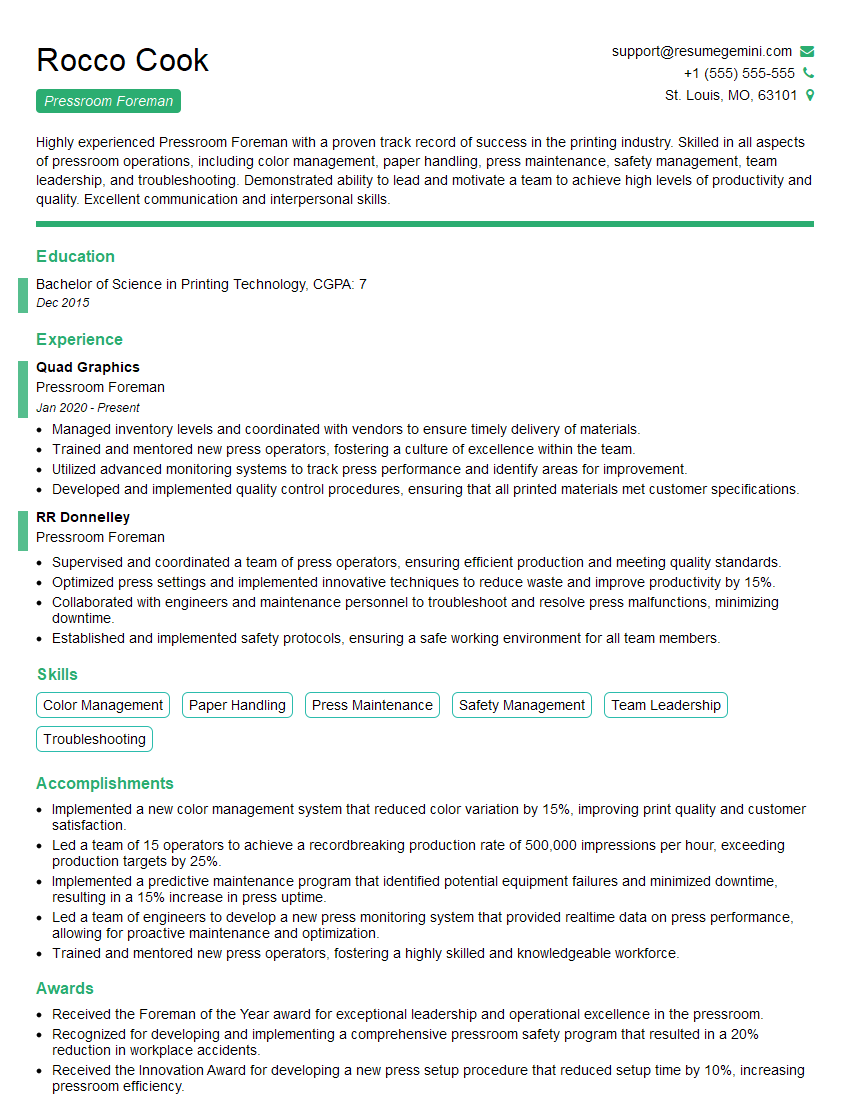
Pressroom Foreman Resume Sample
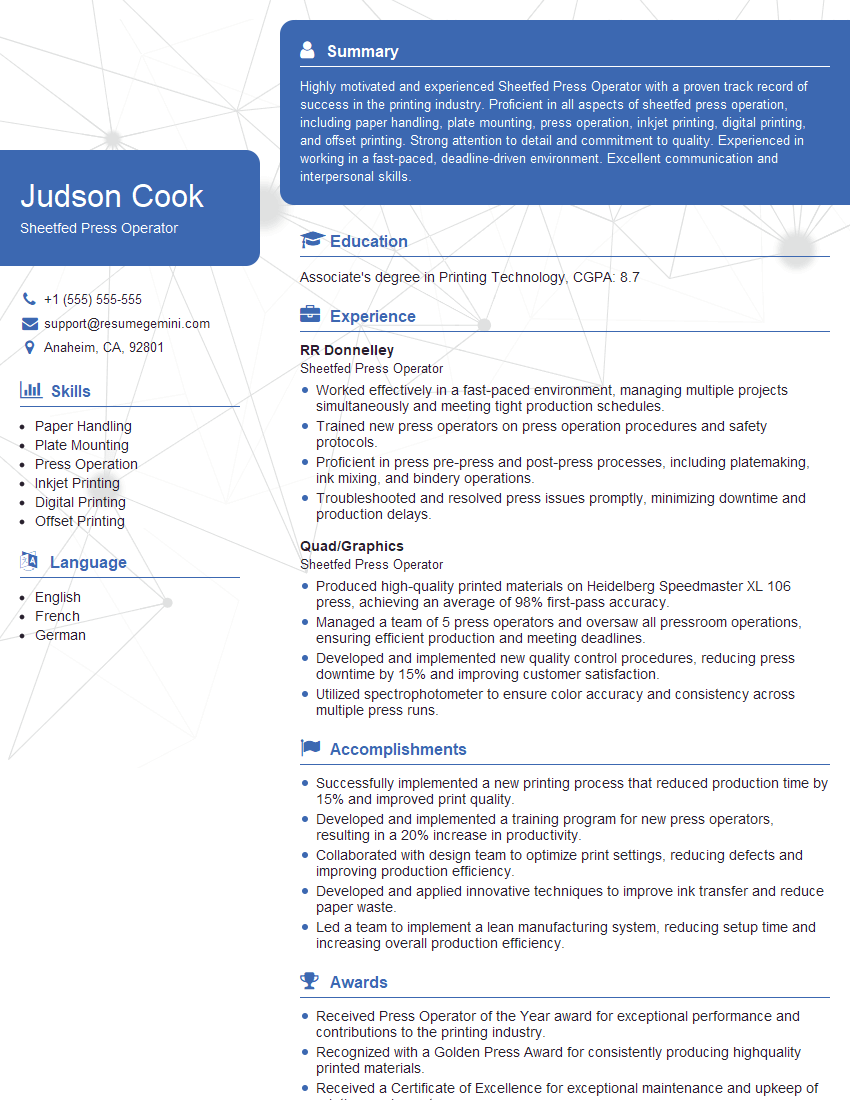
Sheetfed Press Operator Resume Sample
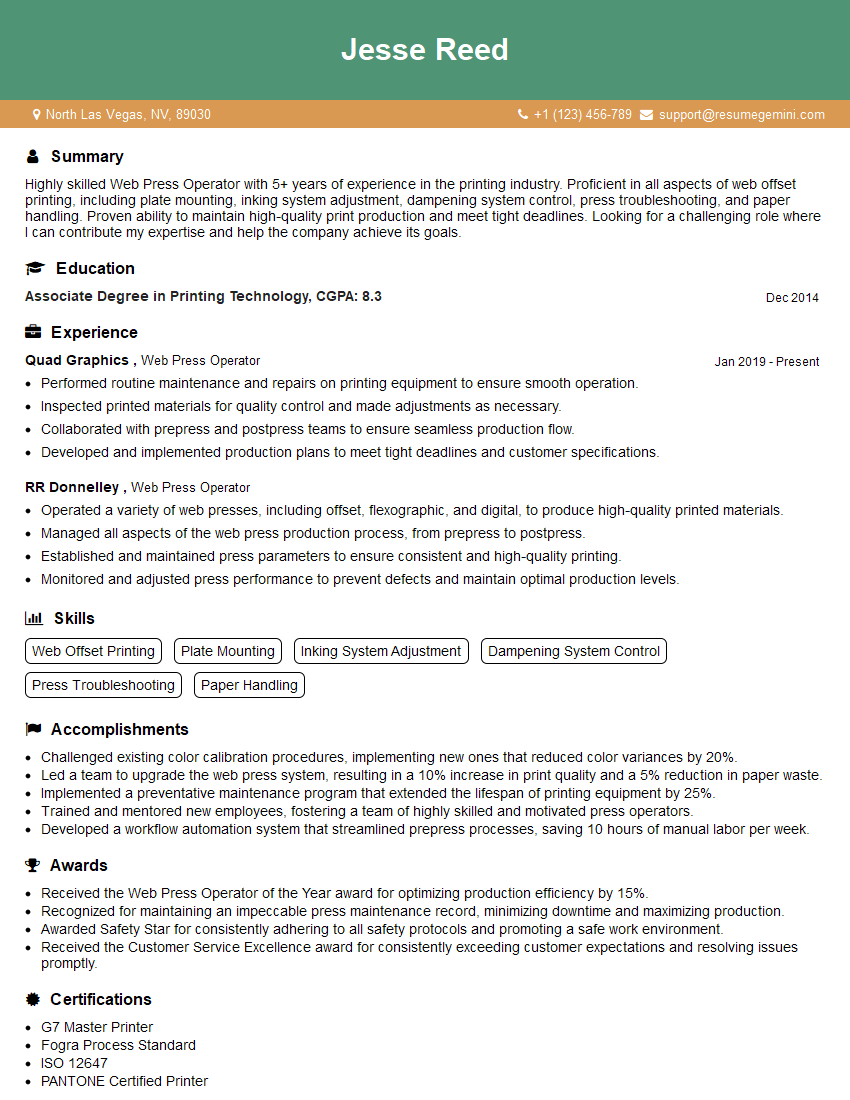
Web Press Operator Resume Sample
Explore more articles
Users Rating of Our Blogs
Share Your Experience
We value your feedback! Please rate our content and share your thoughts (optional).
What Readers Say About Our Blog
Very informative content, great job.
good