Every successful interview starts with knowing what to expect. In this blog, we’ll take you through the top Knowledge of Digital Pre-Press workflow interview questions, breaking them down with expert tips to help you deliver impactful answers. Step into your next interview fully prepared and ready to succeed.
Questions Asked in Knowledge of Digital Pre-Press workflow Interview
Q 1. Explain the importance of color profiles in digital prepress.
Color profiles are crucial in digital prepress because they act as a translator between different devices and software. Think of them as dictionaries for color. Each device (monitor, printer, scanner) interprets color slightly differently. A color profile essentially provides a standard ‘recipe’ to ensure the color you see on your screen is as close as possible to what is printed. Without them, color shifts and inconsistencies would be rampant, resulting in costly reprints and unhappy clients.
For example, an image appearing vibrant red on your calibrated monitor might print as a dull maroon without the correct profile. Common color profiles include sRGB (web), Adobe RGB (photography), and CMYK (printing). Choosing the right profile depends on the final output destination. Proper profile embedding ensures that the intended color is accurately reproduced.
Q 2. Describe the different file formats used in digital prepress and their applications.
Several file formats play critical roles in digital prepress, each suited for specific tasks. Let’s look at a few:
- PDF (Portable Document Format): The industry standard for prepress. It’s highly reliable, preserves fonts and images, and allows for the inclusion of crucial information like bleeds and color profiles. It’s the ideal format for sending files to printers.
- TIFF (Tagged Image File Format): Excellent for high-resolution images. It supports lossless compression, preserving image quality. Used primarily for high-quality images that require precise color reproduction, avoiding any compression artifacts.
- JPEG (Joint Photographic Experts Group): Commonly used for web images and where file size is a concern. Uses lossy compression, meaning some image data is lost during compression. While suitable for online visuals, it’s generally avoided in prepress due to its potential to degrade image quality during the printing process.
- EPS (Encapsulated PostScript): Suitable for vector graphics (logos, illustrations) and complex images. EPS files maintain scalability and preserve the quality of vector elements, crucial for sharp and clear reproductions at any size.
The choice of format depends on the project’s requirements. A complex brochure might require a PDF with embedded fonts and color profiles, while a simple product image might be delivered as a TIFF file.
Q 3. What are the key steps in a typical digital prepress workflow?
A typical digital prepress workflow comprises several key steps, each critical for a successful print job:
- File Preparation: This involves checking the design files for resolution, color mode, fonts, and bleeds. Any corrections or adjustments are made at this stage.
- Color Management: Assigning and verifying the correct color profiles for all elements in the design, ensuring accurate color reproduction across different devices.
- Trapping: Adjusting the color overlap of adjacent colors to prevent unsightly gaps between colors during the printing process.
- Imposition: Arranging pages in their correct order and orientation on the printing sheet to maximize efficiency and reduce waste.
- Proofing: Creating soft or hard proofs to visually check the design before final printing for color accuracy and overall quality assurance.
- Plate Making (for offset printing): Generating printing plates from the digital files, containing the image data ready for printing.
- Output to printing device: Sending the prepared files to the chosen printing device (offset press, digital printer, etc.).
These steps ensure that the final print matches the client’s expectations and conforms to printing standards.
Q 4. How do you ensure color consistency across different printing devices?
Maintaining color consistency across devices requires a multi-pronged approach. Think of it like building a bridge—you need multiple elements working together to create stability. Here are some crucial strategies:
- Color Profile Management: Using the correct color profiles for all devices and software involved in the workflow is crucial. Accurate profile embedding and conversion are essential.
- Color Calibration: Regularly calibrating monitors using a colorimeter or spectrophotometer to ensure accurate screen representation of colors is paramount.
- Proofing: Soft or hard proofs (printed proofs) offer a visual verification of colors before printing. Soft proofing simulates the final printed output on-screen, while hard proofing involves printing a sample sheet using the intended printing press and inks.
- Standardized Printing Processes: Utilizing consistent printing materials, inks, and settings throughout the printing process is key to maintaining color uniformity.
- Color Measurement Devices: Employing spectrophotometers to measure and match colors between different devices and print samples is often necessary for precise color control.
By implementing these strategies, you can significantly reduce variations in color reproduction across different output devices.
Q 5. What is trapping and why is it important?
Trapping is the intentional overlapping of colors in a print design to prevent small gaps from appearing between colors, especially when printed on less-precise machines. Imagine two colored shapes printed next to each other. If the printing process isn’t perfectly aligned, a slight gap might appear between them. Trapping ensures that a tiny sliver of one color overlaps onto the other, masking any misalignment.
This is particularly important with fine lines and small text printed with different colors. Without trapping, tiny white gaps can show up, making the final product look unprofessional. There are two main types of trapping: choke (overlapping the lighter color into the darker color) and spread (overlapping the darker color into the lighter color). The choice depends on the specific colors and printing conditions.
Q 6. Explain the concept of imposition and its role in print production.
Imposition is the process of arranging pages of a document in their correct order and orientation on a printing sheet (or multiple sheets) before printing. Think of it like planning the layout of a jigsaw puzzle before assembling it. The imposition plan considers factors like page size, the number of pages, and the type of printing press being used. Efficient imposition helps to minimize waste and maximize productivity, reducing costs and time.
For example, a 16-page brochure might be arranged across two sheets of paper, with pages appearing in a specific order when folded. Different imposition plans exist depending on whether it’s a booklet, poster, or other print format. Specialized software helps create and visualize the imposition layout before the printing commences.
Q 7. How do you handle image resolution issues in prepress?
Image resolution is crucial for print quality. Insufficient resolution results in blurry or pixelated images. The common rule of thumb is to aim for 300 DPI (dots per inch) for printed materials. Handling resolution issues involves several steps:
- Checking Image Resolution: Always check the resolution of images before proceeding. Software like Adobe Photoshop or Illustrator readily displays image resolution.
- Resampling (with caution): If an image has low resolution, you can resample it, increasing its DPI. However, this will not improve the image’s inherent detail; it simply stretches the pixels, often leading to a loss of sharpness. Only resample if absolutely necessary and at the lowest possible amount.
- Using High-Resolution Images: Sourcing high-resolution images from the start is the best practice. Use only images at or above the required resolution for printing.
- Vector Graphics: For logos and illustrations, vector graphics should be used whenever possible, as they maintain their quality and sharpness regardless of scale.
- Image Sharpening: Consider subtle image sharpening, but overuse can introduce artifacts and noise into the image.
Careful handling of image resolution is essential to achieving high-quality prints. Using the right resolution from the outset is much more efficient than trying to correct low-resolution images later in the process.
Q 8. What are some common prepress quality control checks?
Prepress quality control (QC) is crucial for ensuring a smooth printing process and a high-quality final product. It involves a series of checks to identify and correct potential problems before they reach the press. Think of it as a final ‘dress rehearsal’ before the ‘big show’.
- Image Resolution and Sharpness: We check that images are at the appropriate resolution (typically 300 dpi for print) and are sharp enough to avoid pixelation or blurriness. A low-resolution image blown up to print size will look terrible.
- Color Accuracy: We verify color consistency and accuracy using color profiles and soft proofing. This ensures that the colors on screen accurately represent the final printed colors. For example, we might use a Pantone color matching system.
- Font Embedding and Outlines: We ensure all fonts are properly embedded to avoid font substitution issues on different systems. Critical fonts are often outlined to guarantee consistent rendering.
- Bleed and Margins: We meticulously check bleed (the extra area extending beyond the trim size) and margins to ensure important elements don’t get cut off during trimming. This is especially critical for designs that extend to the edge of the page.
- File Format and Structure: We confirm the file is in the correct format (usually a press-ready PDF) and is structurally sound. A flawed PDF can lead to printing errors or complete failure.
- Trap and Overprint settings: For offset printing, we verify that trap settings (overlapping colors to prevent gaps between them) are correctly applied. Overprint settings are carefully checked to ensure that colors print on top of each other as intended, not knocking out underlying colors.
By diligently performing these checks, we prevent costly reprints and ensure the client receives the highest-quality product possible.
Q 9. Describe your experience with PDF workflows, including creating press-ready PDFs.
PDF workflows are the backbone of modern prepress. My experience encompasses the entire process, from designing in applications like InDesign to creating press-ready PDFs in Adobe Acrobat. I’m particularly adept at creating PDFs that meet the specific requirements of different printing presses (offset, digital, large format etc.).
Creating a press-ready PDF involves several critical steps:
- High-Resolution Images: I start by ensuring all images are at a minimum of 300dpi, and are in a suitable color space (e.g., CMYK).
- Font Embedding and Outlines: I embed all necessary fonts or convert text to outlines, guaranteeing consistent font rendering on any system.
- Color Management: I use color profiles to ensure accurate color representation and consistency throughout the workflow. I usually work with CMYK profiles specific to the chosen printing press.
- Bleed and Margins: I set up appropriate bleed and margin settings, preventing any unwanted cropping during printing.
- Pre-flight Checks: I utilize the pre-flight features of Adobe Acrobat to catch potential errors, such as missing fonts or images, incorrect color spaces, and other issues.
- PDF/X Standard Compliance: I always ensure that the final PDF conforms to a suitable PDF/X standard (e.g., PDF/X-1a, PDF/X-4) specified by the printer, ensuring compatibility and avoiding any unexpected issues during the printing process.
In one project, I had to work with a very large, complex document that involved a mix of images, illustrations and special color requirements. I used Acrobat’s tools for efficient preflighting, creating a high-quality, press-ready PDF on time, without any issues during the print.
Q 10. What software are you proficient in (e.g., Adobe Acrobat, InDesign, Photoshop)?
My software proficiency includes a comprehensive skillset in Adobe Creative Suite, specifically Adobe InDesign, Photoshop, and Illustrator, along with advanced skills in Adobe Acrobat Pro. I am also experienced with other relevant programs like QuarkXPress and color management software such as ColorFlow.
In InDesign, my expertise lies in page layout, typography, and document preparation for print. Photoshop allows me to retouch and prepare high-resolution images for print. Illustrator is used for vector graphics, which are often needed for logos and other sharp elements in print. Finally, Acrobat is indispensable for creating, editing, and ensuring the quality of press-ready PDFs.
Q 11. How do you manage large files and maintain efficient workflows?
Managing large files efficiently is crucial for avoiding delays and maintaining a smooth workflow. My strategies include:
- File Compression: I utilize lossless compression techniques (like JPEG 2000 for images) to reduce file sizes without sacrificing image quality. Lossy compression is avoided for press-ready materials.
- High-Performance Hardware: Working with a system that has ample RAM and a fast processor is key. Solid-state drives (SSDs) significantly improve file access times compared to traditional hard disk drives.
- Efficient File Organization: I use a robust file naming and folder structure system to locate files quickly and avoid duplication. Client-specific folders with version control help me maintain order.
- Cloud Storage and Collaboration Tools: Cloud-based storage services offer efficient collaboration and remote access, making it easier to share large files with clients and printers. However, I carefully choose services to ensure data security and sufficient bandwidth.
- Software Optimization: I ensure my software is up-to-date and optimized for performance. I also limit the number of applications running concurrently to optimize system resources.
For example, I once managed a project with hundreds of high-resolution images. By implementing these strategies, I successfully managed file size, and ensured rapid workflow without compromising on quality.
Q 12. Describe your experience with color proofing.
Color proofing is a critical step in ensuring color accuracy before printing. It allows us to visually compare the colors on screen with the expected printed colors. This is especially important for projects requiring precise color matching, such as corporate branding or high-end packaging.
My experience includes both soft proofing (using software simulations) and hard proofing (using physical prints on a proofing device). Soft proofing provides a quick and cost-effective way to check for general color accuracy, while hard proofing offers a more accurate representation of the final printed colors, taking into account the specific characteristics of the printing press and paper.
I’m proficient in using various color management systems and proofing standards (e.g., ISO coated v2, SWOP). For instance, I use calibrated monitors and profiles to get the most accurate color representation on screen and work closely with printers to understand their specific color capabilities and to request a color proof before a large production run.
Q 13. How do you troubleshoot common prepress problems?
Troubleshooting prepress problems requires a systematic approach. I typically start by identifying the type of error: Is it a font issue? Color problem? File format problem? Then, I use a combination of techniques to diagnose and solve the issue.
- Pre-flighting: I use pre-flight tools in Adobe Acrobat to check for common errors such as missing fonts, images, or incorrect color spaces.
- Visual Inspection: Careful visual inspection can often reveal problems such as low-resolution images or incorrect bleed and margins.
- Communication with the Printer: I work closely with the printer to identify and solve any press-related problems, such as issues with color matching or paper stock.
- Understanding the Output Device: I tailor my workflow to the specific characteristics of the output device, such as the type of press, paper stock, and ink used. A job that prints perfectly on one machine might need adjustments for another.
- Version Control: Keeping track of file versions allows me to quickly revert to previous versions if an error is introduced.
For example, I once encountered a project where the fonts were not rendering correctly on the printer. By identifying the problem as font embedding issues, I was able to embed the correct fonts in the final PDF and ensure that the output matched the design.
Q 14. Explain your understanding of different printing processes (offset, digital, etc.).
I have a solid understanding of various printing processes, including offset, digital, and large-format printing. Each process has its own strengths and weaknesses, requiring a different approach to prepress.
- Offset Printing: This is a high-volume, high-quality process ideal for large print runs. Prepress for offset often involves creating plates, requiring careful attention to color management, trapping, and bleed settings. The PDF needs to be optimized for the specific capabilities of the offset press.
- Digital Printing: Suitable for smaller print runs and quick turnarounds, digital printing is more flexible and requires less prepress preparation. However, color calibration and profile selection remain crucial to accurate output.
- Large-Format Printing: Used for posters, banners, and other large-scale prints, this process necessitates attention to image resolution and scaling. File sizes can be significantly larger than those for offset or digital printing.
Understanding these differences allows me to prepare files correctly and anticipate any potential problems. For example, I wouldn’t prepare a file for a large-format print using the same specifications as a file intended for offset. Resolution, color profile and other requirements are critical to the success of each printing method.
Q 15. How do you ensure the accuracy of text and images in a document?
Ensuring the accuracy of text and images is paramount in pre-press. It’s like building a house – you wouldn’t start without precise blueprints! We use a multi-layered approach. First, we meticulously check for typos and inconsistencies in text using proofreading software and multiple rounds of visual checks. This might involve using tools like spell checkers and grammar checkers, but also a human eye to catch nuances. For images, we ensure the resolution is adequate for the intended print size and that the color profiles are consistent. This often involves evaluating images at 100% zoom to identify pixelation or other defects. We also verify that all fonts are embedded correctly and that there are no missing or corrupt image files. Finally, a final preflight check using software like Acrobat Pro is crucial to catch any last-minute errors before sending the job to print.
For example, I once caught a crucial typo in a client’s brochure headline just before printing, preventing a costly reprint. Similarly, I’ve identified low-resolution images that would have resulted in a blurry final product, saving the client embarrassment and potential financial loss.
Career Expert Tips:
- Ace those interviews! Prepare effectively by reviewing the Top 50 Most Common Interview Questions on ResumeGemini.
- Navigate your job search with confidence! Explore a wide range of Career Tips on ResumeGemini. Learn about common challenges and recommendations to overcome them.
- Craft the perfect resume! Master the Art of Resume Writing with ResumeGemini’s guide. Showcase your unique qualifications and achievements effectively.
- Don’t miss out on holiday savings! Build your dream resume with ResumeGemini’s ATS optimized templates.
Q 16. What is your experience with automated prepress workflows?
My experience with automated prepress workflows is extensive. I’m proficient in using various software solutions to streamline the process, from automated trapping and imposition to preflighting and color management. For instance, I’ve worked extensively with MIS (Management Information Systems) software to integrate prepress tasks with the overall production workflow, improving efficiency and reducing human error. This has involved automating tasks like job creation, file preparation, and proofing. I’m also familiar with automating processes such as creating imposition layouts based on client specifications and generating customized barcodes. Automation allows us to process a higher volume of jobs with greater accuracy and predictability, while significantly reducing manual intervention and associated risks.
For example, I implemented a system using Enfocus PitStop Server that automatically preflight all incoming files, identifying potential issues like missing fonts or low-resolution images before they reach the design team. This saved countless hours of manual checking and reduced the likelihood of costly errors.
Q 17. How do you handle client revisions and feedback in prepress?
Handling client revisions and feedback is a critical part of the prepress process. We use a collaborative approach, often involving version control systems and online proofing tools. These tools allow clients to review the files online, add comments directly on the document and track revisions efficiently. We maintain detailed records of all changes, ensuring that each revision is properly documented and implemented. Clear communication is key; we schedule regular check-ins with clients and provide prompt updates on the progress of revisions. This ensures transparency and minimizes misunderstandings. This is much like building with Lego—each revision is a carefully placed brick, and keeping track of every placement is crucial for the final masterpiece.
Recently, a client required several significant changes to a packaging design late in the process. Our version control system, combined with clear communication and efficient workflow, allowed us to make the changes quickly and accurately without delaying the printing schedule.
Q 18. Explain your knowledge of Pantone Matching System (PMS).
The Pantone Matching System (PMS) is a standardized color reproduction system. It’s essentially a color dictionary, providing a universally recognized set of colors for designers and printers. Each color has a specific PMS number, ensuring that the color appears consistently regardless of the printing method or location. This is crucial for maintaining brand consistency and achieving the exact color specified by the client. My experience with PMS includes specifying PMS colors in design files, converting them to CMYK or other color spaces if needed, and verifying the color accuracy during the proofing process. We often use Pantone color books and spectrophotometers for accurate color matching. Understanding and managing PMS colors is fundamental to maintaining accurate color reproduction in print.
Imagine you’re designing a logo for a company that uses a specific shade of blue. Using PMS ensures that this blue will be reproduced accurately, whether printed on business cards, billboards, or packaging materials.
Q 19. Describe your experience with die-cutting or other specialized finishing processes.
I have significant experience with die-cutting and other specialized finishing processes. This includes preparing files for die-cutting, embossing, foil stamping, and other processes. For die-cutting, for example, this involves creating precise die lines in the design file and providing the correct specifications to the finishing department. This requires a deep understanding of the limitations and capabilities of the equipment. We also ensure the bleed area is correctly set to prevent white lines around the cut edges. Similarly, for embossing and foil stamping, I prepare files with the correct specifications for depth, pressure and foil type. This often involves working closely with finishing specialists to ensure a smooth and efficient process. The process is akin to sculpting; you need to know precisely where to cut and how to manipulate the material to achieve the desired three-dimensional effect.
For instance, I recently worked on a project requiring intricate die-cutting for a luxury invitation. By accurately preparing the files and coordinating with the finishing department, we achieved a high-quality product that perfectly met the client’s expectations.
Q 20. How do you deal with discrepancies between design specifications and printing capabilities?
Discrepancies between design specifications and printing capabilities are common challenges. Addressing these requires a thorough understanding of both design principles and printing limitations. For instance, a designer might specify a color outside the CMYK gamut, resulting in inaccurate color reproduction. We address this by carefully reviewing the design files, communicating with designers, and suggesting adjustments or alternative solutions. This might involve converting unrealistic colors to achievable ones or adjusting the design to compensate for the printing method. Similarly, we address issues related to resolution, font size, and other technical aspects, always prioritizing the final printed product’s quality. We consider factors like the printing press’s capabilities, paper stock, and ink limitations throughout the process.
In one project, a client’s design included a very fine line weight, which would have been illegible on the chosen paper stock. We communicated this early, enabling the client to adjust the design, avoiding potential problems and ensuring the final product was both aesthetically pleasing and legible.
Q 21. What are your strategies for meeting tight deadlines in prepress?
Meeting tight deadlines in prepress requires meticulous planning, efficient workflow, and effective communication. We prioritize tasks based on urgency and allocate resources accordingly. This includes using automated workflows, optimizing processes, and communicating clearly with clients and the printing department. We regularly monitor progress, identifying potential delays early on to develop contingency plans and avoid unexpected setbacks. Moreover, establishing strong relationships with printing vendors and other collaborators can significantly impact turnaround times.
Recently, we faced a tight deadline for a large-scale print job. By leveraging automation tools, streamlining our workflow, and working collaboratively with the printing team, we managed to deliver the project on time without compromising quality. This involved prioritizing tasks, effectively managing time, and open communication throughout the process.
Q 22. How do you prioritize tasks in a fast-paced prepress environment?
Prioritizing tasks in a fast-paced prepress environment requires a strategic approach combining project urgency, deadlines, and dependencies. Think of it like air traffic control – managing multiple projects simultaneously, each with its own arrival time (deadline).
- Prioritization Matrix: I often use a matrix prioritizing tasks based on urgency and importance. Urgent and important tasks (e.g., a last-minute rush job for a major client) take precedence. Important but not urgent tasks (e.g., preparing templates for future projects) are scheduled strategically.
- Dependency Mapping: I meticulously map out task dependencies. For example, if a client needs a PDF proof before the final artwork can be sent to the printer, the proof generation becomes a critical predecessor.
- Communication is Key: Clear communication with clients and internal teams is paramount. Setting realistic expectations and proactively addressing potential delays helps avoid bottlenecks and keeps the workflow flowing smoothly. This includes providing regular updates on project progress.
- Tool Utilization: Project management software, like Asana or Trello, are crucial for visualizing tasks, assigning responsibilities, and tracking progress. This helps maintain transparency and accountability.
For instance, I recently managed a project with several urgent requests, alongside scheduled long-term projects. By using a prioritization matrix and clearly communicating timelines with clients, we successfully delivered all projects on time and met client expectations.
Q 23. What is your experience with variable data printing?
Variable Data Printing (VDP) is a powerful technique that allows for personalized printing on a large scale. Imagine sending out thousands of marketing flyers, each with a unique recipient name and address – that’s the power of VDP.
My experience with VDP includes designing and implementing personalized campaigns for a wide range of clients. This includes:
- Data Integration: I’m proficient in integrating data from various sources, such as CRM systems and spreadsheets, into the design using software like Adobe InDesign and specialized VDP plugins.
- Template Creation: I create dynamic templates that can accommodate variable data fields, ensuring consistent branding while allowing for personalized elements.
- Proofing and Quality Control: I meticulously proofread personalized output to catch any errors stemming from data integration or template inconsistencies. This includes generating variable data proofs to preview a sample of the output.
- File Preparation: I prepare the final print-ready files, ensuring compatibility with the chosen printing method and understanding the data format requirements of the printing press.
For example, I recently worked on a VDP project for a bank that required personalized statements mailed to thousands of customers. By carefully integrating customer data and designing a dynamic InDesign template, we created a highly efficient and personalized mailing campaign.
Q 24. Explain your understanding of print specifications and their impact on prepress.
Print specifications are the blueprint for a successful printing project. They define the crucial parameters, from paper size and type to color profiles and ink specifications, directly impacting the prepress process.
Understanding these specifications is paramount because deviations can lead to costly errors and print quality issues. Think of it like a recipe – if you get the ingredients wrong, the final dish won’t be as expected.
- Color Profiles (e.g., CMYK, Pantone): Ensuring the correct color profile is used from design to output is essential for accurate color reproduction. Incorrect profile selection can lead to significant color shifts.
- Resolution and DPI (Dots Per Inch): Adequate resolution is vital for sharp and clear images. Low-resolution images can appear pixelated and blurry in print.
- Bleed and Margins: Correctly setting bleeds (the area extending beyond the trim size) and margins ensures consistent results after trimming.
- Paper Stock and Finishing: The choice of paper and finishing (e.g., lamination, folding) affects the prepress workflow and the choice of printing techniques.
- Font Embedding and Trapping: Embedding fonts and using trapping techniques (slightly overlapping colors) prevents misregistration and improves print quality.
Ignoring specifications can lead to issues like inaccurate colors, misaligned images, or even needing costly reprints. I meticulously review specifications early in the process and ensure every step, from design to output, adheres to them precisely.
Q 25. How do you ensure accessibility compliance in your prepress work?
Accessibility compliance in prepress work means ensuring printed materials are usable by people with disabilities, especially visual impairments. This involves using accessible design principles and adhering to guidelines like WCAG (Web Content Accessibility Guidelines) for print.
My approach includes:
- Sufficient Color Contrast: Using tools to verify sufficient contrast between text and background ensures readability for people with low vision.
- Alternative Text for Images: Providing clear and concise alternative text descriptions for images allows screen readers to convey the image’s content to visually impaired individuals.
- Structured Document Creation: Using appropriate headings, lists, and paragraph styles in document creation allows screen readers to navigate the content logically.
- Font Selection: Choosing fonts that are clear and easy to read, especially for people with dyslexia.
- PDF Accessibility Checking: Using software to check the accessibility of the final PDF file ensures it meets the accessibility standards.
For example, when creating brochures for a government agency, I made sure all text had sufficient color contrast, added alternative text to all images, and used a structured document layout to improve accessibility for visually impaired individuals. This ensured that the information was accessible to everyone.
Q 26. Describe your experience working with different file formats and their conversions.
Proficiency in handling various file formats and their conversions is essential in prepress. It’s like being a translator, converting documents between different ‘languages’ to ensure compatibility across different software and printing devices.
My experience encompasses a broad range of formats, including:
- Raster formats (e.g., TIFF, JPEG, PNG): Understanding the differences in compression and color spaces, and knowing when to use each format for optimal image quality.
- Vector formats (e.g., AI, EPS, SVG): Working with vector files for logos and illustrations, ensuring they are properly embedded or linked.
- Page Layout formats (e.g., InDesign, QuarkXPress, PDF): Experience with preparing page layout files for print, including preflighting and troubleshooting potential issues.
- File Conversions: Using appropriate software and techniques to accurately convert files between formats, ensuring minimal loss of quality. For example, converting a high-resolution TIFF to a print-optimized JPEG.
I frequently handle conversions, such as preparing high-resolution images from photographers in TIFF format for use in InDesign layouts, and then exporting those layouts as print-ready PDFs. This requires a deep understanding of color profiles, resolution, and the nuances of each file format.
Q 27. How do you maintain organized and well-documented prepress files?
Maintaining organized and well-documented prepress files is crucial for efficiency and accuracy. Think of it as a well-organized library – easily find the book (file) you need without sifting through stacks (folders).
My strategy involves:
- Consistent File Naming Conventions: I use a standardized naming convention to clearly identify files (e.g., ClientName_ProjectName_Date_Version). This prevents confusion and makes searching efficient.
- Organized File Structure: I use a logical folder structure to categorize files by client, project, and file type. For example, a folder for each client, containing subfolders for individual projects and file types (e.g., Images, Vectors, PDFs).
- Version Control: I maintain version history for all files, allowing me to revert to previous versions if necessary. This could involve using version control software or simply incorporating the version number in file names.
- Metadata and Comments: Adding comprehensive metadata and comments to files provides context and ensures others can understand the file’s purpose and history. This is essential for team collaboration.
- Regular Backups: Regular cloud or local backups protect against data loss, ensuring business continuity and mitigating risks.
This systematic approach significantly reduces the time spent searching for files and reduces the chance of errors. This organized system also supports seamless hand-offs and facilitates efficient collaboration among team members.
Key Topics to Learn for Knowledge of Digital Pre-Press workflow Interview
- File Formats and Conversions: Understanding the nuances of various file formats (PDF, TIFF, JPEG, etc.) and their suitability for different printing processes. Mastering color space conversions (CMYK, RGB, etc.) and their impact on print quality.
- Color Management: Practical application of color profiles, proofing methods, and techniques to ensure color consistency across different stages of the workflow. Troubleshooting color discrepancies and maintaining accurate color reproduction.
- Pre-flighting and Quality Control: Thorough knowledge of pre-flighting software and procedures for identifying and resolving potential printing errors (trapped fonts, missing images, incorrect bleeds). Understanding the importance of quality control in minimizing production delays and ensuring print accuracy.
- Imposition and Platemaking: Understanding the principles of imposition and its role in optimizing the printing process. Familiarity with different platemaking technologies and their impact on print quality and efficiency.
- Workflow Software and Automation: Experience with industry-standard pre-press software (e.g., Adobe Acrobat, PitStop Pro). Understanding the benefits of workflow automation and its role in improving efficiency and reducing errors.
- Digital Asset Management (DAM): Knowledge of organizing, storing, and retrieving digital assets efficiently. Understanding the importance of metadata and its role in streamlining the pre-press workflow.
- Troubleshooting and Problem Solving: Ability to diagnose and resolve common pre-press issues, such as font problems, image resolution issues, and color discrepancies. Demonstrating a systematic approach to problem-solving.
Next Steps
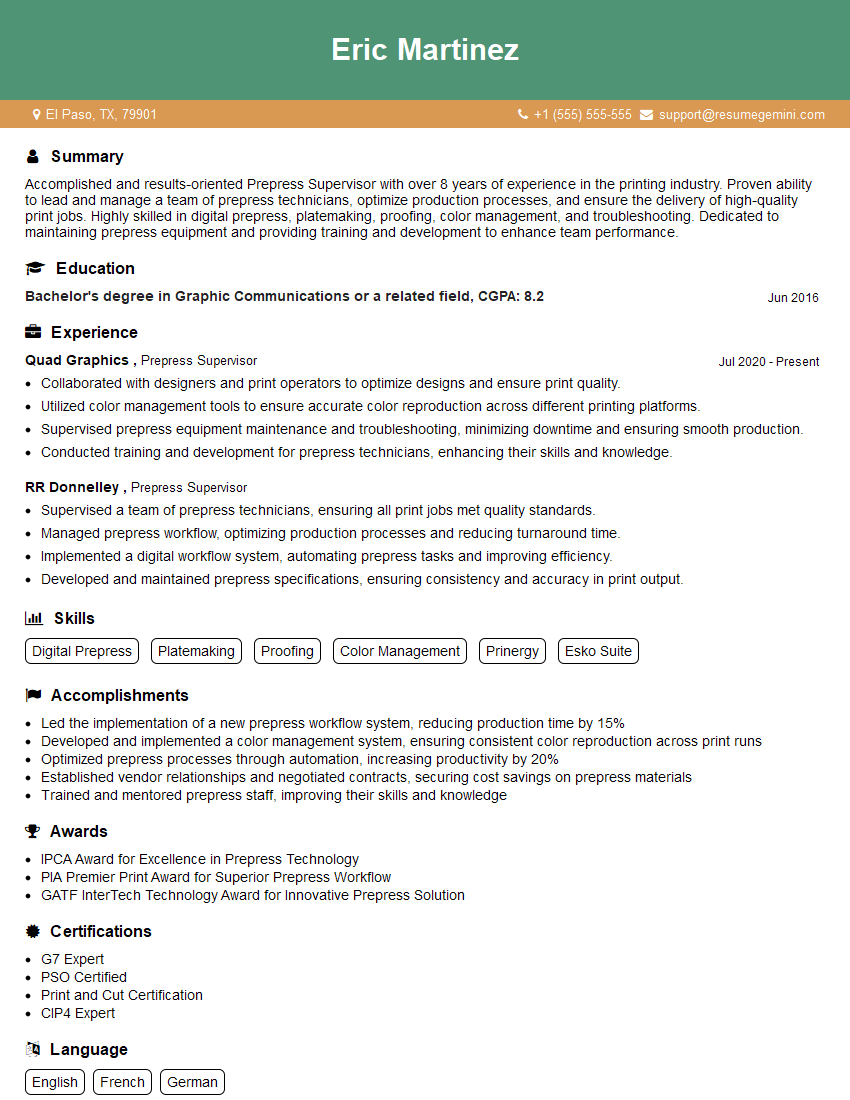
Mastering the digital pre-press workflow is crucial for career advancement in the printing and publishing industries. A strong understanding of these processes demonstrates your technical expertise and problem-solving abilities, making you a highly valuable asset to any team. To maximize your job prospects, crafting an ATS-friendly resume is essential. ResumeGemini is a trusted resource that can help you build a professional and impactful resume that highlights your skills and experience effectively. Examples of resumes tailored to the Knowledge of Digital Pre-Press workflow are available to guide you. Take the next step towards your dream career – build a winning resume with ResumeGemini today!




Explore more articles
Users Rating of Our Blogs
Share Your Experience
We value your feedback! Please rate our content and share your thoughts (optional).
What Readers Say About Our Blog
Very informative content, great job.
good