Unlock your full potential by mastering the most common Ability to create custom designs interview questions. This blog offers a deep dive into the critical topics, ensuring you’re not only prepared to answer but to excel. With these insights, you’ll approach your interview with clarity and confidence.
Questions Asked in Ability to create custom designs Interview
Q 1. Explain your design process from concept to final product.
My design process is iterative and user-centric, focusing on a collaborative approach. It begins with a thorough understanding of the project’s goals and target audience. I start with the concept phase, where I brainstorm ideas, sketch initial layouts, and conduct preliminary research to define the problem and potential solutions. This often involves mood boards, competitor analysis, and user persona development.
Next comes the design phase. Here I translate concepts into tangible designs using software like Figma or Adobe XD. This involves wireframing, prototyping, and creating high-fidelity mockups. I continuously test and iterate on designs at this stage, ensuring usability and visual appeal. For example, in designing an e-commerce website, I might start with simple wireframes to map the user flow, then gradually add visual elements and interactive prototypes to test the checkout process.
The development phase involves collaborating with developers to ensure the designs are implemented accurately. This requires close communication and careful attention to detail. I’ll often provide specifications and assets, and actively participate in user testing during development.
Finally, the launch and iteration phase focuses on post-launch monitoring and analysis. I collect user feedback, track key metrics (e.g., conversion rates, user engagement), and identify areas for improvement. This feedback informs further iterations and updates to refine the design over time, making it a continuous improvement cycle.
Q 2. Describe your experience with different design software (e.g., Figma, Adobe Creative Suite).
I’m proficient in a range of design software, including the Adobe Creative Suite (Photoshop, Illustrator, InDesign) and Figma. My experience with the Adobe suite is extensive, particularly in Photoshop for image manipulation and retouching and Illustrator for vector graphics and icon design. I’ve used InDesign for creating print-ready materials like brochures and marketing collateral. Figma, however, has become my go-to for collaborative design projects due to its real-time collaboration features and excellent prototyping capabilities. For example, I recently used Figma to design a mobile application UI, leveraging its collaborative features to work with a team across different time zones. The ability to easily share and comment on designs significantly improved the workflow.
I find that each tool has its strengths. For pixel-perfect precision, Adobe Photoshop is unparalleled, while Figma excels in UI/UX design and its streamlined version control.
Q 3. How do you handle design feedback and incorporate it into your work?
Handling design feedback is crucial. I approach it as an opportunity for improvement, not criticism. I actively seek feedback throughout the design process, not just at the end. I start by listening carefully and asking clarifying questions to fully understand the feedback’s context. I then categorize the feedback into areas like usability, aesthetics, and functionality. This helps prioritize the changes needed. For example, if the feedback highlights usability issues, I’d prioritize those changes above purely aesthetic ones.
I document all feedback and incorporate it into the design iteratively, creating updated versions and sharing them with stakeholders. If a suggestion seems contradictory to design principles, I’ll engage in constructive dialogue to explain my reasoning while remaining open to alternative approaches. The key is to maintain a transparent and collaborative environment.
Q 4. Walk me through a challenging design problem you’ve solved.
One challenging project involved designing a website for a non-profit organization with limited resources and a complex information architecture. They needed a website that was both visually appealing and highly functional, while remaining simple and accessible to a diverse audience with varying technical skills. The challenge lay in balancing the need for comprehensive content with the limitations imposed by the budget.
My solution was a phased approach. We started with a minimal viable product (MVP) focusing on the most crucial features and information. I prioritized clear navigation, intuitive user flows, and a clean, uncluttered design. I utilized a responsive design framework to ensure optimal viewing across all devices. We launched the MVP and tracked user analytics to identify areas for improvement. Based on this data, we iteratively added features and content in subsequent phases, maximizing impact within the limited budget.
The project taught me the importance of prioritizing and iterating. By focusing on the essential elements and continuously evaluating performance, we were able to create a successful website that effectively served the non-profit’s needs.
Q 5. How do you stay up-to-date with current design trends?
Staying updated on design trends is essential. I regularly follow design publications like Awwwards, Behance, and Dribbble. These platforms showcase innovative work and emerging trends. I also attend industry conferences and webinars, and actively participate in online design communities. Following key influencers on social media also helps in staying informed about the latest tools and techniques.
More importantly, I analyze trends critically, identifying those that offer genuine value and those that are fleeting fads. I focus on understanding the underlying principles that drive these trends, rather than blindly following them. This ensures I integrate relevant aspects into my designs while maintaining a focus on timeless design principles.
Q 6. Explain your understanding of UX principles and how you apply them.
UX principles are the cornerstone of my design approach. I understand that good design is not just visually appealing but also functional and user-friendly. Core UX principles, such as usability, findability, accessibility, and desirability, guide my design decisions. Usability ensures the ease of use; findability ensures information is easily located; accessibility caters to users with disabilities; and desirability focuses on creating something enjoyable and engaging.
For example, when designing a website’s navigation, I ensure clear and intuitive labeling, logical information hierarchy, and consistent design language. I consider accessibility guidelines (WCAG) to ensure the website is usable by people with visual or motor impairments. I also use A/B testing to compare different designs and identify the most effective approaches.
Q 7. Describe your experience with user research and its impact on your designs.
User research is integral to my design process. I employ various research methods, including user interviews, surveys, usability testing, and A/B testing. This helps me gather insights into user needs, behaviors, and pain points. For example, in a recent project designing a new mobile banking app, I conducted user interviews to understand their frustrations with existing banking apps and their expectations for a new one. This feedback informed design decisions regarding the app’s layout, navigation, and features.
The impact of user research is significant. It helps me create designs that are truly user-centered, addressing their needs effectively and leading to higher user satisfaction and engagement. By incorporating user feedback early in the process, I can avoid costly revisions later and create more successful products.
Q 8. How do you ensure your designs are accessible to users with disabilities?
Ensuring accessibility is paramount in my design process. It’s not just about compliance; it’s about creating inclusive experiences for everyone. My approach involves following WCAG (Web Content Accessibility Guidelines) 2.1 AA standards, which provides a comprehensive set of success criteria. This means considering:
- Alternative text for images: Providing descriptive alt text for all images allows screen readers to convey the image’s meaning to visually impaired users. For example, instead of
alt="image.jpg", I’d usealt="A smiling woman holding a cup of coffee." - Keyboard navigation: All interactive elements must be navigable using only a keyboard. I meticulously test keyboard focus order and ensure that users can complete all tasks without a mouse.
- Sufficient color contrast: I use tools like WebAIM’s contrast checker to ensure adequate contrast ratios between text and background colors, making it easier for users with low vision to read the content. This goes beyond just black text on a white background; I consider various color palettes and their accessibility.
- Captions and transcripts for videos and audio: Providing accurate captions and transcripts ensures that deaf or hard-of-hearing users can fully access the multimedia content.
- Semantic HTML: Using appropriate HTML5 semantic elements (like
<header>,<nav>,<main>,<article>,<aside>, and<footer>) provides structure and meaning to the code, making it easier for assistive technologies to understand the content.
Beyond these technical aspects, user testing with individuals with disabilities is crucial. I actively seek feedback and iterate on designs based on their input to ensure genuine inclusivity.
Q 9. Explain your approach to creating responsive designs.
Responsive design is a cornerstone of my work. It’s about creating a seamless experience across all devices, from large desktops to small smartphones. My approach is based on a mobile-first strategy, meaning I start by designing for the smallest screen size and then progressively enhance the design for larger screens. This ensures a consistent and optimized experience regardless of the device.
I use a combination of techniques, including:
- Fluid grids: Using percentage-based widths and flexible layouts allows the content to adapt smoothly to different screen sizes.
- Flexible images: I ensure images scale proportionally without distortion, using the
max-width: 100%property. - Media queries: These CSS rules allow me to apply different styles based on screen size, orientation, and other factors. For example, I might adjust the layout or hide certain elements on smaller screens to improve usability.
- Responsive images: I utilize the
<picture>element orsrcsetattribute to provide different image sizes for different screen densities, optimizing performance and visual quality.
I also extensively test on various devices and browsers to ensure the design functions as expected across all platforms. For instance, I recently designed a website for a local bakery. The initial design, while beautiful on desktops, was cluttered on mobile. Through responsive design principles, I refactored the navigation, made the images more efficient, and created a mobile-friendly experience that improved the user’s journey, ultimately resulting in a better conversion rate.
Q 10. How do you prioritize features in a design project with limited time and resources?
Prioritization is critical when resources are limited. I employ the MoSCoW method – Must have, Should have, Could have, Won’t have – to categorize features based on their importance and feasibility. This collaborative approach involves stakeholders to ensure alignment on priorities.
The process includes:
- Defining user needs: I thoroughly research user needs and map them to features. This provides a clear understanding of what’s essential.
- Estimating effort: I work with the development team to estimate the time and resources required for each feature.
- MoSCoW categorization: We jointly categorize each feature using the MoSCoW method. For instance, core navigation and essential content fall under ‘Must have,’ while advanced features may be categorized as ‘Should have’ or ‘Could have’.
- Iteration and refinement: We regularly revisit the prioritization based on feedback and changing project circumstances. This allows for flexibility and adaptation.
This ensures we focus on the most impactful features first, delivering a Minimum Viable Product (MVP) that meets crucial user needs while leaving room for future enhancements.
Q 11. Describe your experience with design systems and their benefits.
Design systems are crucial for creating consistent and scalable designs. They provide a single source of truth for design and development components, such as color palettes, typography styles, spacing, and UI components. My experience involves designing, implementing, and maintaining design systems, leveraging tools like Figma or Sketch and collaborating with developers to ensure seamless integration.
Benefits of design systems include:
- Consistency: Ensures a unified brand experience across all platforms and products.
- Efficiency: Reduces design and development time by reusing components.
- Scalability: Easily accommodates growth and new features.
- Maintainability: Simplified updates and maintenance due to centralized design assets.
For a recent e-commerce project, we implemented a design system. The result was a significant reduction in development time, improved consistency across the website and mobile app, and a more efficient design process overall. It also enhanced team collaboration and allowed for greater scalability as we expanded the platform’s features.
Q 12. How do you measure the success of your designs?
Measuring design success goes beyond aesthetics. I use a multi-faceted approach combining qualitative and quantitative data to evaluate the effectiveness of my designs. This includes:
- User testing: Observing users interacting with the design and gathering feedback on their experience. This provides valuable insights into usability and satisfaction.
- Analytics: Tracking key metrics such as conversion rates, bounce rates, task completion rates, and time on site to assess the design’s impact on user behavior and business objectives.
- A/B testing: Comparing different design variations to identify which performs better in terms of specific metrics (more on A/B testing below).
- Surveys and feedback forms: Gathering direct feedback from users about their experience with the design.
- Heuristic evaluation: Applying established usability principles to identify potential issues.
By combining these methods, I gain a comprehensive understanding of how well my designs meet user needs and achieve business goals. For example, by tracking conversion rates after a redesign, I can determine if the changes led to a significant increase in sales.
Q 13. How do you handle conflicting design preferences from stakeholders?
Handling conflicting preferences requires diplomacy and effective communication. It’s crucial to foster a collaborative environment where all stakeholders feel heard and valued. My approach involves:
- Understanding the rationale: I actively listen to each stakeholder’s perspective, understanding their motivations and concerns behind their design preferences.
- Data-driven decision making: I use user research data, analytics, and A/B testing results to support design choices, prioritizing user needs over personal preferences.
- Presenting design rationale: I clearly articulate the design decisions, explaining the underlying principles and the rationale behind the choices. Visual aids like mockups and prototypes are helpful.
- Finding compromises: I work with stakeholders to find a compromise that addresses everyone’s key concerns while maintaining design integrity and user experience. Sometimes this involves exploring alternative solutions or iterating on the design based on feedback.
- Documenting decisions: I maintain clear documentation of the design decisions and the rationale behind them, ensuring transparency and accountability.
In one project, stakeholders had conflicting opinions on the color palette. By presenting user testing data showing the higher preference for one palette, I helped to reach a consensus, showcasing the importance of data-backed decision making.
Q 14. Explain your experience with A/B testing and iterative design.
A/B testing and iterative design are integral parts of my workflow. A/B testing involves comparing two or more versions of a design to see which performs better. Iterative design means continuously refining the design based on user feedback and data. The two work hand in hand to create optimized designs.
My approach involves:
- Defining hypotheses: Clearly stating what you hope to achieve with each A/B test. For example: “We hypothesize that a redesigned call-to-action button will increase click-through rates by 15%.”
- Creating variations: Developing different versions of the design, changing only one or two elements at a time to isolate the impact of each change.
- Running the test: Deploying the variations to a live audience and collecting data on their performance.
- Analyzing results: Analyzing the data to determine which variation performed better and drawing conclusions.
- Iterating based on findings: Incorporating the learnings into future iterations of the design.
For instance, on a recent landing page redesign, we A/B tested different headline variations. The results showed a significant improvement in conversion rates using a more concise headline, validating our iteration. This iterative process, guided by data, resulted in a substantially improved landing page.
Q 15. Describe your process for creating wireframes and prototypes.
My wireframing and prototyping process is iterative and user-centered. I begin by thoroughly understanding the project’s goals and target audience through user research and stakeholder interviews. This informs the creation of low-fidelity wireframes, often using simple tools like pen and paper or basic wireframing software. These initial sketches focus on the information architecture and user flow, prioritizing functionality over aesthetics.
Once the core structure is established, I move to higher-fidelity wireframes, incorporating more visual details and interactive elements. This stage involves refining the layout, navigation, and user interactions. Finally, I create interactive prototypes, often using tools like Figma or Adobe XD. Prototypes allow for testing the usability and functionality of the design before moving to the visual design phase. Throughout this process, I regularly test with users and incorporate feedback to ensure the design meets the user’s needs effectively.
For example, on a recent e-commerce project, I started with paper sketches to map out the product browsing and checkout flows. I then transitioned to Figma to create interactive prototypes simulating the user journey, allowing me to identify and resolve navigation issues and usability problems early in the design process.
Career Expert Tips:
- Ace those interviews! Prepare effectively by reviewing the Top 50 Most Common Interview Questions on ResumeGemini.
- Navigate your job search with confidence! Explore a wide range of Career Tips on ResumeGemini. Learn about common challenges and recommendations to overcome them.
- Craft the perfect resume! Master the Art of Resume Writing with ResumeGemini’s guide. Showcase your unique qualifications and achievements effectively.
- Don’t miss out on holiday savings! Build your dream resume with ResumeGemini’s ATS optimized templates.
Q 16. How do you incorporate branding guidelines into your designs?
Incorporating branding guidelines is crucial for maintaining brand consistency and recognition. I start by thoroughly reviewing the brand’s style guide, which typically includes logo usage, color palettes, typography, imagery style, and voice and tone guidelines. I meticulously adhere to these specifications throughout the design process. For example, I’ll use the specified brand colors and fonts, ensuring proper logo placement and spacing, and maintaining a consistent visual style across all design elements.
If the style guide is lacking or outdated, I work closely with the client to clarify and update it. I might suggest alternative colour palettes that align with current design trends while still reflecting the brand’s personality, or I might design custom illustrations or icons that are consistent with the brand’s overall style. This collaborative approach ensures the design accurately represents the brand and contributes to a cohesive brand identity.
Q 17. Explain your understanding of color theory and typography.
Color theory and typography are foundational elements of effective design. Color theory involves understanding the relationships between colors, including hue, saturation, and brightness, and how these relationships impact the mood and perception of a design. For example, warm colors evoke feelings of energy and excitement, while cool colors convey calmness and serenity. I utilize color palettes strategically to guide the user’s eye and communicate the intended message. I might use contrasting colors to highlight key information or complementary colors to create a harmonious and balanced visual experience.
Typography involves selecting and using typefaces to convey a specific message and brand identity. I consider factors such as readability, legibility, and the overall aesthetic. Different typefaces evoke distinct feelings: a serif font might suggest tradition and elegance, while a sans-serif font can feel modern and minimalist. I choose typefaces appropriate for the context, ensuring proper hierarchy and consistency in font sizes and styles across the design.
Q 18. Describe your experience with visual hierarchy and its importance in design.
Visual hierarchy is the arrangement of elements in a design to guide the user’s eye and communicate information in a clear and logical order. It’s crucial for effective communication and usability. I achieve visual hierarchy through various techniques, including size, contrast, color, proximity, and white space. Larger and more contrasting elements naturally draw the eye first, establishing a clear focal point. Proximity groups related elements together, improving readability and comprehension. White space, or negative space, prevents clutter and allows elements to breathe, improving overall clarity.
For instance, in a website design, I’d use a large, bold headline as the primary focal point, followed by supporting subheadings and body text in progressively smaller sizes. I’d use color contrast to highlight important calls to action and ensure sufficient white space to avoid a cramped and confusing layout. A poorly designed hierarchy can lead to disorientation and decreased user engagement; a well-designed hierarchy, however, guides the user effortlessly through the information, ensuring a positive user experience.
Q 19. How do you ensure consistency across different design platforms?
Maintaining consistency across different design platforms requires a systematic approach and careful planning. I use design systems, which are collections of reusable components and guidelines that ensure consistency in design, functionality, and user experience across various platforms. A well-defined design system includes component libraries with pre-designed UI elements such as buttons, forms, and navigation menus. These elements are consistently styled and behave predictably across different platforms.
Furthermore, I use style guides that define brand colors, typography, and other visual elements. Using these resources, I ensure that the design elements are visually consistent regardless of the device or platform. Tools like Figma and Adobe XD allow for creating design systems and component libraries that can easily be shared and implemented across teams, fostering consistency across multiple projects and platforms.
Q 20. Explain your experience with creating design specifications and style guides.
Creating design specifications and style guides is an integral part of my design process. Design specifications document the technical details of the design, including dimensions, spacing, colors, and font styles. These specifications serve as a guide for developers during the implementation phase, ensuring the final product matches the design accurately. They often include detailed information about responsive design, ensuring the design adapts seamlessly across different screen sizes.
Style guides, on the other hand, define the overall brand identity and visual language. They encompass logo usage, color palettes, typography, imagery styles, and even voice and tone. A comprehensive style guide serves as a reference point for all designers and stakeholders, ensuring consistency in branding and communication. I typically use tools like InVision or Zeroheight to create and manage style guides, making them readily accessible to the entire team.
Q 21. How do you handle time constraints and deadlines in a design project?
Managing time constraints and deadlines requires careful planning and prioritization. I start by breaking down the project into smaller, manageable tasks with clearly defined timelines. I utilize project management tools to track progress and identify potential bottlenecks. I prioritize tasks based on their importance and urgency, focusing on the core elements first. Open communication with clients and stakeholders is vital to ensure everyone is aligned on expectations and to address any unforeseen challenges proactively.
If a deadline seems unattainable, I discuss the situation openly with the client, exploring options like adjusting the scope of the project or extending the deadline. I find that clear communication and collaboration are key to managing time effectively and delivering high-quality work within reasonable constraints. It’s better to deliver a slightly simplified version on time than to miss a deadline and compromise the quality.
Q 22. Describe your experience with different design methodologies (e.g., Agile, Waterfall).
My experience encompasses both Agile and Waterfall methodologies, each suited to different project needs. Waterfall, with its linear, sequential approach, works best for projects with clearly defined requirements and minimal anticipated changes. I’ve used this successfully on several branding projects where the scope was well-understood from the outset. For instance, designing a logo and brand guidelines for a new non-profit required a structured approach, following a clear progression from research to final assets. Agile, on the other hand, is ideal for projects with evolving requirements and a need for flexibility. I frequently employ Agile methodologies for website redesigns or app development, where user feedback and iterative improvements are crucial. For a recent e-commerce site redesign, we used Scrum, holding daily stand-ups and sprint reviews to ensure we were meeting user needs and adapting to changing market demands. The iterative nature of Agile allowed us to incorporate user feedback seamlessly throughout the development cycle, resulting in a significantly improved product.
Q 23. How do you conduct usability testing and interpret the results?
Usability testing is crucial for validating design choices and ensuring a positive user experience. My approach involves several key steps: defining clear objectives, recruiting a representative sample of users, creating a test plan with specific tasks, and observing user behavior during testing sessions. I utilize a combination of methods, including think-aloud protocols where users verbalize their thought process while interacting with the design, and eye-tracking to understand visual attention patterns. For example, in testing a new navigation system, we found through eye-tracking that users were consistently overlooking a key menu item. This finding led us to redesign the placement and visual prominence of that menu item, significantly improving user engagement. Post-testing, I analyze the data collected—including user feedback, task completion rates, and error rates—to identify areas for improvement and iterate on the design. This iterative process ensures that the final design is both intuitive and effective.
Q 24. Explain your understanding of information architecture and its role in design.
Information architecture (IA) is the structural design of shared information environments. It’s the blueprint that organizes content in a way that’s easy for users to find what they need. It’s essentially about creating a clear and logical path for users to navigate information. A poorly designed IA can lead to user frustration and difficulty finding information, while a well-designed IA enhances user experience and promotes efficient task completion. My approach involves understanding user needs, defining content inventory, creating sitemaps and wireframes, and employing card sorting to categorize and label information. For example, in designing an online library catalog, I worked to create a hierarchical structure organizing books by genre, author, title, and keyword, ensuring users could easily locate books regardless of their search strategy. A well-defined IA is crucial for all design projects; it acts as the foundation upon which the visual design is built.
Q 25. How do you collaborate effectively with developers and other team members?
Effective collaboration is paramount in design. I thrive in team environments and believe in open communication and shared responsibility. I actively participate in regular team meetings, contribute to design reviews, and ensure clear and consistent communication with developers. I utilize collaborative design tools like Figma, which facilitate real-time collaboration and feedback sharing. For instance, in a recent project, I used Figma to share design prototypes with developers, allowing for immediate feedback and identification of potential technical challenges early in the process. Furthermore, I create clear and detailed design specifications, including annotations and style guides, to ensure that developers understand the design intent. Clear communication and proactive problem-solving prevent misunderstandings and maintain project momentum.
Q 26. Describe your experience with creating custom illustrations or icons.
I have extensive experience creating custom illustrations and icons, utilizing both traditional and digital methods. I’m proficient in Adobe Illustrator and Photoshop, and often employ a combination of vector and raster graphics to achieve the desired level of detail and scalability. For example, I created a series of custom icons for a mobile banking app, ensuring consistency in style and adhering to the brand guidelines. My approach to icon design involves understanding the context and purpose of each icon, sketching initial concepts, refining them digitally, and testing their usability. Custom illustrations often require a deeper understanding of the project’s narrative and visual style. I once illustrated a children’s book, working closely with the author to ensure the illustrations effectively conveyed the story’s mood and message. The success of custom illustration or icon creation relies heavily on strong visual communication skills and attention to detail.
Q 27. How do you ensure the scalability and maintainability of your designs?
Scalability and maintainability are key considerations in my design process. I strive to create designs that are flexible and adaptable to future growth or changes in requirements. I achieve this through the use of modular design principles, creating reusable components that can be easily adapted and rearranged. For example, when designing a website’s layout, I utilize a grid system that allows for easy addition or removal of content without affecting the overall design structure. I also ensure that the design is built using scalable vector graphics (SVGs) whenever possible, enabling seamless resizing without loss of quality. Furthermore, I create comprehensive style guides that document design elements, ensuring consistency and facilitating future maintenance and updates. Prioritizing scalability and maintainability saves time and resources in the long run, allowing designs to adapt to evolving needs.
Q 28. Describe a time you had to pivot your design approach mid-project. What was the outcome?
During the development of a mobile application, we initially designed the user interface based on extensive user research focusing on a specific demographic. However, during the user testing phase, we discovered that a significant portion of our target audience found the interface overly complex. We realized that our initial design assumptions were incorrect. We pivoted our design approach by simplifying the interface, removing unnecessary features, and reorganizing the information architecture to be more intuitive. This involved revisiting our user research, conducting additional interviews, and redesigning several key screens. While this caused a slight delay in the project timeline, the outcome was a significantly improved user experience, resulting in higher user satisfaction and engagement rates post-launch. This experience reinforced the importance of iterative design and the need to be flexible and adaptable to changing circumstances throughout the project lifecycle.
Key Topics to Learn for Ability to create custom designs Interview
- Design Principles: Understanding fundamental design principles like composition, balance, color theory, typography, and visual hierarchy. Practical application: Analyzing existing designs to identify strengths and weaknesses based on these principles.
- Software Proficiency: Demonstrating expertise in relevant design software (e.g., Adobe Creative Suite, Figma, Sketch). Practical application: Explaining your workflow and problem-solving approach when using these tools for specific design challenges.
- User Experience (UX) and User Interface (UI) Design: Knowledge of UX/UI best practices, user research methodologies, and information architecture. Practical application: Describing how you would approach designing a user-friendly interface for a specific application or website.
- Responsive Design: Creating designs that adapt seamlessly to different screen sizes and devices. Practical application: Explaining your approach to designing for mobile, tablet, and desktop platforms.
- Accessibility: Designing inclusive experiences that cater to users with disabilities. Practical application: Discussing how you would incorporate accessibility considerations into your design process.
- Design Thinking & Problem Solving: Articulating your design process, from ideation and sketching to prototyping and testing. Practical application: Describing a past project where you solved a design challenge through iterative design and user feedback.
- Collaboration & Communication: Demonstrating the ability to effectively collaborate with developers, marketers, and other stakeholders. Practical application: Describing your experience working within a design team and presenting design solutions to clients or colleagues.
Next Steps
Mastering the ability to create custom designs is crucial for career advancement in many creative fields. A strong portfolio showcasing your skills is essential, but a well-crafted resume is your first impression. An ATS-friendly resume significantly increases your chances of getting your application noticed by recruiters. To enhance your resume and maximize your job prospects, leverage ResumeGemini – a trusted resource for building professional resumes. Examples of resumes tailored to highlight expertise in creating custom designs are available to help you get started.

Art Director Resume Sample

Creative Director Resume Sample

Information Architect Resume Sample

Web Designer Resume Sample

Game Designer Resume Sample
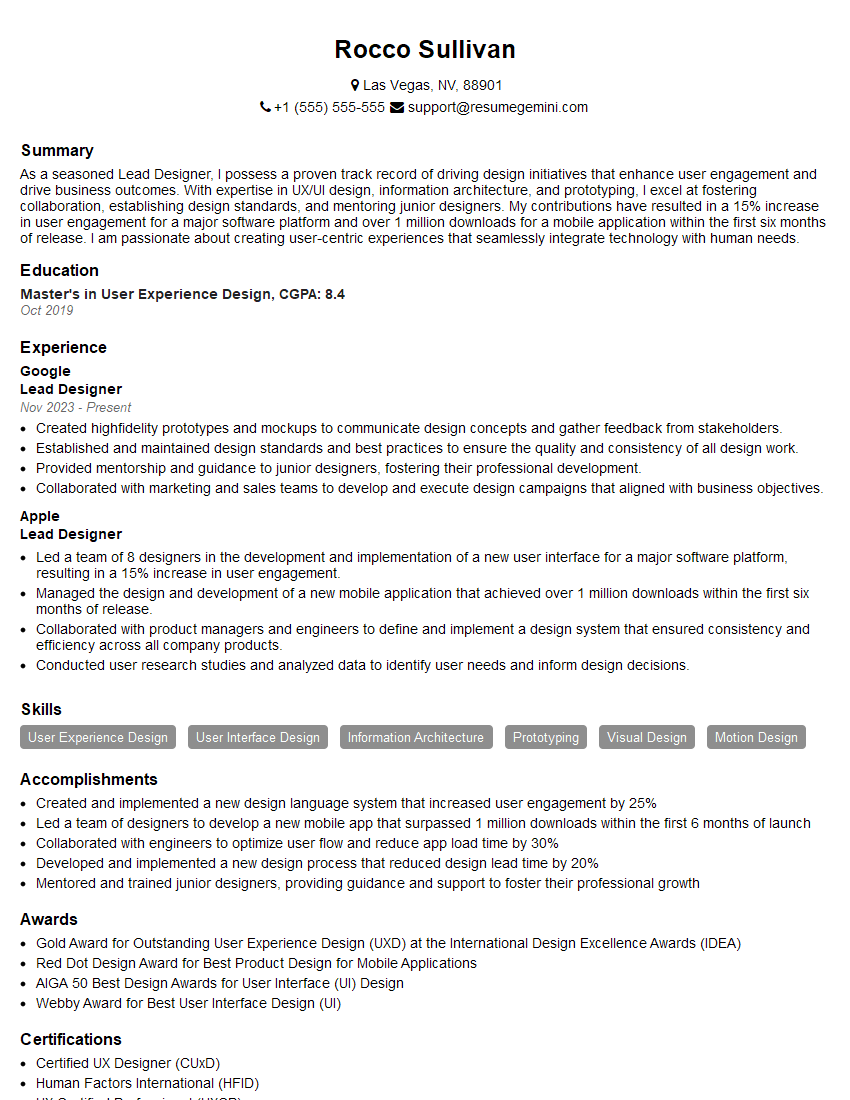
Lead Designer Resume Sample

Product Designer Resume Sample

3D Modeler Resume Sample

Graphic Designer Resume Sample

Packaging Designer Resume Sample
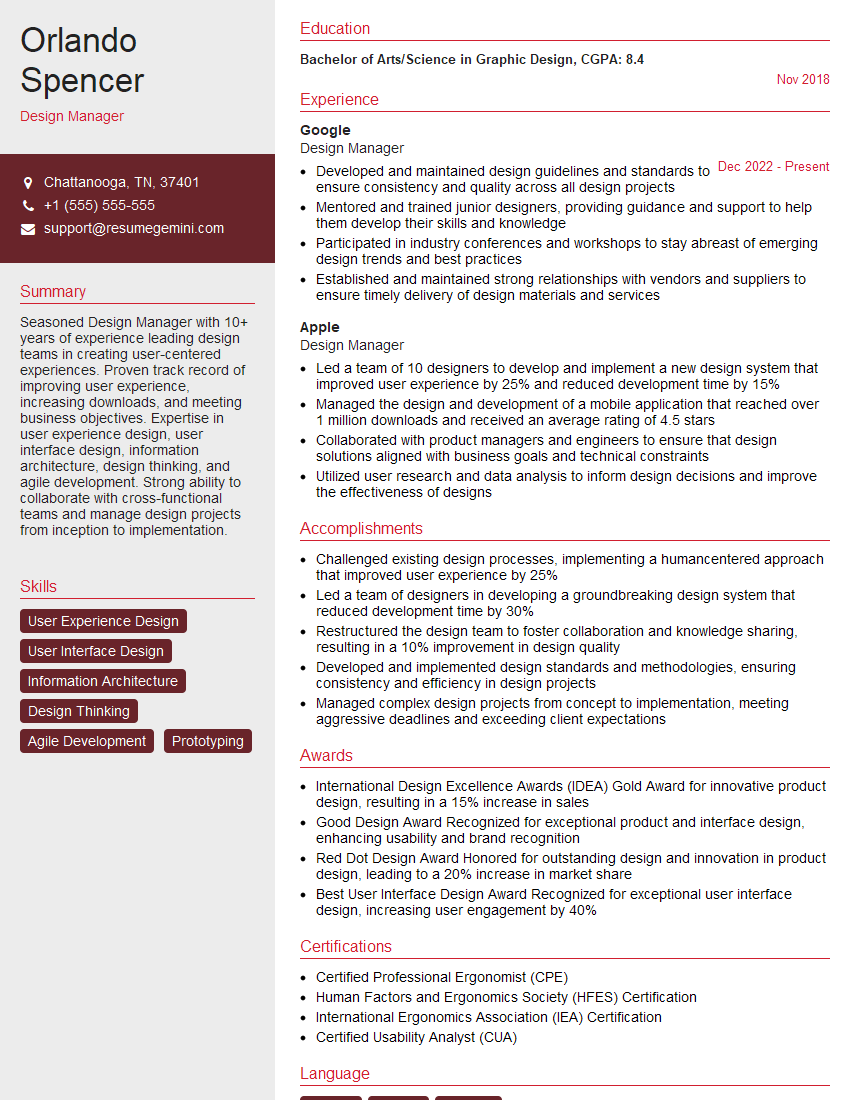
Design Manager Resume Sample

UX Designer Resume Sample
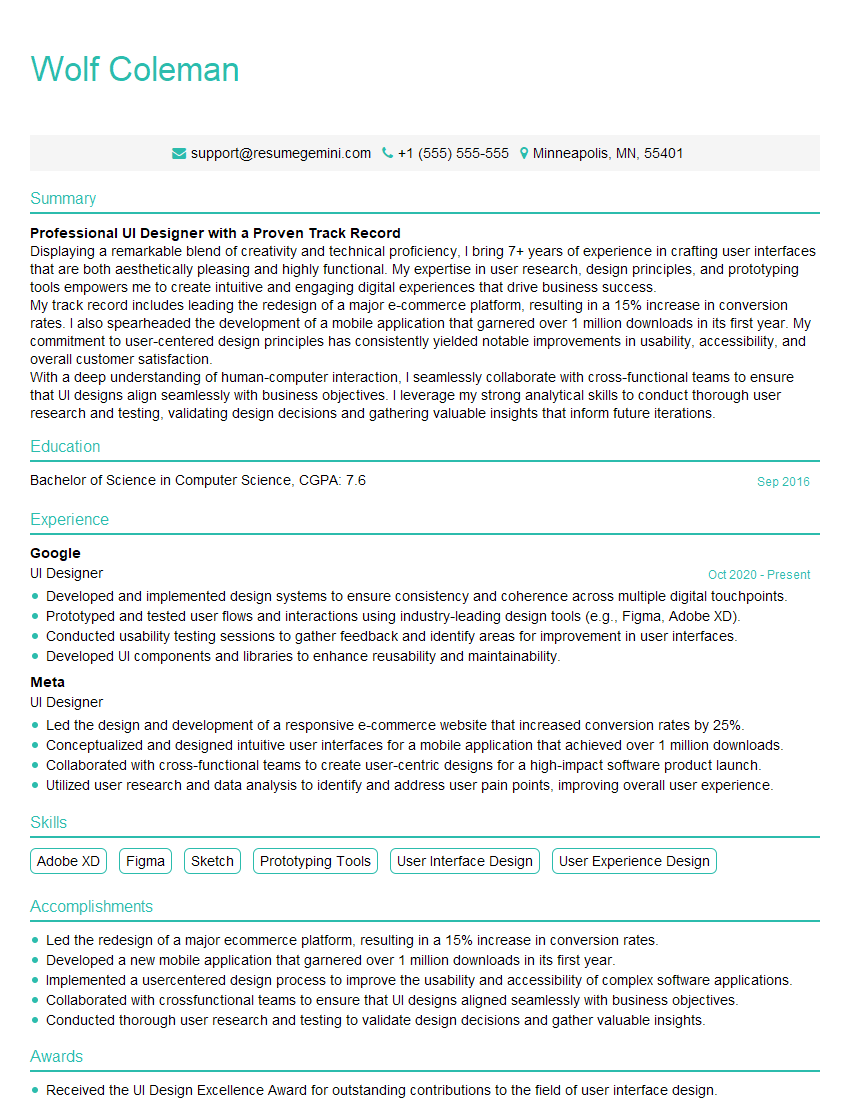
UI Designer Resume Sample
Explore more articles
Users Rating of Our Blogs
Share Your Experience
We value your feedback! Please rate our content and share your thoughts (optional).
What Readers Say About Our Blog
Very informative content, great job.
good