Every successful interview starts with knowing what to expect. In this blog, we’ll take you through the top Expertise in using engraving engraving software interview questions, breaking them down with expert tips to help you deliver impactful answers. Step into your next interview fully prepared and ready to succeed.
Questions Asked in Expertise in using engraving engraving software Interview
Q 1. Describe your experience with different engraving software packages.
My experience spans a variety of engraving software packages, each with its strengths and weaknesses. I’m proficient in industry-standard programs like LaserGRBL, LightBurn, and RDWorks, as well as some niche options tailored to specific machine types. LaserGRBL, for instance, is excellent for open-source laser engravers due to its versatility and community support. LightBurn offers a more user-friendly interface, particularly beneficial for beginners, while RDWorks excels in its integration with Ruida-controlled laser systems. Each software package requires a different approach to design import, parameter adjustment, and job management; mastering these nuances is crucial for efficient workflow. For example, learning how to effectively utilize the raster and vector functionalities within LightBurn, such as optimizing the speed and power settings for different materials, dramatically impacts the quality and precision of the engraving. My experience extends to troubleshooting software-related issues and adapting the software to specific machine configurations and material properties, including wood, metal, and acrylic.
Q 2. What are the key differences between laser, rotary, and CNC engraving?
The key differences between laser, rotary, and CNC engraving lie primarily in the method of material removal. Laser engraving uses a high-powered laser beam to ablate (burn away) or alter the surface of the material, leaving a mark. This method is fast and precise for many materials, but it’s limited by the material’s ability to absorb the laser’s wavelength. Rotary engraving employs a spinning bit to mechanically carve into the material. It’s suitable for deep engravings and a wider range of materials but can be slower and less precise than laser engraving. Finally, CNC (Computer Numerical Control) engraving utilizes a variety of tools—including bits, drills, and even specialized cutters—moved with high precision to cut or carve into the material. CNC machines are the most versatile, capable of intricate designs and various depths, making them ideal for complex projects. The choice of method depends heavily on the material, design complexity, desired depth, and budget.
Q 3. How do you handle file formatting issues in engraving software?
File formatting issues are common in engraving, and resolving them requires a thorough understanding of vector and raster graphics. Most engraving software prefers vector graphics (SVG, DXF) for precise engravings because they are resolution-independent. Raster graphics (JPG, PNG) are pixel-based and may result in blurry or pixelated engravings, especially at higher resolutions. I handle these issues by ensuring that my input files are in the correct format. If I receive a JPG, for example, I’ll use vector tracing software to convert it to a vector format, cleaning up any imperfections in the process. This involves carefully adjusting thresholds to balance detail and clean lines, which requires practice and attention to detail. If the software doesn’t support the specific format, I convert it using readily available online converters or dedicated software, always previewing the results before sending the file to the machine. This meticulous approach ensures that the final engraving accurately reflects the design intent.
Q 4. Explain the process of creating a vector graphic for engraving.
Creating a vector graphic for engraving involves several key steps. I begin with a design concept, which can be a hand-drawn sketch, a digital image, or even a photograph. Then, I use vector graphics editing software like Adobe Illustrator or Inkscape to create the design. For intricate designs, I might use a combination of drawing tools, tracing functions, and image manipulation techniques to precisely create vector shapes. It’s critical to ensure that all lines are closed and properly connected to avoid engraving errors. After the vector graphic is complete, I check for any unwanted nodes or overlapping paths that could affect the engraving process, using functions such as ‘simplify’ or ‘clean up’ within the software. Finally, I export the design in a format compatible with my engraving software, most often SVG or DXF. These steps guarantee a clean, sharp, and accurately engraved result.
Q 5. How do you calibrate and maintain an engraving machine?
Calibrating and maintaining an engraving machine is essential for accuracy and longevity. Calibration typically involves adjusting the laser power, speed, and focus (for laser systems), or the bit depth and pressure (for rotary or CNC systems). I use test engravings on scrap material to fine-tune these settings, making incremental adjustments until I achieve the desired result. Regular maintenance involves inspecting and cleaning the machine components, replacing worn parts (like laser lenses or engraving bits), and keeping the work area clean and free of debris. Lubricating moving parts (in rotary or CNC machines) is also vital. For laser engravers, ensuring the proper alignment of the laser optics is critical for consistent engraving quality. A thorough understanding of the machine’s manual and regular preventative maintenance is crucial to extend the lifespan of the equipment and maintain its precision.
Q 6. What are common troubleshooting steps for engraving software errors?
Troubleshooting engraving software errors often involves a systematic approach. I start by checking for obvious issues, such as incorrect file formats, missing drivers, or insufficient memory. I carefully examine error messages provided by the software, which often point to the source of the problem. Next, I check the machine’s connection to the computer, ensuring that all cables are securely connected and that the machine is correctly powered on. If the error persists, I review the software’s settings, ensuring that all parameters (speed, power, depth, etc.) are appropriately set for the chosen material and design. If these steps fail, I consult the software’s documentation or online forums for solutions, and sometimes, contacting the software’s technical support is necessary. For instance, a common issue is a communication problem between the software and the engraving machine; ensuring the correct communication port is selected often solves this.
Q 7. How do you ensure accurate depth and speed settings in your engraving process?
Accurate depth and speed settings are crucial for a successful engraving. The depth setting determines how deep the engraving penetrates the material, while the speed affects the engraving’s quality and the machine’s longevity. I determine the appropriate settings through experimentation, starting with test engravings on scrap material of the same type I’ll use for the final project. I adjust the depth and speed settings incrementally, noting the results of each test run. This iterative process ensures that I find the optimal balance between engraving depth and quality, preventing issues such as shallow or too deep engravings and avoiding damage to the machine or material. Factors like material type, engraving design complexity, and the desired finish will influence these settings, demanding careful attention to detail and experience.
Q 8. Describe your experience with different engraving materials (wood, metal, plastic).
My experience encompasses a wide range of engraving materials, each presenting unique challenges and opportunities. Wood, for instance, requires careful consideration of grain direction to prevent splintering and ensure a clean cut. I’ve worked extensively with various wood types, from softwoods like pine (requiring shallower cuts and slower speeds) to hardwoods like cherry and walnut (allowing for deeper, more intricate designs and higher speeds). Metal engraving is a different beast altogether. The hardness of the material dictates bit selection and requires precise control over depth and pressure to avoid breakage or uneven results. I have experience with both ferrous (steel, iron) and non-ferrous metals (aluminum, brass), each demanding a unique approach. Finally, plastics offer a broad spectrum of properties, from brittle acrylics to flexible polymers. Choosing the right engraving technique and bit is crucial here to avoid melting, cracking, or other surface imperfections. I have consistently adjusted my parameters, from speed and depth to bit type, to achieve optimal results for each material.
For example, engraving a delicate design on a thin sheet of brass requires a much finer bit and shallower pass than engraving a deep logo onto a thick piece of oak.
Q 9. Explain your understanding of vector images versus raster images in engraving.
In engraving, understanding the difference between vector and raster images is paramount. Vector images are defined mathematically by lines and curves, making them infinitely scalable without loss of quality. Think of them like mathematical instructions: you can zoom in infinitely, and the lines will always remain crisp and sharp. This is ideal for engraving because the detail is preserved, no matter the size of the project. Raster images, conversely, are composed of pixels. Zooming in reveals the individual pixels, causing the image to become blurry and pixelated. Enlarging a raster image for engraving will result in a poor-quality, low-resolution output. I always prefer to use vector graphics for my projects because they ensure that the engraved result is as clean and precise as the original design.
For example, a company logo in a scalable vector graphics (SVG) format will always provide a crisp engraving, whether it’s engraved on a small pen or a large sign. A raster image (like a JPG) of the same logo would become pixelated if enlarged.
Q 10. How do you manage large or complex engraving projects?
Managing large or complex engraving projects involves a systematic approach. I typically break down the project into smaller, manageable sections. This allows for easier error correction and parallel processing if multiple machines are available. Using software features like tiling, which allows me to engrave a large design in sections and seamlessly combine them later, is essential. Careful planning and precise preparation of the material are key to avoid costly mistakes. Prior to starting a large job, I will often create a test engraving on a sample piece of material to ensure the settings are optimal and there are no unexpected issues.
For instance, when engraving a large mural onto multiple wood panels, I’d create a detailed plan detailing each section, accounting for potential seams and material alignment. Each section would then be engraved individually before assembly.
Q 11. What is your experience with CAM software and its integration with engraving?
My experience with Computer-Aided Manufacturing (CAM) software is extensive. I’m proficient in using various CAM packages to generate toolpaths for engraving. This is critical for precise control over the engraving process, allowing me to optimize cutting parameters such as speed, depth, and feed rate, depending on the material and desired finish. The seamless integration of CAM software with my engraving machines ensures that the generated toolpaths are accurately translated into physical movements, resulting in consistent, high-quality engraving. This is especially useful for complex 3D engravings or those requiring intricate detail.
I regularly use CAM software to generate toolpaths for intricate designs, allowing me to achieve fine details and consistent depth across the entire piece which is difficult to achieve manually.
Q 12. How do you ensure the quality and consistency of your engraved products?
Maintaining quality and consistency requires a multifaceted approach. It starts with selecting the right equipment and materials. Regular calibration and maintenance of engraving machines are also essential, ensuring optimal performance and precision. Careful control over parameters like depth, speed, and bit type directly impact the final outcome. I consistently test my settings on sample pieces before moving to the final product. Consistent material sourcing helps to minimize variability, ensuring consistent results across different production runs. Documentation of each step is also crucial for traceability and problem-solving, allowing for repeatability.
For instance, I maintain a detailed log of settings used for each project and material combination, which provides a valuable reference point for future projects.
Q 13. How familiar are you with different types of engraving bits/lasers?
My familiarity with engraving bits and lasers is comprehensive. For rotary engraving, I’m adept at selecting the appropriate bits based on the material and desired effect – from V-bits for crisp lettering to ball-nose bits for rounded curves and engraving on curved surfaces. I understand the impact of bit diameter, shape, and material on the final engraving. With laser engraving, I’m experienced in adjusting laser power, speed, and frequency to control the depth and quality of the engraving, including various effects like etching or cutting. The choice between a CO2 laser (better for wood and acrylics) or a fiber laser (better for metals) is made based on the material being engraved.
For instance, I’d choose a V-bit for sharp lettering on wood and a ball-nose bit for engraving a smooth curve on metal. For laser engraving, I’d adjust the power and speed to achieve a light etch or deep cut, depending on the desired outcome.
Q 14. Explain your process for designing and setting up engraving jobs.
My design and setup process is methodical. It starts with receiving the client’s requirements and understanding their vision for the final product. The design phase involves translating this vision into a digital format, using vector graphics software for maximum precision. This involves optimizing the design for engraving, considering factors like kerning, letter spacing, and overall layout. Once the design is finalized, I select the appropriate engraving method (rotary or laser), bits or laser parameters, and material. A test engraving on a sample piece is crucial to fine-tune the settings before proceeding with the final piece. Careful material preparation, including cleaning and clamping, is essential for optimal results. The entire process is documented to ensure reproducibility and problem-solving.
For a complex design, I might even create a 3D model to simulate the engraving process before actually starting work. This allows me to catch any design flaws early on and save time and materials.
Q 15. How do you handle unexpected issues or malfunctions during engraving?
Handling unexpected issues during engraving requires a systematic approach combining preventative measures and reactive problem-solving. Prevention begins with regular machine maintenance, ensuring all components are properly calibrated and functioning optimally. This includes checking laser alignment, air assist pressure, and focusing lens cleanliness.
However, malfunctions can still occur. For instance, a sudden power outage mid-engraving could lead to an incomplete or damaged product. My strategy involves immediately stopping the engraving process to prevent further damage, carefully inspecting the work, and assessing the extent of the issue. If the problem is minor, such as a minor burn mark, I might be able to salvage it through post-processing techniques. More serious issues, like a broken laser tube, demand immediate professional repair or replacement.
I always maintain detailed logs of my work, including software settings and machine conditions. This record helps to identify patterns and potential issues, improving preventative maintenance strategies. Additionally, I am comfortable troubleshooting common issues, such as material incompatibility or incorrect settings, by systematically checking each parameter and referring to the software’s troubleshooting guides and the manufacturer’s documentation. For extremely complex issues, I reach out to experienced colleagues or technical support for assistance.
Career Expert Tips:
- Ace those interviews! Prepare effectively by reviewing the Top 50 Most Common Interview Questions on ResumeGemini.
- Navigate your job search with confidence! Explore a wide range of Career Tips on ResumeGemini. Learn about common challenges and recommendations to overcome them.
- Craft the perfect resume! Master the Art of Resume Writing with ResumeGemini’s guide. Showcase your unique qualifications and achievements effectively.
- Don’t miss out on holiday savings! Build your dream resume with ResumeGemini’s ATS optimized templates.
Q 16. Describe your experience with post-processing techniques (cleaning, finishing).
Post-processing is crucial for achieving a high-quality, professional finish in engraving. My experience encompasses various techniques depending on the material and the desired outcome. For example, after laser engraving wood, I might use fine-grit sandpaper to smooth out any rough edges and then apply a wood finishing oil or varnish to enhance the colour and protect the engraving. With metal engravings, I may employ a wire brush to remove any burrs created during the process followed by a thorough cleaning with compressed air. For acrylics, a simple wipe-down with isopropyl alcohol usually suffices to remove any residue.
Cleaning and finishing is not just about aesthetics; it’s about ensuring the longevity of the engraved product. A well-finished product is more resistant to wear and tear and better protects the material from the elements. The choice of cleaning and finishing agents depends heavily on the material being engraved, some require specific treatments to avoid damaging the surface.
I’ve also experimented with more advanced techniques, such as chemical etching for enhanced detail and durability on metals or using specialized polishing compounds for a high-gloss finish on acrylics. The key is always to meticulously select the right process for the particular material to avoid damaging it or diminishing the quality of the engraving.
Q 17. How do you determine appropriate engraving parameters based on material and design?
Determining appropriate engraving parameters is fundamental to achieving desired results. It’s a complex interplay of factors involving the material’s properties (like density, hardness, and melting point), the design’s intricacy, and the capabilities of the engraving machine. I begin by researching the specific material and consulting online databases or manufacturers’ guidelines for recommended settings. For example, engraving soft wood requires different settings than engraving hard metals.
Typically, I start with test runs on scrap material of the same type, varying parameters like power, speed, frequency (for laser), or pressure (for rotary), and depth of cut step-by-step. I carefully observe the results and adjust the parameters accordingly. For intricate designs, lower power and speed usually yield better detail but might take longer. Deeper engravings on harder materials require higher power and may necessitate multiple passes. The software often assists with this process by allowing for preview simulations of the engraving process.
For example, I might use a lower power and slower speed for a delicate floral design on soft wood, whereas a deeper and more aggressive setting might be needed for engraving text on stainless steel. Through experience, I’ve developed a keen eye for judging the ideal settings by observing the engraving process and the immediate results.
Q 18. What software features do you find most essential for efficient engraving?
Several software features are essential for efficient engraving. Firstly, the ability to import various file formats (like AI, EPS, SVG, DXF) is critical for compatibility. Secondly, powerful vector editing tools are necessary for manipulating and optimizing designs before engraving. This includes scaling, resizing, and adding or removing details. A well-designed interface that allows easy adjustment of parameters like power, speed, dpi, and frequency is essential for efficient workflow.
The simulation or preview feature is invaluable for visualizing the engraving before it’s actually done on the material, preventing errors and wasted materials. Finally, features that support advanced capabilities like automatic nesting (optimizing material usage) or creating intricate 3D relief engravings are highly advantageous in boosting efficiency and creativity. Software such as LightBurn, RDWorks, and LaserDRW are good examples of applications that offer these features. I constantly explore new features to improve my workflow.
Q 19. How do you manage and organize engraving files and projects?
Managing and organizing engraving files and projects is vital for maintaining efficiency and preventing chaos. My strategy involves a multi-layered approach. Firstly, I utilize a robust file naming convention that includes project name, date, material, and client details, ensuring easy searchability and identification. This is critical in a busy professional environment. Secondly, I employ a structured folder system on my computer, keeping projects separated by client or by type of engraving. This clear organizational structure prevents wasted time searching for the right files.
Furthermore, I use a project management tool (like Asana or Trello) to track active projects, deadlines, and client communication, ensuring seamless workflow. This centralized system allows me to manage multiple projects concurrently without losing track of details. Backups are crucial. Regular backups of my files are stored both locally and on cloud storage to protect against data loss due to hardware failure. A robust backup strategy provides peace of mind and prevents potential disaster scenarios.
Q 20. Describe your experience with engraving safety protocols.
Engraving safety is paramount. My experience has instilled in me a meticulous approach to safety protocols. This starts with using appropriate personal protective equipment (PPE), including laser safety glasses that are rated for the specific wavelength of the laser being used, hearing protection (for some machines), and gloves to protect against burns or chemical exposure. Furthermore, I ensure that the engraving area is well-ventilated to minimize exposure to fumes and dust generated during the process. Proper ventilation is crucial, especially when working with certain materials.
I always follow the manufacturer’s safety guidelines for operating the engraving machine and heed all warnings. Before starting any engraving, I thoroughly inspect the machine for any potential hazards, and I ensure all safety interlocks are functioning correctly. I never leave the machine unattended during operation and maintain a clean and organized workspace to minimize trip hazards and potential accidents. Regular machine maintenance is also a crucial part of my safety regimen. I keep a log of all maintenance and safety checks for auditing purposes.
Q 21. How do you measure the success of an engraving project?
Measuring the success of an engraving project is multifaceted. Firstly, the most fundamental metric is the accuracy and quality of the engraving itself. Does the final product accurately reflect the design? Is the engraving clean, crisp, and free from defects? Visual inspection plays a significant role here. I also assess the durability of the engraving – will it withstand wear and tear under normal use conditions? This often requires evaluating the depth of the engraving, particularly when working with materials susceptible to scratches or abrasion.
Beyond the technical aspects, client satisfaction is paramount. Does the client find the final product aesthetically pleasing and does it meet their expectations? This involves close communication throughout the process, from initial design discussions to final delivery. Timeliness and adherence to deadlines are also key aspects. Ultimately, a successful engraving project is one where the technical quality meets or exceeds expectations while achieving high client satisfaction. Often, client feedback plays a crucial role in refining my processes and improving future projects.
Q 22. Explain your understanding of color management in laser engraving.
Color management in laser engraving isn’t about applying color in the traditional painting sense; instead, it’s about controlling the tone and depth of the engraving. We’re manipulating the material’s surface to create variations in reflectivity, which our eyes perceive as different shades. This is primarily achieved through varying laser power and speed. A higher power and slower speed will generally result in a darker, more deeply engraved area, while lower power and faster speed creates lighter, shallower engravings. Think of it like grayscale printing – the more laser energy applied to a specific area, the darker that area becomes.
Software plays a vital role. Most engraving software allows you to import grayscale images and convert them into vector paths or raster data suitable for laser engraving. The software translates the grayscale values into laser power parameters. For example, a pure black in the image might correspond to 100% laser power, while a pure white might mean 0%. The intermediate gray tones dictate the varying laser power levels during the engraving process.
Understanding the material is critical. Different materials react differently to laser energy. Darker woods, for example, will absorb more laser energy than lighter ones, requiring adjustments to power settings to achieve the desired tonal range. Calibration and test engravings are essential to fine-tune the color management for each material.
Q 23. How do you work with clients to finalize engraving designs and specifications?
Finalizing designs and specifications with clients involves a collaborative and iterative process. I begin by carefully listening to their vision, discussing their expectations for the final product, and understanding the intended application. This includes the type of material, size, and the desired level of detail.
Then, I provide them with mockups and proofs, often generating multiple design options to explore different artistic possibilities. We review these together, making adjustments to fonts, sizing, placement, and overall aesthetic. This might involve several rounds of revisions, ensuring the client is fully satisfied before proceeding to the final engraving. I maintain clear and consistent communication throughout the process, providing updates and addressing any concerns. Once the design is approved, I create detailed specifications for the laser engraver, including power settings, speed, passes, and focusing adjustments. This ensures the engraving process is optimized for the chosen material and desired outcome.
Q 24. What are some best practices for optimizing engraving speed and efficiency?
Optimizing engraving speed and efficiency involves a multi-pronged approach focusing on software settings and material selection. Firstly, efficient vector artwork is crucial; intricate, highly detailed designs will inevitably take longer. Simplifying the design where possible, using clean lines and avoiding excessive small details can significantly improve speed.
Secondly, software settings are paramount. Increasing the laser’s power (within safe parameters) and feed rate can dramatically reduce engraving time. However, this needs careful balancing; too high a power may lead to burning or damage to the material, while too fast a feed rate can result in uneven or shallow engraving. Experimentation and test runs are vital to find the sweet spot for optimal quality and speed. Finally, choosing the right material impacts efficiency. Softer materials typically engrave faster than harder ones, allowing for quicker turnaround times.
Using appropriate software features such as the ability to perform multiple passes or to utilize different engraving depths for varied textural effects also adds another layer of optimization to reduce overall processing times.
Q 25. How do you stay current with advancements in engraving technology and software?
Staying current in the engraving field demands a proactive approach. I regularly attend industry conferences and workshops, networking with other professionals and learning about the latest advancements in laser technology and software. I actively participate in online forums and communities dedicated to laser engraving, engaging in discussions and sharing best practices. Furthermore, I subscribe to industry publications and regularly review new software updates and releases from leading manufacturers. This ensures I’m familiar with new functionalities, optimized settings, and innovative techniques for improving engraving quality and efficiency.
Q 26. Describe a time you had to solve a complex engraving problem. What was your solution?
I once received a client request for a highly detailed engraving on a curved, uneven surface – a handcrafted wooden bowl. The challenge was maintaining consistent depth and clarity across the entire curved surface, as the laser’s focal point needed constant adjustment. A simple ‘one-pass’ engraving wouldn’t work due to the uneven surface.
My solution was to utilize a combination of advanced software features and a meticulous approach. I used 3D scanning to create a digital model of the bowl’s surface. The software then allowed me to compensate for the curvature, automatically adjusting the laser’s focal point during the engraving process, ensuring a consistent depth across the entire surface. This involved breaking down the engraving into multiple passes with optimized power and speed parameters for each section, preventing burning and ensuring a clean, consistent engraving. The result was a high-quality engraving that perfectly adhered to the client’s demanding specifications.
Q 27. What is your experience with different types of engraving fonts and styles?
My experience spans a wide range of engraving fonts and styles, from classic serif and sans-serif typefaces to more decorative and ornate scripts. I’m proficient in selecting fonts appropriate for different materials and applications. For example, a bold, sans-serif font might be suitable for a clean, modern design on metal, while a delicate script font might be more appropriate for engraving on glass or wood.
Beyond standard typefaces, I’m comfortable working with custom fonts and creating unique engraving styles. I can adjust kerning, letter spacing, and line height to achieve the desired aesthetic. I understand the importance of font legibility and how different fonts and styles can impact the overall visual appeal of the engraved piece. I often collaborate with clients to explore various font options to find the perfect match for their project.
Q 28. How familiar are you with 3D engraving techniques and software?
My familiarity with 3D engraving techniques and software is extensive. I’m proficient in using software packages that allow for the creation and implementation of 3D engraved designs, such as those incorporating relief sculpting, multi-level engravings, or even full 3D models. I’m adept at manipulating 3D models in software and translating them into effective g-code for execution on my laser engraving equipment.
This involves understanding the limitations and capabilities of the laser, adjusting the settings to account for material thickness, ensuring proper depth mapping and adjusting the rasterization parameters for optimal results. I’ve worked on various projects, from creating intricate 3D engraved logos to producing personalized 3D portraits on various materials. My experience also includes troubleshooting issues related to 3D engraving, such as ensuring proper focus and adjusting power settings for different depths and angles within the 3D model.
Key Topics to Learn for Expertise in using Engraving Software Interview
- Software Proficiency: Deep understanding of specific engraving software (e.g., Corel Laser, EngraveLab, etc.) including interface navigation, toolbars, and settings.
- Design Principles: Applying design principles like vector graphics, scaling, resolution, and color profiles to create high-quality engraving designs.
- Material Knowledge: Understanding various materials suitable for engraving (wood, metal, plastic, etc.) and their properties affecting the engraving process.
- Machine Operation: Familiarity with engraving machines, including setup, calibration, and troubleshooting common issues (e.g., laser alignment, feed rate adjustments).
- File Formats & Conversion: Proficiency in handling various file formats (AI, EPS, DXF, etc.) and converting them for optimal engraving.
- Quality Control: Implementing quality control measures to ensure consistent and accurate engraving results, identifying and correcting defects.
- Troubleshooting & Problem-Solving: Ability to diagnose and resolve technical problems related to software, machine malfunctions, or material inconsistencies.
- Safety Procedures: Knowledge of safety regulations and best practices for operating engraving machinery and handling materials.
- Project Management: Experience managing engraving projects from design to completion, including time management and resource allocation.
Next Steps
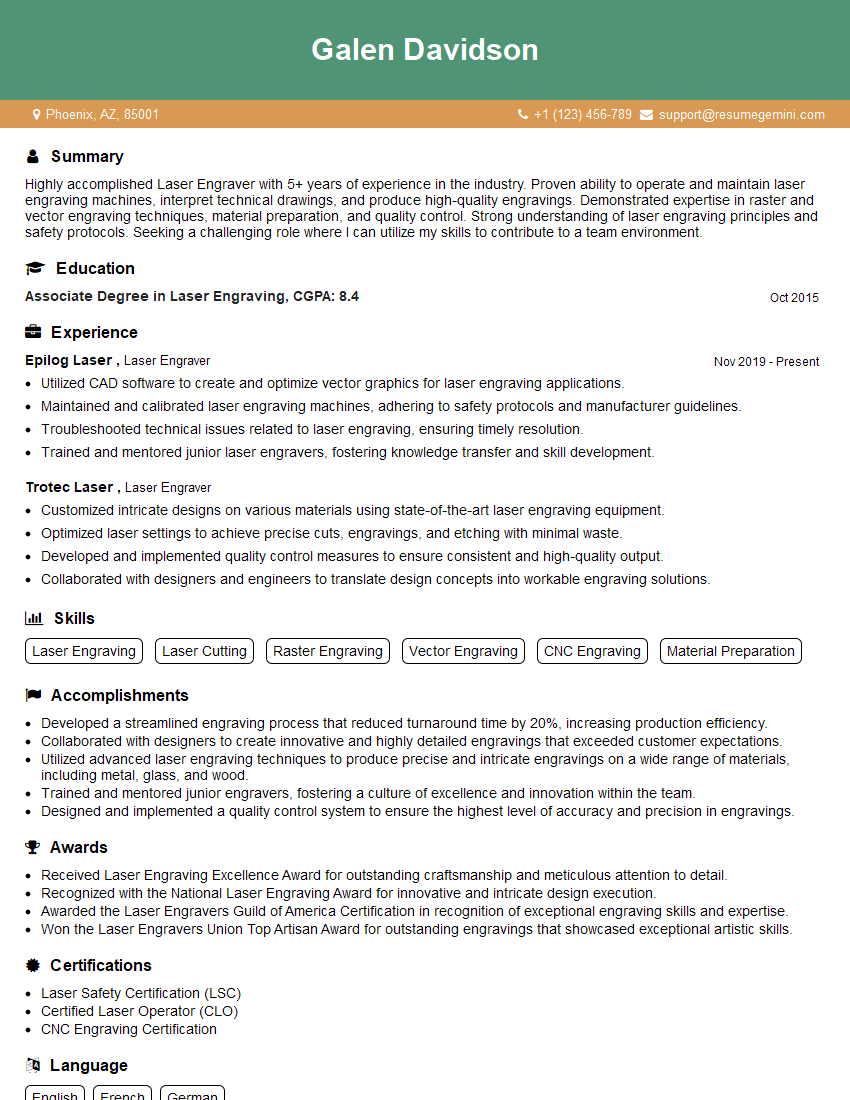
Mastering expertise in using engraving software significantly enhances your career prospects in manufacturing, personalized gifts, industrial marking, and various creative fields. A strong resume is crucial for showcasing your skills to potential employers. Building an ATS-friendly resume increases the chances of your application being noticed by recruiters. ResumeGemini is a valuable resource to help you craft a professional and impactful resume that highlights your engraving software expertise. Examples of resumes tailored to showcasing expertise in using engraving software are available, further enhancing your job search.
Explore more articles
Users Rating of Our Blogs
Share Your Experience
We value your feedback! Please rate our content and share your thoughts (optional).
What Readers Say About Our Blog
Very informative content, great job.
good