Cracking a skill-specific interview, like one for Proficiency in using digital printing equipment, requires understanding the nuances of the role. In this blog, we present the questions you’re most likely to encounter, along with insights into how to answer them effectively. Let’s ensure you’re ready to make a strong impression.
Questions Asked in Proficiency in using digital printing equipment Interview
Q 1. Describe your experience with different digital printing technologies (e.g., inkjet, toner-based).
My experience encompasses a wide range of digital printing technologies. I’ve extensively worked with both inkjet and toner-based systems, each possessing unique strengths and weaknesses. Inkjet printing, utilizing liquid ink, excels in producing vibrant, high-resolution images, especially on photo-quality papers. I’ve used various inkjet technologies, including piezo and thermal inkjet, understanding their differences in printhead technology and ink droplet formation. For instance, I’ve worked extensively with Epson’s large-format inkjet printers for high-volume photographic reproduction, appreciating their superior color gamut. On the other hand, toner-based printing, using powdered ink fused onto the paper with heat, shines in its speed and durability, making it ideal for high-volume print jobs requiring longevity, such as brochures or business cards. My experience here includes working with Xerox and HP’s production printers, where I’ve mastered the nuances of toner density and fusing temperature optimization for consistent print quality.
I’ve also explored specialized digital printing methods, such as UV printing for direct-to-substrate applications on materials like acrylic or metal, as well as sublimation printing for textiles. This diverse experience allows me to select the optimal technology for any given project, maximizing quality and efficiency.
Q 2. Explain the color management process in digital printing.
Color management in digital printing is critical for ensuring accurate color reproduction from screen to print. It’s a multi-step process involving several key components. First, the source file—a digital image or design—needs to be profiled, assigning specific color values within a standardized color space, commonly sRGB or Adobe RGB. This ensures the colors are consistently represented across different devices. Next, the RIP (Raster Image Processor) software uses this profile and the printer’s profile to translate the colors into instructions the printer understands. The printer profile defines how the printer’s inks interact to create specific colors. This process accounts for variations in ink absorption, paper type, and printer characteristics. Regular color calibration using colorimeters and spectrophotometers is essential to maintain accuracy. Finally, a good understanding of color gamuts is vital; we need to be mindful of the limitations of both the monitor and the printer and manage expectations of color matching accordingly.
For example, a color that looks vibrant on screen might be impossible to replicate perfectly on a particular printer’s paper stock due to differences in their color gamuts. A crucial aspect of my work is effective communication with clients, ensuring they understand these limitations and potential discrepancies.
Q 3. How do you troubleshoot common print quality issues (e.g., banding, color inconsistencies)?
Troubleshooting print quality issues requires a systematic approach. Let’s take banding and color inconsistencies as examples. Banding, the appearance of horizontal or vertical stripes across the print, often results from problems with the printhead, such as clogged nozzles or uneven ink distribution. I begin by inspecting the printhead visually and running cleaning cycles. If the issue persists, I check the ink supply levels and replace any empty cartridges. In severe cases, printhead alignment or even replacement might be necessary.
Color inconsistencies can stem from various factors, including incorrect color profiles, improper calibration, or variations in substrate. I address this by first verifying the accuracy of the color profile used, recalibrating the printer, and checking the consistency of the paper or substrate used in the print run. Sometimes, subtle variations in environmental conditions, like temperature and humidity, can influence print quality, which I take into account when troubleshooting. This step involves cross-referencing data from previous runs with the same parameters. In more complex cases, I will leverage the printer’s diagnostic tools to pinpoint the exact cause, employing both software-based diagnostics and a visual inspection of print components.
Q 4. What is your experience with RIP software and color profiles?
RIP software is the bridge between the digital design file and the printer. I have extensive experience with various RIPs, including industry-standard software such as Onyx and Fiery. These programs manage the color profiles, optimize the image data for printing, and control the printer’s functions. My proficiency includes color profile creation and management, where I customize profiles for specific substrates and printers to achieve optimal color accuracy. For instance, I would create separate profiles for matte and gloss paper stock, acknowledging the difference in ink absorption and how this affects the final output. Furthermore, I’m adept at using the RIP software’s tools for image optimization, such as color correction, sharpening, and halftoning techniques to ensure the finest possible print quality. Understanding the nuances of each RIP allows me to configure its settings for different printing projects and materials, ensuring an optimized workflow and superior output.
Q 5. How do you ensure accurate color matching between digital proofs and final prints?
Accurate color matching between digital proofs and final prints is paramount. The process starts with employing a high-quality proofing system that accurately mimics the final print’s colors and characteristics. This could involve software-based proofing using accurate color profiles or using a dedicated proofing printer. The paper or substrate used for the proof should match the final print’s material as closely as possible. It is essential to use a calibrated monitor, ensuring the on-screen representation is consistent with the target color values. Furthermore, I use colorimetric measurements with a spectrophotometer on both the proof and the final print to objectively quantify the color difference, employing standards like Delta E to evaluate the result. If discrepancies exist, adjustments are made to the color profile or printer settings to minimize the differences between the proof and the final product. This iterative process ensures that the final print meets the client’s expectations regarding color fidelity.
Q 6. Describe your experience with different types of substrates used in digital printing.
My experience covers a wide range of substrates used in digital printing. I’ve worked with standard papers, ranging from coated to uncoated, and different weights and finishes. I’ve also used specialty papers like canvas, metallic, and textured papers. In addition, I have experience printing on various non-paper materials like vinyl, textiles (including polyester and cotton), plastics (like acrylic and PVC), and even certain metals using UV-curable inks. Each substrate demands different ink settings and printing parameters. For example, printing on canvas requires different ink absorption settings compared to printing on a glossy photo paper. Understanding the properties of each substrate is crucial for achieving optimal print quality and durability, and prevents print issues such as bleeding or poor ink adhesion.
Q 7. What is your experience with print finishing techniques (e.g., cutting, binding, laminating)?
Print finishing is a vital part of the overall process. I’m experienced with a variety of techniques, including cutting, using both guillotine cutters and die-cutters for precise shapes. I’m skilled in different binding methods, such as saddle-stitch binding (for brochures), perfect binding (for books), and wire-O binding (for notebooks). I also have experience with laminating, applying a protective film to enhance the print’s durability and water resistance. Moreover, I’m familiar with other finishing options like embossing, debossing, and folding, all to achieve the desired aesthetic and functionality for the final product. My experience includes working with both in-house and external finishing services, selecting the best method to match the requirements of each project. I always choose methods that optimize the quality and longevity of the printed product and improve its value for the client.
Q 8. How do you maintain and troubleshoot digital printing equipment?
Maintaining and troubleshooting digital printing equipment requires a proactive and systematic approach. It’s not just about fixing problems; it’s about preventing them. My routine involves daily, weekly, and monthly checks.
- Daily Checks: I inspect the printer for any visible issues like paper jams, toner leaks, or unusual noises. I also check print quality and ensure the system is functioning properly by running test prints.
- Weekly Checks: I perform more in-depth cleaning, including cleaning the fuser unit, removing dust and debris from rollers, and inspecting the paper path for any obstructions. I also check toner levels and replace as needed.
- Monthly Checks: These involve more extensive maintenance, such as checking and calibrating color settings, running cleaning cycles specific to the printer model, and performing preventative maintenance recommended by the manufacturer. This might involve replacing certain parts proactively before they fail.
Troubleshooting is a more reactive process. I use a logical approach, starting with the most obvious problems (like paper jams) and moving to more complex issues. If a problem persists, I consult the printer’s diagnostic codes, service manuals, and online resources, and if necessary, I contact the manufacturer’s technical support.
For example, I once encountered a recurring banding issue on a high-volume Xerox digital press. By systematically checking the drum, cleaning the transfer rollers, and then finally recalibrating the image processing unit, I identified the root cause to be a slightly misaligned drum, and fixed it by adjusting its position.
Q 9. Explain your understanding of print resolution and its impact on image quality.
Print resolution refers to the number of dots per inch (DPI) or pixels per inch (PPI) used to create an image. A higher resolution means more dots or pixels are used, resulting in a sharper, more detailed image with finer lines and smoother transitions between colors. Conversely, lower resolution leads to pixelation, jagged lines, and a generally less crisp output.
The impact on image quality is substantial. For instance, a low-resolution image (e.g., 72 DPI) printed on a high-resolution printer will still appear blurry or pixelated because the printer is unable to overcome the inherent limitations of the source image’s low resolution. In contrast, a high-resolution image (e.g., 300 DPI or higher) will produce superior quality, particularly for detailed graphics or text.
In my work, understanding resolution is crucial for selecting appropriate image files and ensuring the final product meets client expectations. For instance, a marketing brochure requires much higher resolution (300 DPI) compared to a simple business card (150 DPI might suffice).
Q 10. Describe your experience with workflow automation software in a digital printing environment.
I have extensive experience with various workflow automation software commonly used in the digital printing environment, such as EFI Fiery, Kodak Prinergy, and other RIP (Raster Image Processor) software solutions. These systems streamline the entire process, from job submission and pre-flighting to color management and final output.
My experience includes setting up and managing these systems, configuring job tickets, automating color profiles, and integrating them with other software like MIS (Management Information Systems) for order tracking and production scheduling. Automation helps to reduce manual intervention, minimize errors, and increase overall efficiency. For instance, setting up automated color profiles ensures consistent color output across different jobs and printers, reducing the need for manual adjustments.
In one project, we implemented an automated workflow system that drastically reduced our turnaround time. Previously, manual processing of files would take hours, while the automated system reduced this to minutes, significantly boosting our capacity and meeting tight deadlines.
Q 11. What are the key differences between offset and digital printing?
Offset and digital printing are distinct methods with significant differences in their processes, costs, and applications.
- Offset Printing: This is an indirect printing method using plates to transfer ink to a blanket cylinder, then to the substrate. It’s best suited for high-volume print runs due to its lower per-unit cost once the setup is complete. However, setup costs are higher, requiring time and materials to create plates.
- Digital Printing: This is a direct printing method where the image is printed directly onto the substrate, eliminating the need for plates. This allows for on-demand printing, customization, and shorter turnaround times. It’s ideal for smaller print runs and personalized items, though the per-unit cost is generally higher for smaller volumes.
Here’s an analogy: imagine baking cookies. Offset printing is like baking a large batch from a single recipe – efficient for many cookies but inflexible for variations. Digital printing is like using a 3D cookie printer— you can create small batches of unique cookies rapidly, but each cookie costs more.
Q 12. How do you manage and prioritize multiple print jobs efficiently?
Managing and prioritizing multiple print jobs efficiently requires a structured approach. I typically use a combination of techniques:
- Job Scheduling Software: Using dedicated software enables me to create schedules and track jobs based on deadlines, material needs, and printer availability.
- Prioritization Matrix: I use a matrix that considers factors such as urgency, complexity, and client importance. This helps in ranking jobs to ensure that the most critical ones are completed first.
- Communication: Open communication with clients about expected delivery times is crucial. This avoids misunderstandings and ensures everyone is aligned.
- Workflow Optimization: Regularly reviewing and optimizing the workflow process helps identify bottlenecks and improve overall efficiency. For example, optimizing paper handling and pre-press tasks can minimize downtime.
For instance, in a busy week, I might prioritize rush orders for a major client over smaller, less time-sensitive jobs, even if the latter have earlier deadlines. This prioritization is carefully planned and communicated to all involved.
Q 13. What is your experience with pre-press preparation for digital printing?
Pre-press preparation for digital printing is crucial for achieving high-quality output. It involves several steps that prepare the digital files for printing:
- File Check & Conversion: Verifying the file format, resolution, color mode (CMYK usually), and ensuring all fonts and images are embedded. I often convert files to the optimal format for the specific printer.
- Image Editing and Color Correction: Adjusting brightness, contrast, and color balance to meet client specifications or improve image quality. Color profiles are carefully selected and applied.
- Imposition & Nesting: Arranging multiple pages or smaller designs onto larger sheets to optimize paper usage. This step can significantly impact print costs.
- Proofing: Creating a soft proof (digital preview) or a hard proof (printed sample) to review the design and colors before the final print run. This allows for final adjustments and client approvals.
For example, before printing a large quantity of personalized brochures, I would carefully examine each client’s file for potential issues, ensure that their logos are high-resolution, and then accurately nest multiple designs onto the same sheet to maximize efficiency and reduce material waste.
Q 14. How do you calculate the cost of a digital printing job?
Calculating the cost of a digital printing job requires factoring in various elements:
- Material Costs: This includes the cost of paper, ink/toner, and any additional substrates (e.g., canvas, vinyl).
- Labor Costs: The time spent on pre-press preparation, printing, and finishing (e.g., cutting, binding) must be considered.
- Equipment Costs: These are indirect costs that cover depreciation, maintenance, and operating expenses related to the printing equipment.
- Overhead Costs: This covers rent, utilities, and administrative expenses.
- Profit Margin: A percentage is added to cover profit and ensure business sustainability.
The formula can be simplified as: Total Cost = (Material Costs + Labor Costs + Equipment Costs + Overhead Costs) * (1 + Profit Margin)
For a specific job, I would determine the quantity needed, the type of paper, the printing specifications, and then use the above factors to arrive at the final cost. For example, a small run of 100 business cards will have a higher per-unit cost compared to a large print run of 10,000 brochures due to the fixed costs associated with setup and operation being distributed across fewer units.
Q 15. Explain your experience with quality control procedures in digital printing.
Quality control in digital printing is paramount for ensuring consistent, high-quality output. My approach involves a multi-stage process, starting even before the printing begins. This includes meticulous pre-flight checks of digital files to identify potential issues like incorrect color profiles, low resolution images, or missing fonts. I carefully inspect the print settings – including color management, resolution, and ink levels – on the machine to ensure they align perfectly with the job requirements.
During the printing process, I conduct regular visual inspections of the printed sheets, looking for color inconsistencies, banding, misregistration (where colors aren’t aligned correctly), and any signs of media defects. I use colorimeters and densitometers for precise color measurements, comparing them against the proof or specified color targets. Post-printing, a final quality check is done to ensure the entire run is consistent. Any defective prints are immediately flagged and addressed. This system ensures that only top-quality prints leave our facility.
For instance, I once caught a minor color shift in a large banner print during the midway point of the run. By adjusting the ink settings slightly, I prevented a costly reprint and maintained a high level of quality.
Career Expert Tips:
- Ace those interviews! Prepare effectively by reviewing the Top 50 Most Common Interview Questions on ResumeGemini.
- Navigate your job search with confidence! Explore a wide range of Career Tips on ResumeGemini. Learn about common challenges and recommendations to overcome them.
- Craft the perfect resume! Master the Art of Resume Writing with ResumeGemini’s guide. Showcase your unique qualifications and achievements effectively.
- Don’t miss out on holiday savings! Build your dream resume with ResumeGemini’s ATS optimized templates.
Q 16. How do you handle customer requests and resolve print-related issues?
Handling customer requests and resolving print-related issues involves clear communication, a systematic approach, and a strong problem-solving attitude. I begin by actively listening to the client to fully understand their needs and expectations. I then clarify the specifics of their request, including file specifications, desired quantity, turnaround time, and any special requirements. This minimizes misunderstandings from the outset.
If an issue arises during the printing process, I analyze the root cause systematically. This could involve examining the provided digital files, assessing the print settings, or checking the equipment for any malfunctions. I communicate any necessary adjustments or delays transparently to the customer. For example, if a file has a low resolution that impacts print quality, I might offer suggestions for file improvements or alternative solutions. If a machine malfunction occurs, I’ll outline a timeline for repair and ensure the customer receives updates.
I’ve had situations where a customer wasn’t happy with the color accuracy. By reviewing the original design file and comparing it with the printed output using a spectrophotometer, we pinpointed the discrepancy to an incorrect color profile in the original file. By correcting the profile and reprinting a small test run, the problem was quickly solved, preserving the customer’s trust.
Q 17. Describe your experience with different digital printing file formats (e.g., PDF, TIFF).
I have extensive experience working with various digital printing file formats. PDF (Portable Document Format) is a standard for its reliability and ability to preserve formatting. I often prefer PDF/X-1a for print-ready files because it embeds color profiles, preventing color discrepancies. TIFF (Tagged Image File Format) is excellent for high-resolution images, particularly for large-format printing. I often work with TIFF files when dealing with photographic prints or artwork that requires exceptional detail.
I’m also familiar with other formats like JPEG, although it’s less ideal for print-critical jobs due to compression artifacts. I ensure the correct color space (e.g., CMYK) is used depending on the printing process and media, and I always check for the resolution adequacy, ensuring it’s suitable for the intended print size. Incorrect file formats or improper settings can lead to poor quality prints or even printing failures, so meticulous file handling is critical.
For instance, I’ve had to work with customers who provided JPEGs for brochures. While I could print them, I clearly communicated the limitations of JPEG compression, particularly the potential for visual artifacts in areas with fine detail. We often collaborated to re-supply the files in a higher-quality TIFF or PDF format to ensure best results.
Q 18. What is your understanding of print density and how it affects the final output?
Print density refers to the amount of ink deposited on a particular area of the printed substrate. It’s measured in dots per inch (dpi) for inkjet and lines per inch (lpi) for screen printing. A higher density generally means more ink, resulting in a darker, richer color. However, excessively high density can lead to several issues.
Lower print density can result in faded colors, poor contrast, and less vibrant images. Too low density can also affect readability, particularly with text. On the other hand, excessive density (often called ‘ink loading’) can cause problems such as ink bleeding (ink spreading beyond the intended area), trapping (ink overlapping causing color shifts), and slower drying times. It can also increase the chance of smudging and significantly affect the overall print quality.
Balancing print density is crucial. I use densitometers to measure the precise density of various color patches across the printed output and compare them to the desired values to maintain optimal print quality and avoid issues such as trapping or bleeding. The choice of ink, substrate, and printing techniques all interplay to achieve the desired density.
Q 19. How do you ensure the security and confidentiality of print jobs?
Security and confidentiality are paramount in handling print jobs. I implement several measures to ensure sensitive information is protected throughout the printing process. This starts with secure file handling – I use password-protected files and avoid storing sensitive data on easily accessible shared drives. Access to the printing equipment itself is restricted to authorized personnel only.
After printing, all print files and physical prints are securely disposed of, according to the company’s data destruction policy. This often involves shredding or pulping paper prints and securely deleting digital files. We also follow strict procedures for handling confidential print jobs, ensuring they are processed separately and with extra scrutiny. For example, highly sensitive documents might have a dedicated printer and a tracking system to ensure accountability.
For projects involving sensitive data, we often utilize secure print release systems that require a personal identification number (PIN) to retrieve prints, adding an extra layer of security.
Q 20. Describe your experience with large-format digital printing.
Large-format digital printing presents unique challenges and opportunities. I have significant experience with wide-format printers, working with various media like vinyl banners, fabric displays, and posters. The key difference from smaller-format printing lies in the scale and the need for precise handling of larger media rolls. This requires proficiency in using specialized printers and software designed for large-format printing.
One major consideration is ensuring color consistency across large print areas. Precise calibration of the printer and careful media handling are crucial to avoid color banding or inconsistencies. Furthermore, the resolution must be high enough to produce sharp and clear images, even at larger scales. I routinely use different types of inks, from solvent-based to eco-solvent, depending on the application and the material being printed on. For example, solvent-based inks are excellent for outdoor applications due to their weather resistance, while eco-solvent inks are more environmentally friendly.
I recall a project where we printed a massive banner for a trade show. Ensuring seamless color consistency across the entire banner was challenging due to its size. We carefully calibrated the printer, conducted test prints, and used color management profiles to ensure the final product was flawless.
Q 21. What is your understanding of different ink types used in digital printing?
Different ink types in digital printing cater to various needs, impacting print quality, durability, and environmental impact. Common ink types include:
- Dye-based inks: These are vibrant and cost-effective, but less water-resistant and fade faster, making them suitable for indoor applications.
- Pigment-based inks: More water-resistant and fade-resistant than dye-based, pigment inks are ideal for outdoor applications and longer-lasting prints. They are often used in fine art prints or documents requiring longevity.
- Solvent-based inks: These are known for their durability and weather resistance, making them suitable for outdoor signage and banners. However, they have a strong odor and require specific ventilation systems.
- UV-curable inks: These inks cure instantly upon exposure to UV light, producing prints that are very durable and scratch-resistant. They are often used in applications requiring high durability, such as floor graphics.
- Latex inks: Water-based and odorless, latex inks offer a good balance of durability, vibrant colors, and environmental friendliness. They are suitable for a wide range of applications.
Choosing the right ink type is crucial for achieving the desired result, depending on the application, budget, and environmental concerns. I select inks based on factors such as the intended use of the print, the substrate material, the desired longevity, and the client’s budget and sustainability preferences.
Q 22. How do you perform routine maintenance on digital printing equipment?
Routine maintenance on digital printing equipment is crucial for ensuring consistent print quality, minimizing downtime, and extending the lifespan of the machine. It’s a multi-faceted process that involves both preventative and corrective actions.
Daily Checks: This includes visually inspecting the printer for any obvious issues like paper jams, ink leaks, or loose components. I also check ink levels and ensure the printer is properly connected to the network and power supply.
Weekly Cleaning: This involves cleaning the print heads (using the manufacturer’s recommended cleaning solution), removing any accumulated dust or debris from the rollers and paper path, and checking and cleaning the fuser unit (if applicable). Think of this like regularly vacuuming your house to prevent build-up.
Monthly Maintenance: A more thorough cleaning is performed, including a deep clean of the print heads, potentially replacing worn parts like rollers or belts, and performing a test print to check print quality.
Preventative Maintenance Schedules: Following the manufacturer’s recommended maintenance schedule is paramount. This typically includes things like replacing specific parts at certain intervals, regardless of current condition to avoid bigger issues down the line.
For example, when working with a Xerox iGen, I meticulously follow their prescribed cleaning procedures for the fuser unit, carefully documenting each step and noting any unusual wear or tear. I treat each machine as if it were my own, ensuring it operates at peak efficiency.
Q 23. What is your experience with calibrating and profiling digital printing equipment?
Calibrating and profiling are essential steps in ensuring color accuracy and consistency in digital printing. Calibration adjusts the printer’s internal settings to align with industry standards, while profiling creates a custom color profile for a specific printer and substrate combination.
My experience involves using colorimeters and spectrophotometers to measure color values. This data is then used to create ICC profiles, which act as a translator between the printer’s output and the desired color. For example, using a spectrophotometer like an X-Rite i1iSis, I’ve created custom profiles for various papers, ensuring that the Pantone colors specified by my clients accurately appear on the final print.
Calibration is usually a simpler process, often involving built-in tools within the printer’s software or using specialized calibration software. This process helps to ensure consistency and stability throughout the machine’s operational lifespan.
I’ve successfully calibrated and profiled various digital printing devices, including HP Indigo presses and Canon imagePROGRAF large format printers, consistently delivering accurate color reproduction for a wide variety of printing applications.
Q 24. How do you identify and correct registration issues in digital prints?
Registration issues, where the colors or images don’t align perfectly, are a common problem in digital printing. Identifying and correcting them requires a systematic approach.
Visual Inspection: The first step is a careful visual inspection of the printed output. Look for misalignments between colors, particularly in areas with fine details or sharp lines. Imagine looking at a tightly woven fabric – any misalignment will be immediately obvious.
Test Prints: Run test prints with registration targets to precisely measure misalignment. These targets provide numerical data to quantify the issue.
Software Adjustments: Many printers offer software adjustments for registration. These adjustments can fine-tune the position of the print heads or rollers to correct misalignment. This is often a simple adjustment, much like adjusting the alignment on a projector.
Mechanical Adjustments (Advanced): In some cases, mechanical adjustments might be necessary. This requires in-depth knowledge of the printer’s mechanics and should only be performed by trained technicians. This would involve recalibration of internal components and is a more involved procedure.
Substrate Issues: Ensure the paper or substrate is properly fed and free of defects. Warped or damaged media can cause registration problems.
For instance, I once encountered a registration issue on a large format print due to a slight warp in the banner material. By carefully adjusting the media feed and utilizing the printer’s software controls, I was able to correct the misalignment and deliver a perfect final product.
Q 25. Explain your experience with variable data printing.
Variable data printing (VDP) allows for personalized content on each printed piece. My experience encompasses the entire workflow, from data preparation and file setup to print execution and output verification.
I’m proficient in using various VDP software applications like Adobe InDesign and specialized VDP software solutions. I understand the importance of data integrity and have experience working with large datasets, ensuring that the correct information is printed on the correct piece. This process is like sending personalized postcards – each recipient gets a uniquely tailored message.
I’ve worked on projects ranging from personalized marketing materials like brochures and postcards to customized transactional documents such as invoices and statements. I’ve even created personalized event tickets with unique QR codes. Each project required careful management of the data to ensure accuracy and efficiency.
In one instance, I had to manage a database with over 10,000 records for a large-scale marketing campaign. To ensure the seamless generation of thousands of individualized prints, I streamlined the entire workflow, using automation wherever possible to prevent errors and maintain speed.
Q 26. Describe your experience working with different types of finishing equipment (e.g., folders, cutters).
My experience with finishing equipment is extensive, encompassing various types of folders, cutters, and other post-print processing tools. This experience significantly improves the quality and presentation of the final printed output.
Folders: I’m experienced with various folding techniques including letter folds, Z-folds, and gate folds, using both manual and automated folding machines. Knowing which fold is best for a given application is critical.
Cutters: I’m proficient in using guillotine cutters, rotary cutters, and die-cutting machines for precise and accurate cutting. Safety protocols are paramount here, as mistakes can lead to injury.
Other Finishing Equipment: This includes experience with binding machines (perfect binding, saddle stitch), laminators, and perforators, and I am always ready to learn new equipment and processes.
For example, I once had a project requiring a complex die-cut design. By utilizing the appropriate die-cutting machine and carefully setting up the process, I was able to achieve the precise cuts needed without damaging the printed material.
Q 27. How do you optimize print settings for various substrates and applications?
Optimizing print settings for different substrates and applications is crucial for achieving high-quality results. This involves understanding the specific characteristics of each substrate and adjusting the printer settings accordingly. For example, thicker substrates require different settings compared to thinner papers.
I consider factors such as:
Substrate Type: Paper weight, texture, coating, and composition all affect the ink absorption and overall print quality. Thicker papers often require higher pressure and temperature settings to prevent ink from smudging.
Application: Different applications, such as outdoor banners versus indoor brochures, call for different print settings to ensure durability and color vibrancy.
Ink Type: The choice of ink will also significantly impact the settings required. For example, UV inks require different curing settings than other ink types.
I often use test prints to fine-tune the settings, iteratively adjusting until I achieve the desired result. This process might include fine-tuning resolution, color management, and drying/curing settings, depending on the equipment in use. For instance, when printing on canvas, I would adjust the settings to ensure optimal ink absorption and prevent smudging, ensuring the final product meets the client’s quality requirements.
Q 28. What safety precautions do you follow while operating digital printing equipment?
Safety is paramount when operating digital printing equipment. I consistently follow a strict set of safety procedures.
Personal Protective Equipment (PPE): I always wear appropriate PPE, including safety glasses and gloves, to protect myself from ink splashes, paper cuts, and other potential hazards.
Machine Safety Features: I fully understand and utilize all the safety features provided by the equipment, such as emergency stop buttons, safety guards, and interlocks.
Proper Handling of Materials: I handle all materials carefully to prevent cuts or injuries. Heavy paper rolls, for instance, are handled with care and using appropriate lifting techniques.
Chemical Safety: I handle inks and cleaning solutions carefully, according to the manufacturer’s guidelines, and always in a well-ventilated area.
Regular Inspections: Before operating the equipment, I always inspect it for any signs of damage or malfunction.
For example, when handling solvents or cleaning agents, I ensure adequate ventilation and always wear appropriate respiratory protection. Regular safety checks are part of my routine, treating every operation as a high-priority safety matter.
Key Topics to Learn for Proficiency in using Digital Printing Equipment Interview
- Understanding Digital Printing Technologies: Explore different digital printing methods (e.g., inkjet, toner-based, UV printing) and their respective applications. Compare and contrast their strengths and weaknesses in terms of print quality, speed, cost-effectiveness, and substrate compatibility.
- Pre-Press Preparation: Master file preparation techniques including color management (CMYK, spot colors), image resolution, and file format conversion (PDF, TIFF). Understand the importance of proofing and color calibration for accurate output.
- Operating Digital Printing Equipment: Gain hands-on experience with various digital printing machines. Learn about routine maintenance, troubleshooting common issues (e.g., paper jams, color mismatches), and ensuring optimal machine performance.
- Print Quality Control: Develop a keen eye for detail in identifying and correcting print defects. Understand the use of densitometers and other quality control tools to ensure consistency and accuracy.
- Substrate Handling and Finishing: Learn about different printing substrates (paper, cardstock, vinyl, etc.) and their properties. Understand various finishing techniques such as cutting, laminating, binding, and folding.
- Workflow and Production Management: Learn about optimizing print workflows, scheduling jobs effectively, and managing resources efficiently. Understand the importance of meeting deadlines and adhering to quality standards.
- Health and Safety Procedures: Familiarize yourself with safety protocols and best practices associated with operating digital printing equipment, including handling inks and chemicals.
- Problem-solving and Troubleshooting: Develop the ability to identify and resolve technical problems independently, using available resources and documentation. This includes understanding error messages and taking appropriate actions.
Next Steps
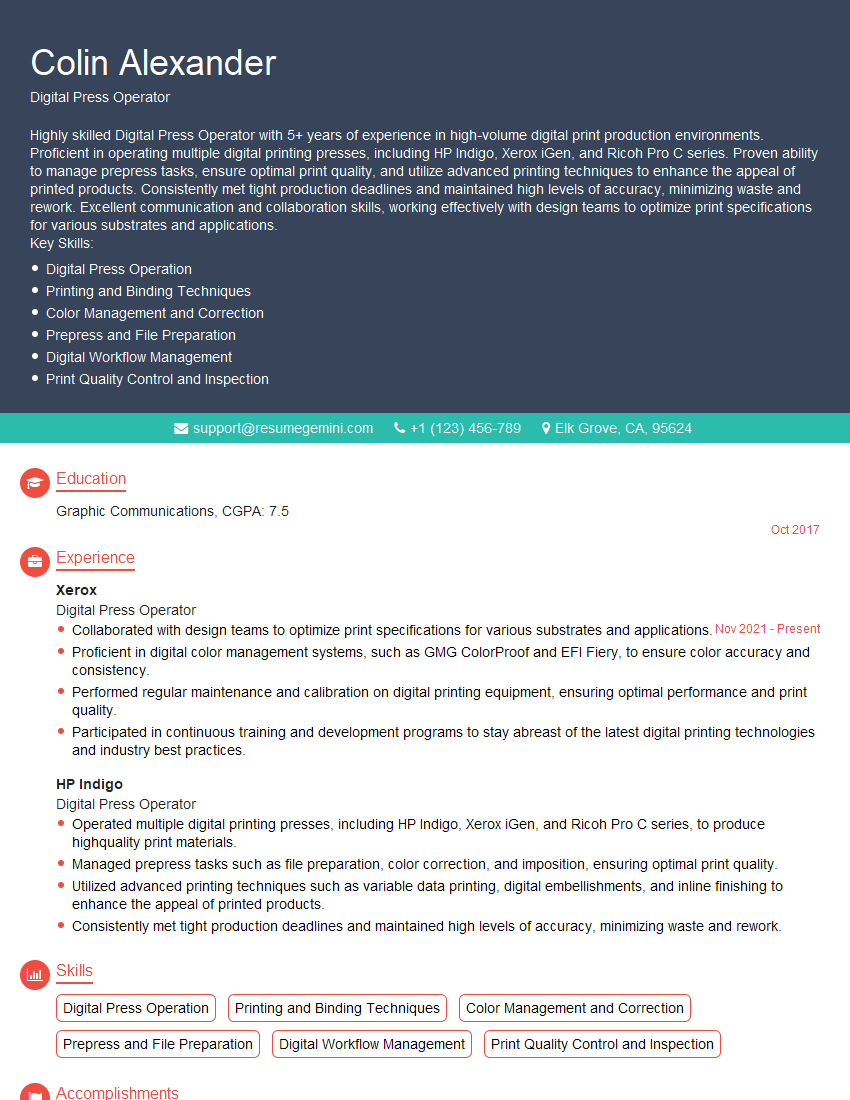
Mastering proficiency in using digital printing equipment opens doors to exciting career opportunities in a dynamic industry. A strong understanding of these technologies is highly sought after and will significantly enhance your job prospects. To maximize your chances of landing your dream role, invest time in crafting a compelling and ATS-friendly resume that highlights your skills and experience effectively. ResumeGemini is a trusted resource that can help you build a professional resume tailored to the specific requirements of the job market. Examples of resumes tailored to Proficiency in using digital printing equipment are available, providing valuable templates and guidance for creating a winning application.
Explore more articles
Users Rating of Our Blogs
Share Your Experience
We value your feedback! Please rate our content and share your thoughts (optional).
What Readers Say About Our Blog
Very informative content, great job.
good