Preparation is the key to success in any interview. In this post, we’ll explore crucial Technical Workflow Management interview questions and equip you with strategies to craft impactful answers. Whether you’re a beginner or a pro, these tips will elevate your preparation.
Questions Asked in Technical Workflow Management Interview
Q 1. Describe your experience optimizing technical workflows.
Optimizing technical workflows involves streamlining processes to improve efficiency, reduce errors, and enhance overall productivity. This is achieved through a combination of analysis, automation, and continuous improvement. My experience spans various industries, where I’ve successfully reduced processing times, lowered operational costs, and improved team collaboration.
- In one project for a software development company, I analyzed their release cycle. By identifying redundant steps and automating testing procedures, we reduced the release time by 40%.
- Another engagement involved optimizing a data processing pipeline. Through process re-engineering and implementing a more efficient algorithm, we boosted throughput by 60% while maintaining data integrity.
Q 2. Explain your approach to identifying bottlenecks in a technical workflow.
Identifying bottlenecks in a technical workflow requires a systematic approach. I typically start with data analysis, using metrics like cycle time, wait time, and error rates to pinpoint areas of congestion. This is followed by qualitative assessments, involving interviews with team members to understand their experiences and challenges.
- Data-driven analysis: I use tools like process mining software to visualize the workflow and identify bottlenecks. This allows me to see exactly where tasks are piling up or experiencing delays.
- Qualitative analysis: I conduct interviews and workshops to gain a deeper understanding of the human factors involved, including communication challenges, skill gaps, and missing tools.
- Root cause analysis: Once bottlenecks are identified, I use techniques like the ‘5 Whys’ to drill down to the root cause and understand the underlying reasons for the inefficiencies.
For example, in a recent project, data analysis revealed that a specific approval stage was the major bottleneck. Further investigation uncovered an unclear approval process, causing delays. By clarifying the process and automating the approval notifications, we dramatically reduced the bottleneck.
Q 3. How do you measure the effectiveness of a technical workflow?
Measuring the effectiveness of a technical workflow relies on a set of key performance indicators (KPIs). These KPIs should align with the overall business objectives and provide a clear picture of the workflow’s efficiency and impact.
- Cycle time: Measures the time it takes to complete a task or process from start to finish.
- Throughput: Measures the volume of work completed within a specific timeframe.
- Error rate: Measures the frequency of errors or defects in the process.
- Cost per unit: Measures the cost associated with completing a unit of work.
- Customer satisfaction: (Where applicable) measures the satisfaction levels of customers who receive the output of the workflow.
It’s important to track these metrics over time to identify trends and measure improvements resulting from workflow optimizations. For example, if we reduced cycle time by 20% and simultaneously decreased error rates by 15%, this demonstrates a significant improvement in workflow effectiveness.
Q 4. What tools and technologies have you used for workflow automation?
My experience encompasses a wide range of tools and technologies for workflow automation. My choices depend on the specific requirements of the project and the existing technological infrastructure.
- BPMN (Business Process Model and Notation) tools: Such as Camunda, used for modeling, analyzing, and automating workflows.
- Workflow automation platforms: Such as Zapier or IFTTT for simpler integrations and automation.
- Scripting languages: Like Python, for creating custom automation scripts.
- Cloud-based platforms: Such as AWS Step Functions or Azure Logic Apps, for managing complex, distributed workflows.
- Collaboration and project management tools: Such as Jira, Asana, or Monday.com for tracking progress and managing tasks.
For instance, in one project, we utilized Python scripts integrated with an AWS Step Functions workflow to automate a complex data migration process. This resulted in a significant reduction in manual intervention and improved reliability.
Q 5. Describe a time you improved a complex technical process.
In a previous role, we faced a significant challenge with our software deployment process. It was manual, time-consuming, and error-prone, leading to frequent delays and disruptions. The process involved multiple teams, each with their own tools and procedures.
To improve this, I implemented a DevOps approach, introducing continuous integration and continuous deployment (CI/CD). We adopted a new version control system, automated testing procedures, and implemented a robust deployment pipeline using Jenkins. This involved significant collaboration with different teams to standardize their processes and integrate them into the CI/CD pipeline. The result was a 75% reduction in deployment time, a significant decrease in errors, and a much more reliable release process. This improved not only efficiency but also team morale by removing the stress associated with the previous manual and unpredictable system.
Q 6. How do you handle conflicting priorities in a technical workflow?
Handling conflicting priorities requires a structured approach that involves prioritization and clear communication. I typically use a combination of techniques to address such situations.
- Prioritization matrix: Using a matrix based on urgency and importance to rank tasks and allocate resources effectively.
- Stakeholder alignment: Open communication with stakeholders to clarify priorities and ensure everyone is on the same page. This involves understanding the business goals and objectives behind each task.
- Negotiation and compromise: When conflicts arise, I facilitate discussions to find mutually acceptable solutions, potentially involving trade-offs or adjustments to timelines.
- Escalation protocol: Having a clear escalation process to resolve conflicts that cannot be resolved at lower levels.
For instance, if a high-priority bug fix and a planned feature release conflict, a prioritization matrix and stakeholder discussions would determine which takes precedence. Perhaps a short delay to the feature release might be accepted to ensure critical bug resolution.
Q 7. What methodologies (e.g., Agile, Lean) have you used to manage workflows?
My workflow management experience extensively utilizes Agile and Lean methodologies. These methodologies are crucial for building efficient and adaptable workflows.
- Agile: I leverage Agile principles like iterative development, sprint planning, and daily stand-ups to manage workflows in a flexible and responsive manner. This allows for adapting to changing requirements and prioritizing tasks based on feedback and changing priorities.
- Lean: I apply Lean principles like waste reduction (reducing unnecessary steps or delays), continuous improvement (Kaizen), and value stream mapping to identify and eliminate bottlenecks and inefficiencies. Value stream mapping is particularly helpful to understand the flow of work and identify areas for optimization.
For example, using Scrum within an Agile framework, I would work with a team to break down a large project into smaller, manageable sprints. Simultaneously, applying Lean principles, I’d ensure each step in the process added value and eliminate any waste. The combination of these methodologies ensures we deliver high-quality results efficiently.
Q 8. Explain your experience with workflow diagramming and documentation.
Workflow diagramming and documentation are crucial for visualizing and understanding complex technical processes. I have extensive experience using various diagramming tools, such as Lucidchart, draw.io, and Visio, to create clear and concise representations of workflows. My documentation goes beyond simple diagrams; it includes detailed descriptions of each step, responsible parties, required inputs and outputs, potential bottlenecks, and success metrics. For example, in a recent project involving software deployment, I created a flowchart outlining the entire process from code commit to production release, including steps like code review, testing, and deployment to staging and production environments. This documentation served as a living document, updated as the process evolved, ensuring everyone was on the same page and any changes were clearly tracked.
My documentation also incorporates standard notation where appropriate (like BPMN 2.0), to ensure consistency and clarity across various stakeholders. I believe in creating documentation that is not only technically accurate but also user-friendly and easily accessible to both technical and non-technical audiences. This often involves the use of simple language and visual aids to enhance comprehension.
Q 9. How do you ensure compliance and security within technical workflows?
Ensuring compliance and security in technical workflows is paramount. My approach involves a multi-layered strategy. First, I meticulously integrate security protocols and compliance requirements into the workflow design itself. This includes defining access controls, data encryption measures, and audit trails at each stage. For instance, in a project handling sensitive customer data, I ensured that all data transfer points were encrypted and that access was strictly controlled based on the principle of least privilege. Secondly, I leverage automated tools and processes to enforce these security measures. This might involve implementing automated security checks during the workflow, using tools like security scanners or intrusion detection systems. Finally, regular audits and reviews are conducted to ensure the effectiveness of the implemented security measures and to identify potential weaknesses.
Compliance is addressed by mapping the workflow to relevant regulations and standards (e.g., ISO 27001, HIPAA, GDPR). I ensure that the workflow’s design and implementation align with these requirements, documenting the adherence process thoroughly. This might involve creating checklists, using specialized compliance management software, or implementing regular compliance assessments.
Q 10. Describe your experience with different workflow management software.
I have experience with a variety of workflow management software, ranging from simple task management tools like Asana and Trello to more sophisticated platforms like Jira and SharePoint. My choice of software depends heavily on the project’s specific needs and complexity. For smaller projects with simpler workflows, Asana or Trello might suffice. However, for larger, more complex projects requiring robust features like issue tracking, custom workflows, and integration with other development tools, I prefer Jira. I’ve also used SharePoint for managing document workflows and collaboration within larger organizations. My proficiency extends beyond merely using these tools; I understand how to configure them effectively to optimize workflows, customize dashboards, and generate meaningful reports to track progress and identify bottlenecks.
For example, in a recent agile development project, we used Jira to track user stories, sprint progress, and bug fixes. The ability to create custom workflows within Jira allowed us to tailor the process to our specific needs, resulting in improved efficiency and transparency.
Q 11. How do you communicate workflow changes to stakeholders?
Communicating workflow changes effectively is critical to minimizing disruption and ensuring buy-in from stakeholders. My approach is multi-faceted. I begin by clearly identifying the purpose and impact of the changes, explaining the reasons behind them in a transparent manner. Then, I use a combination of communication channels to reach all relevant stakeholders. This might include email announcements, team meetings, project updates in project management software, and even informal one-on-one conversations to address specific concerns.
For significant changes, I might develop a detailed change management plan, including training materials and support documentation. This helps stakeholders understand the new workflow and provides them with the resources they need to adapt smoothly. Regular feedback mechanisms are essential; I encourage open communication and actively solicit feedback throughout the change process to address any questions or concerns.
Q 12. How do you handle unexpected issues or disruptions in a workflow?
Unexpected issues or disruptions are inevitable in any workflow. My approach focuses on proactive risk management and reactive problem-solving. Proactively, I identify potential risks during workflow design, developing contingency plans to mitigate their impact. For example, in a data processing workflow, I might build in redundancy or error handling to account for potential data loss or system failures. Reactively, when disruptions occur, I follow a structured problem-solving process. This involves quickly assessing the situation, identifying the root cause of the problem, and implementing the appropriate corrective actions. Transparency is key; I keep all stakeholders informed of the situation and the steps being taken to resolve it.
Communication and collaboration are critical in such situations. I work closely with the affected teams to restore the workflow as quickly and efficiently as possible, often using root cause analysis techniques to prevent similar issues from recurring.
Q 13. What is your experience with implementing change management strategies for workflows?
Implementing change management strategies for workflows requires a systematic approach. I typically utilize a phased approach, starting with a thorough needs assessment to justify the change and to understand stakeholder requirements. Then, I develop a detailed change management plan outlining the proposed changes, the timeline for implementation, and the resources required. This plan includes a communication strategy, a training program for affected personnel, and a process for monitoring and evaluating the success of the change. Throughout the implementation phase, I actively manage resistance to change, addressing concerns and proactively communicating updates. Post-implementation, I conduct regular reviews to assess the effectiveness of the change and make any necessary adjustments.
The ADKAR model (Awareness, Desire, Knowledge, Ability, Reinforcement) is a helpful framework I often employ. It guides the process by ensuring that stakeholders are aware of the need for change, desire to participate, have the knowledge to execute the new workflow, possess the ability to use the new system or process, and are provided with reinforcement and support to maintain the changes.
Q 14. How do you prioritize tasks within a complex technical workflow?
Prioritizing tasks in a complex technical workflow requires a structured approach. I typically use a combination of methods depending on the specific context. One common technique is prioritization matrices, such as the Eisenhower Matrix (urgent/important), which helps categorize tasks based on their urgency and importance. Another approach involves using a weighted scoring system, where each task is assigned a score based on factors like business value, risk, and dependencies. This allows for a more quantitative approach to prioritization. For projects using Agile methodologies, I utilize sprint planning and backlog grooming sessions to prioritize tasks based on their value and feasibility within a given iteration.
Clear communication and collaboration are vital. I involve stakeholders in the prioritization process to ensure that priorities align with overall project goals. Tools like Jira and Asana allow for collaborative task management and prioritization, making it easy to track progress and adjust priorities as needed.
Q 15. Describe your experience with risk assessment in workflow management.
Risk assessment in workflow management is crucial for identifying potential problems before they disrupt operations. It involves systematically evaluating the likelihood and potential impact of various risks that could affect the workflow’s efficiency, quality, or security. This isn’t just about finding problems; it’s about proactively mitigating them.
My approach typically involves a four-step process: Identification (brainstorming potential risks, using checklists, and reviewing past incidents), Analysis (assessing the likelihood and impact of each risk using a risk matrix), Response Planning (developing strategies like risk avoidance, mitigation, transfer, or acceptance), and Monitoring (tracking risks and adjusting plans as needed).
For example, in a software development workflow, a risk might be a dependency on a third-party library that becomes unavailable. My response plan would involve exploring alternative libraries, building redundancy into the system, or negotiating a service level agreement with the provider. Regular monitoring would involve checking the library’s status and updating our system if necessary.
Career Expert Tips:
- Ace those interviews! Prepare effectively by reviewing the Top 50 Most Common Interview Questions on ResumeGemini.
- Navigate your job search with confidence! Explore a wide range of Career Tips on ResumeGemini. Learn about common challenges and recommendations to overcome them.
- Craft the perfect resume! Master the Art of Resume Writing with ResumeGemini’s guide. Showcase your unique qualifications and achievements effectively.
- Don’t miss out on holiday savings! Build your dream resume with ResumeGemini’s ATS optimized templates.
Q 16. How do you ensure the scalability and maintainability of technical workflows?
Scalability and maintainability are paramount for any technical workflow. A well-designed workflow should gracefully handle increased load and changes over time. This requires a modular and well-documented design.
- Modularity: Break down complex workflows into smaller, independent modules. This allows for easier scaling (adding more resources to specific modules) and maintenance (updating or replacing individual parts without impacting the entire system). Think of it like building with LEGOs – you can easily change or add pieces.
- Automation: Automate repetitive tasks using scripting or workflow automation tools. This frees up human resources and reduces errors, improving scalability and reducing maintenance overhead.
- Version Control: Employ a version control system (like Git) to track changes to the workflow definition and code. This allows for rollback if needed and enables collaborative development.
- Documentation: Thorough documentation of the workflow, its components, and dependencies is essential. This aids in understanding and maintaining the workflow, especially as the team grows or changes.
- Standardization: Use standardized tools and technologies whenever possible. This reduces complexity and makes it easier to find resources and expertise.
For instance, imagine a data processing workflow. By modularizing the data cleaning, transformation, and loading steps, we can independently scale each based on data volume. Automation handles the repetitive tasks, while version control tracks changes and allows us to revert if necessary.
Q 17. Explain your approach to training others on new workflow processes.
Training others effectively requires a blended approach combining theoretical understanding and hands-on practice. I tailor my training to the audience’s existing knowledge and experience.
- Needs Assessment: Start by assessing the trainees’ prior knowledge and skill level to determine the appropriate training content and delivery method.
- Modular Training: Break down complex processes into smaller, manageable modules. This makes the material less overwhelming and allows for better retention.
- Hands-on Practice: Provide opportunities for hands-on practice using realistic scenarios and simulated workflows. This reinforces learning and identifies any gaps in understanding.
- Feedback and Iteration: Regularly solicit feedback from trainees to improve the training materials and methods. Iterative refinement is key.
- Documentation and Resources: Provide comprehensive documentation, including step-by-step guides and reference materials, that trainees can consult after the training session.
For example, when training new team members on a CI/CD pipeline, I start with an overview of the process, then move to hands-on exercises using a sandbox environment, finally culminating in a guided walkthrough of a real-world deployment.
Q 18. How do you gather and analyze data to improve technical workflows?
Data is essential for improving technical workflows. My approach involves a cyclical process of data collection, analysis, and implementation.
- Data Collection: Identify relevant metrics to track (e.g., task completion time, error rates, resource utilization). Use monitoring tools, logs, and databases to gather this data.
- Data Analysis: Analyze the collected data to identify bottlenecks, inefficiencies, and areas for improvement. Use statistical methods and visualization techniques to gain insights.
- Implementation: Implement changes to the workflow based on the analysis. This may involve process automation, tool upgrades, or team restructuring.
- Monitoring and Iteration: Monitor the impact of changes and iterate on the process based on results. This is an ongoing process of continuous improvement.
For example, analyzing task completion times can reveal bottlenecks. If a particular step consistently takes longer than others, I’d investigate the cause – whether it’s a technical problem, a lack of training, or a poorly defined process.
Q 19. What metrics do you use to track workflow efficiency?
Tracking workflow efficiency requires a combination of quantitative and qualitative metrics. The specific metrics used depend on the nature of the workflow, but some common ones include:
- Cycle Time: The total time taken to complete a task or workflow.
- Throughput: The number of tasks or units processed per unit of time.
- Error Rate: The percentage of tasks or units with errors.
- Resource Utilization: The percentage of time resources (e.g., people, machines) are actively working.
- Lead Time: The time it takes for a request to be fulfilled.
- Customer Satisfaction (Qualitative): Gathering feedback from users or stakeholders on their experience with the workflow.
By tracking these metrics, we can identify areas for improvement and measure the effectiveness of changes implemented.
Q 20. Describe a time you had to troubleshoot a problem in a technical workflow.
In a previous project involving a large-scale data pipeline, we experienced unexpected delays in data processing. The initial diagnosis pointed to a database bottleneck. However, after deeper investigation using monitoring tools and log analysis, we discovered the real problem was a poorly optimized data transformation script running within the pipeline. This script was performing unnecessary operations, significantly slowing down the entire process.
My troubleshooting approach involved:
- Identifying the symptoms: Observed significant delays in processing.
- Gathering data: Used monitoring tools to identify the specific stages of the pipeline causing delays.
- Analyzing data: Examined logs and performance metrics to pin down the root cause – the inefficient script.
- Implementing a solution: Optimized the script by removing unnecessary operations and improving data structures.
- Verifying the solution: Retested the pipeline to ensure the issue was resolved.
This experience highlighted the importance of robust monitoring and detailed log analysis in troubleshooting complex workflows.
Q 21. How do you collaborate with different teams to optimize workflows?
Collaboration is key to optimizing workflows, especially in larger organizations with multiple teams involved. My approach focuses on open communication and shared understanding.
- Cross-functional Collaboration: Establish regular communication channels (e.g., meetings, shared documentation) to facilitate information sharing between teams.
- Shared Goals and Metrics: Ensure all teams involved have a shared understanding of the goals and metrics for the workflow. This promotes alignment and coordinated effort.
- Process Mapping and Modeling: Use visual tools to model the workflow and identify handoffs and dependencies between teams. This highlights potential bottlenecks and areas for improvement.
- Conflict Resolution: Establish a clear process for addressing disagreements and conflicts between teams. This promotes a collaborative and constructive work environment.
- Feedback Loops: Establish feedback loops to allow teams to share their experiences and identify areas for improvement in the workflow.
For example, optimizing a software delivery workflow requires collaboration between development, testing, and operations teams. Regular meetings, shared dashboards, and process mapping can facilitate this collaboration and help identify issues across teams.
Q 22. What are your preferred methods for documenting technical workflows?
My preferred methods for documenting technical workflows emphasize clarity, accessibility, and maintainability. I typically utilize a combination of approaches tailored to the specific workflow’s complexity and the team’s familiarity with different tools.
Visual Workflow Diagrams: Tools like Lucidchart, draw.io, or even simple whiteboard sessions are crucial for visualizing the steps, decision points, and dependencies within a workflow. This ensures everyone understands the process at a glance. For example, a diagram clearly showing the handoff points between development, testing, and deployment teams is invaluable.
Process Documentation: I use a structured approach to writing process documentation, often employing a wiki or a shared document repository. This includes clear step-by-step instructions, roles and responsibilities, input/output specifications, and error handling procedures. The documentation should be living and updated regularly.
Standard Operating Procedures (SOPs): For repetitive tasks or critical processes, SOPs provide a standardized and consistent approach. These are particularly useful for ensuring quality and reducing errors. A well-written SOP for deploying a software update to a production environment, for instance, minimizes risk.
Version Control: All workflow documentation should be version-controlled, allowing for tracking changes, collaboration, and rollback capabilities if needed. This is crucial for managing evolving processes and preventing confusion.
The key is to choose the documentation method that best suits the team and the workflow. Overly complex documentation can be counterproductive, while insufficient documentation leads to inefficiencies and errors.
Q 23. How do you balance efficiency and quality in workflow management?
Balancing efficiency and quality in workflow management is a constant challenge. It requires a delicate balance between streamlining processes and ensuring the work meets high standards. My approach involves:
Process Optimization: Identifying and eliminating bottlenecks, redundancies, and unnecessary steps within the workflow. This might involve automating repetitive tasks or re-allocating resources to address critical path issues. For example, automating testing through CI/CD pipelines can significantly improve efficiency.
Quality Assurance Measures: Integrating quality checks at various stages of the workflow. This can include code reviews, testing procedures, and regular audits to ensure compliance with standards and identify potential problems early. Implementing robust testing frameworks and code reviews is vital here.
Data-Driven Decision Making: Tracking key performance indicators (KPIs) such as cycle time, defect rates, and throughput. This data helps in identifying areas for improvement and measuring the impact of changes. Regularly analyzing these metrics allows for informed decisions.
Continuous Improvement: Embracing a culture of continuous improvement through regular review and refinement of workflows. This could involve using techniques like Kaizen or Lean methodologies to continuously identify and address inefficiencies.
The optimal balance is not static; it’s an iterative process that requires constant monitoring and adjustment based on feedback and data analysis. The goal is to achieve maximum output with minimal wasted effort and high quality.
Q 24. How do you handle resistance to change when implementing workflow improvements?
Resistance to change is a common hurdle when implementing workflow improvements. Addressing this requires a thoughtful and collaborative approach. I typically use the following strategies:
Communication and Transparency: Clearly articulate the reasons for the change, highlighting the benefits and addressing potential concerns. Involve team members in the planning and implementation process to foster a sense of ownership.
Training and Support: Provide adequate training and ongoing support to help team members adapt to the new workflow. This could involve workshops, online tutorials, or one-on-one coaching.
Pilot Programs: Implement changes gradually through pilot programs, allowing for testing and feedback before full-scale rollout. This minimizes disruption and allows for adjustments based on real-world experience.
Addressing Concerns: Actively listen to and address concerns raised by team members. Find common ground and demonstrate that their feedback is valued. This shows respect and builds trust.
Incentivize Adoption: Recognize and reward early adopters and those who actively contribute to the success of the new workflow. This fosters positive engagement and motivation.
Change management is a crucial aspect of successful workflow implementation. It’s not just about implementing the new system, but about building buy-in and ensuring a smooth transition.
Q 25. What is your experience with integrating different systems into a unified workflow?
Integrating different systems into a unified workflow requires careful planning and execution. My experience includes working with various tools and technologies, utilizing APIs and integration platforms to create seamless data flow between systems.
API Integration: I leverage APIs (Application Programming Interfaces) to connect different systems, enabling automated data exchange and workflow orchestration. For instance, integrating a CRM with a project management tool using their respective APIs to automatically update customer information and project status.
Integration Platforms as a Service (iPaaS): These platforms provide pre-built connectors and tools to simplify the integration process. They often offer features like data transformation, error handling, and monitoring capabilities. Examples include MuleSoft Anypoint Platform or Zapier.
Custom Integration Solutions: In cases where pre-built solutions are insufficient, custom integration solutions might be necessary. This often involves developing custom scripts or applications to bridge the gap between systems.
Data Mapping and Transformation: This crucial step involves defining how data should be transformed and mapped between different systems to ensure data consistency and accuracy. For example, converting data formats or standardizing naming conventions.
Successful integration requires careful consideration of data security, scalability, and maintainability. Thorough testing is essential to ensure the integrated workflow functions as expected.
Q 26. Describe your experience with capacity planning in workflow management.
Capacity planning in workflow management involves accurately predicting and allocating resources to meet the demands of the workflow. This ensures the workflow can handle the workload efficiently and effectively without bottlenecks or delays.
Workload Forecasting: Predicting future demand by analyzing historical data, considering seasonality and growth patterns. This could involve reviewing past project timelines, task durations, and resource utilization.
Resource Allocation: Allocating resources (personnel, tools, infrastructure) based on the predicted workload. This involves considering skill sets, availability, and task dependencies.
Bottleneck Identification: Identifying potential bottlenecks in the workflow by analyzing resource utilization and task dependencies. This might highlight areas where additional resources are needed or process improvements are required.
Performance Monitoring: Continuously monitoring the workflow’s performance to detect any deviations from the plan and make necessary adjustments. This requires setting up monitoring systems and tracking relevant KPIs.
Scenario Planning: Developing plans for different scenarios, such as unexpected surges in demand or resource unavailability. This ensures the organization is prepared to handle various situations.
Effective capacity planning is crucial for avoiding delays, improving efficiency, and managing costs. It requires a proactive and data-driven approach.
Q 27. How do you ensure that technical workflows are aligned with business objectives?
Aligning technical workflows with business objectives is critical for ensuring that the work being done directly supports the organization’s goals. My approach involves:
Understanding Business Goals: Clearly defining the organization’s strategic goals and objectives. This includes understanding key performance indicators (KPIs) and business priorities.
Workflow Mapping: Mapping the technical workflows to the business objectives. This involves identifying how each workflow contributes to achieving the overall business goals. For example, showing how a new software development workflow contributes to increased market share or improved customer satisfaction.
KPI Definition: Defining KPIs for each workflow that are directly related to business objectives. This allows for tracking progress and demonstrating the impact of the workflow on business outcomes.
Continuous Monitoring and Adjustment: Regularly monitoring the performance of workflows and making adjustments as needed to ensure alignment with business objectives. This iterative process ensures that the workflows remain relevant and effective.
Collaboration and Communication: Facilitating communication and collaboration between technical teams and business stakeholders to ensure a shared understanding of goals and priorities.
This ensures the technical teams are working on the right things, in the right way, and contributing directly to the success of the organization.
Q 28. How do you stay up-to-date with the latest trends in workflow management?
Staying current with the latest trends in workflow management is crucial for maintaining a competitive edge. I employ several strategies:
Industry Publications and Blogs: Regularly reading industry publications, blogs, and research papers to stay informed about new methodologies, tools, and technologies. This includes publications focusing on process improvement, project management, and DevOps.
Conferences and Workshops: Attending industry conferences and workshops to learn from experts and network with other professionals. This allows for hands-on experience and exposure to real-world applications.
Online Courses and Certifications: Pursuing online courses and certifications to expand my knowledge and skills in workflow management and related areas. This ensures a structured learning experience.
Professional Networks: Engaging with professional networks and communities to participate in discussions, share ideas, and learn from others’ experiences. This includes online forums and professional organizations.
Experimentation and Pilot Projects: Experimenting with new tools and techniques on a small scale before implementing them broadly. This allows for testing and evaluation in a controlled environment.
Continuous learning is vital in this rapidly evolving field. By actively seeking out new information and experiences, I can ensure my expertise remains relevant and effective.
Key Topics to Learn for Technical Workflow Management Interview
- Workflow Design and Optimization: Understanding different workflow methodologies (e.g., Agile, Waterfall), process mapping techniques, and optimization strategies for efficiency and scalability.
- Automation and Tooling: Familiarity with various automation tools and technologies used in workflow management, including their implementation and integration challenges. Practical experience with specific tools is highly beneficial.
- Data Analysis and Reporting: Analyzing workflow data to identify bottlenecks, measure performance, and make data-driven decisions for improvement. This includes understanding key performance indicators (KPIs).
- Risk Management and Mitigation: Identifying potential risks and challenges within workflows and developing strategies to mitigate them proactively. This often involves understanding potential points of failure.
- Collaboration and Communication: Effective communication and collaboration techniques for managing workflows across teams and departments. This includes understanding stakeholder management.
- Security and Compliance: Understanding security protocols and compliance requirements within technical workflows, and implementing measures to ensure data integrity and confidentiality.
- Troubleshooting and Problem-Solving: Demonstrating the ability to diagnose and resolve issues within complex workflows, including root cause analysis and preventative measures.
Next Steps
Mastering Technical Workflow Management is crucial for career advancement in today’s technology-driven world. It demonstrates your ability to streamline processes, boost efficiency, and contribute significantly to organizational success. To maximize your job prospects, creating a strong, ATS-friendly resume is paramount. ResumeGemini can help you craft a compelling resume that showcases your skills and experience effectively. We provide examples of resumes tailored to Technical Workflow Management to guide you. Invest time in building a professional resume that accurately reflects your capabilities and helps you land your dream role.

Operations Manager Resume Sample
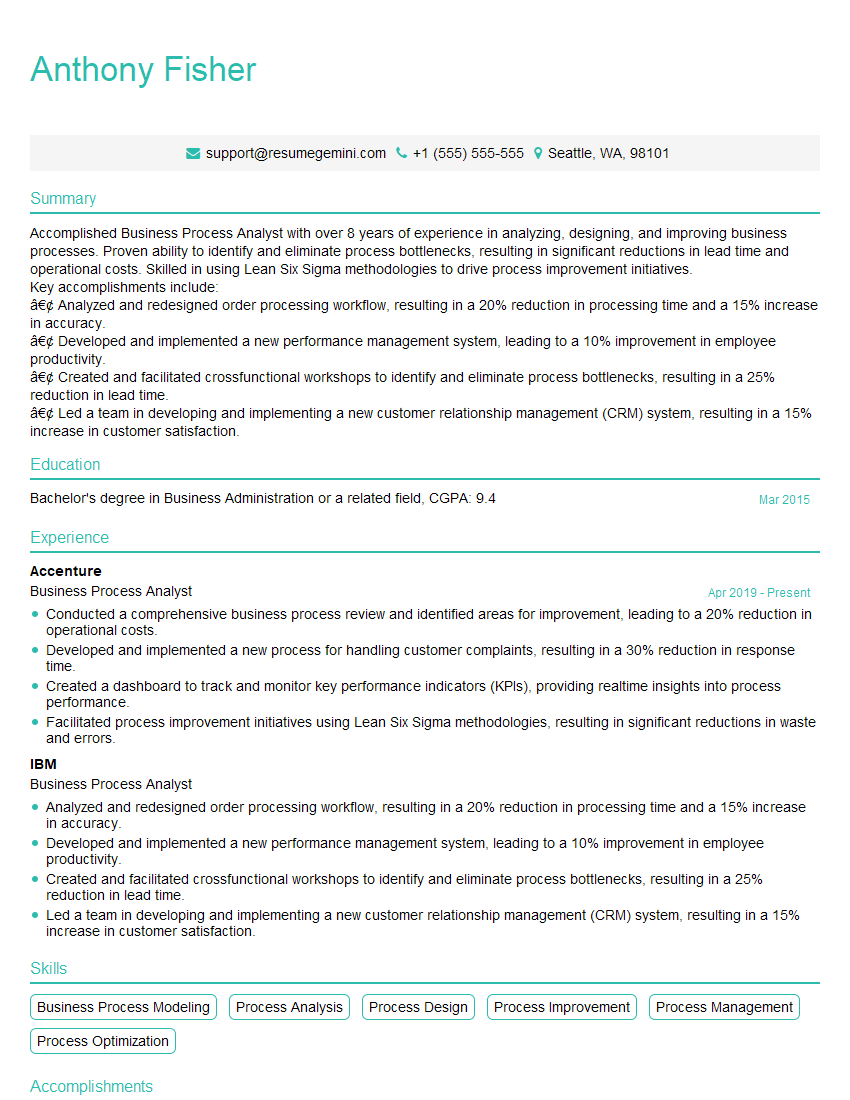
Business Process Analyst Resume Sample
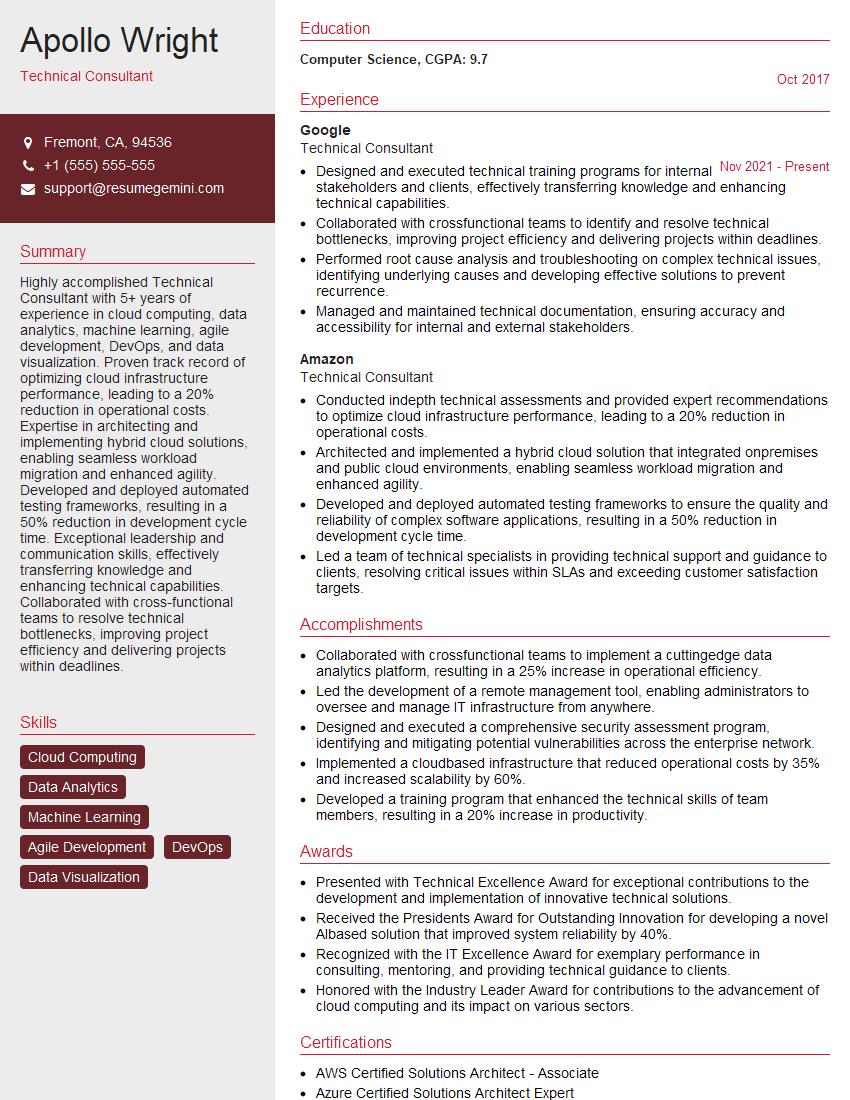
Technical Consultant Resume Sample

Systems Analyst Resume Sample

Technical Project Manager Resume Sample

IT Project Manager Resume Sample

Release Manager Resume Sample
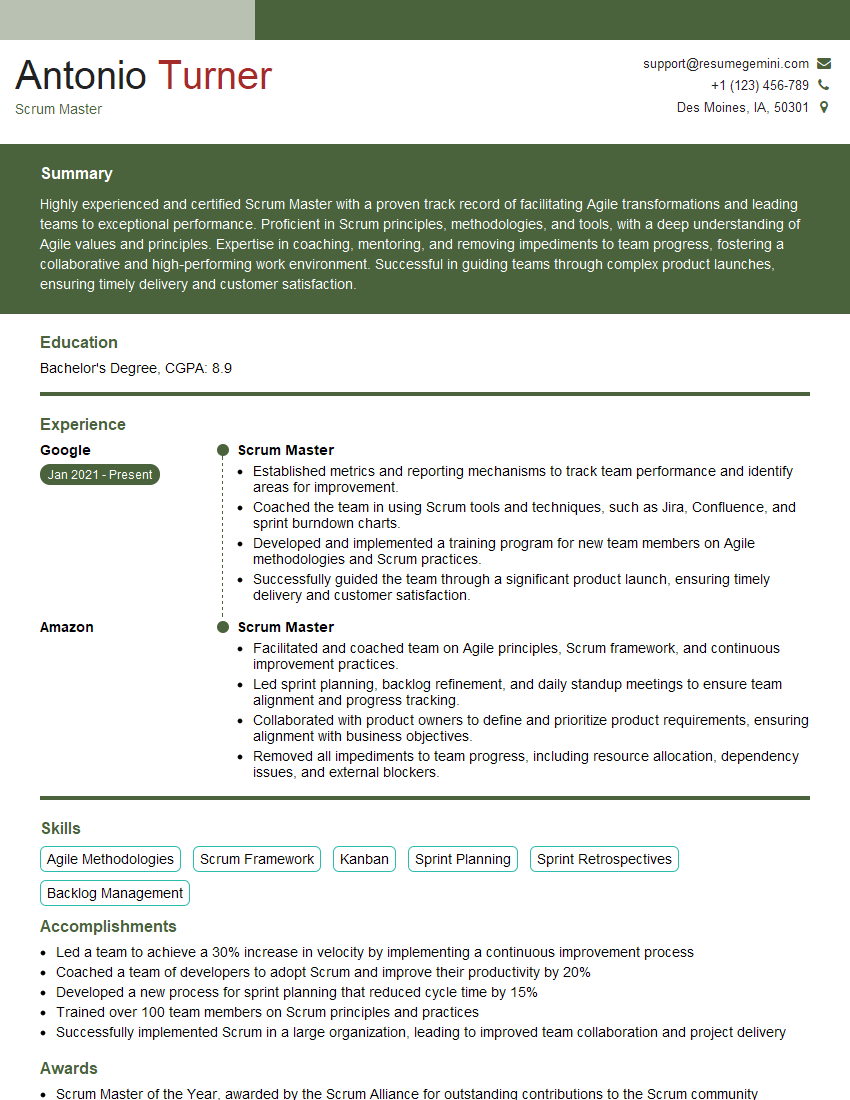
Scrum Master Resume Sample

Automation Specialist Resume Sample

DevOps Engineer Resume Sample
Explore more articles
Users Rating of Our Blogs
Share Your Experience
We value your feedback! Please rate our content and share your thoughts (optional).
What Readers Say About Our Blog
Very informative content, great job.
good